EasyManua.ls Logo

Omron MC-510 Gentle Temp - Measuring Temperature in One-Second Mode; Insert Probe Correctly into the Ear; Initiate Measurement by Pressing the Switch

Omron MC-510 Gentle Temp
20 pages
Print Icon
To Next Page IconTo Next Page
To Previous Page IconTo Previous Page
Loading...
TITLE
9
Beep!
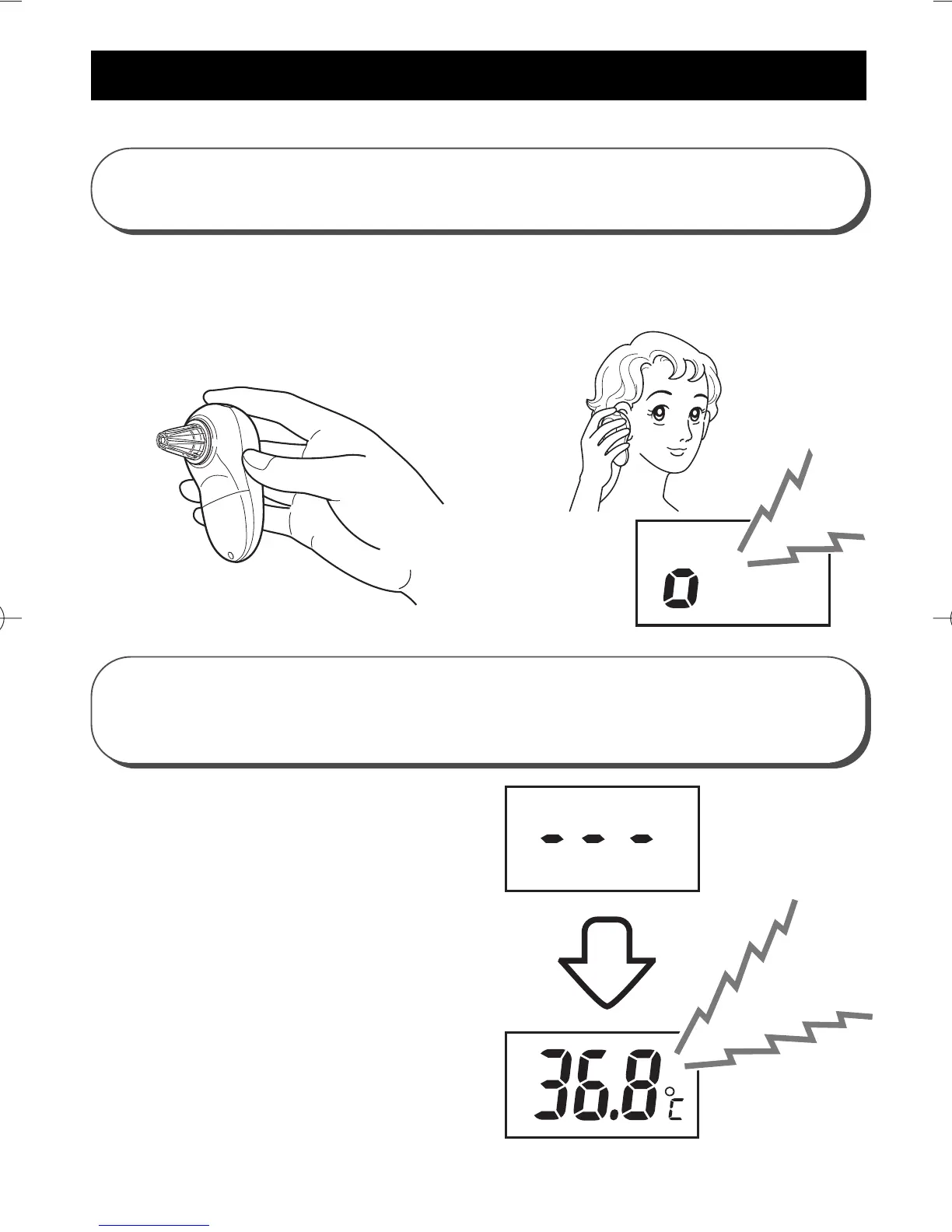
MEASUREMENT IN "ONE-SECOND MODE"
4
Press the Switch while the
unit is in the ear.
3
Insert the probe into the ear.
B
eep B
eep
B
eep B
eep
Hold the main unit with your fingers as shown
below. Insert the probe in the ear as far as it goes in
the direction of the eardrum.
When it beeps,
you can start the
measurement.
When the unit
beeps repeatedly,
the measurement
is finished.
Measurement finishes in
approximately 1 second.
Press the switch to
illuminate the backlit
screen for 2 seconds. You
can quickly read the
results.
Asia EN-02-20[MC-510]-9 10/1/03 11:59 AM Page 9

Related product manuals