Appendices
A - 58
NX-series Position Interface Units User’s Manual (W524)
The command velocity is only used when the Output Mode Selection parameter is set to a
velocity-continuous pulse output.
For position-synchronous pulse output, the set value for the Command Velocity object is
ignored.
The command velocity for velocity-continuous pulse output is signed 32-bit (DINT) data. How-
ever, the set value itself is handled as an absolute value, regardless of the sign. The pulse out-
put direction is determined by the sign of the command position.
• If a latch has not been assigned to an external input, no latch operation is performed.
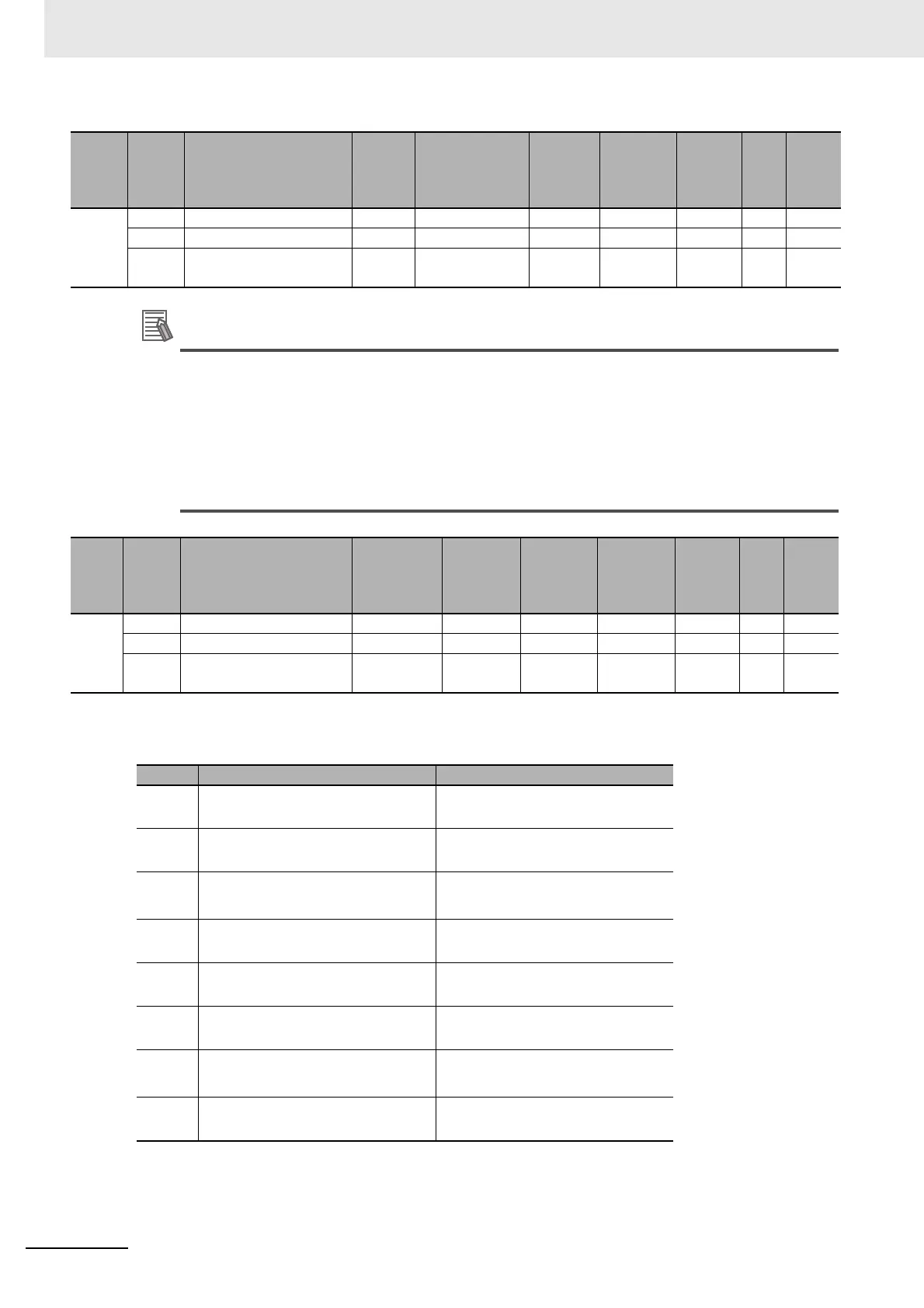
• The following table shows the settings of the Latch Function object.
Index
(hex)
Subin-
dex
(hex)
Object name Default Data range Unit Data type Access
I/O
allo-
cat-
ion
Data
attri-
bute
7003 --- Command Velocity --- --- --- --- --- --- ---
00 Number of Entries 1 1 --- USINT RO No ---
01 Ch1 Command Velocity 0 −2147483648 to
2147483647
pps DINT RW Yes N
Index
(hex)
Subin-
dex
(hex)
Object name Default
Data
range
Unit Data type Access
I/O
allo-
cat-
ion
Data
attri-
bute
7004 --- Latch Function No --- --- --- --- --- ---
00 Number of Entries 1 1 --- USINT RO No ---
01 Ch1 Latch Function 0000 hex 0000 to
FFFF hex
--- WORD RW Yes N
Bit Data name Description
0 Latch Input 1 Enable 1: Enable the latch input 1.
0: Disable the latch input 1.
1 Latch Input 1 Trigger Condition 0: One-shot Mode
1: Continuous Mode
2 Latch Input 1 Trigger Selection 0: External input
1: Phase-Z input.
*1
*1. The Pulse Output Unit does not have a phase-Z input. If you use the latch function,
set the Latch Input 1 Trigger Selection and Latch Input 2 Trigger Selection bits to
0. Latch inputs are not detected if you set these bits to 1.
6 Latch Input 1 Motion Stop Enable 0: No stop
1: Immediate stop
8 Latch Input 2 Enable 1: Enable the latch input 2.
0: Disable the latch input 2.
9 Latch Input 2 Trigger Condition 0: One-shot Mode
1: Continuous Mode
10 Latch Input 2 Trigger Selection 0: External input
1: Phase-Z input.
*1
14 Latch Input 2 Motion Stop Enable 0: No stop
1: Immediate stop


 To Next Page
 Loading...







