19
RFID System
User's Manual
Section 2 Installing the USB Driver (V600-CHUD)
Section 2
Communications Preparations
Installing the USB Driver (V600-CHUD)
When connecting the Hand-held Reader Writer to the host device for the first time, the USB driver must be
installed at the host device.
Install the USB Driver in the Personal Computer
The V600-CHUD supports Windows 2000 and Windows XP operating systems. Install the driver in the
host device following the procedure corresponding to the OS being used.
Operation on other OS is not supported.
• Windows 2000
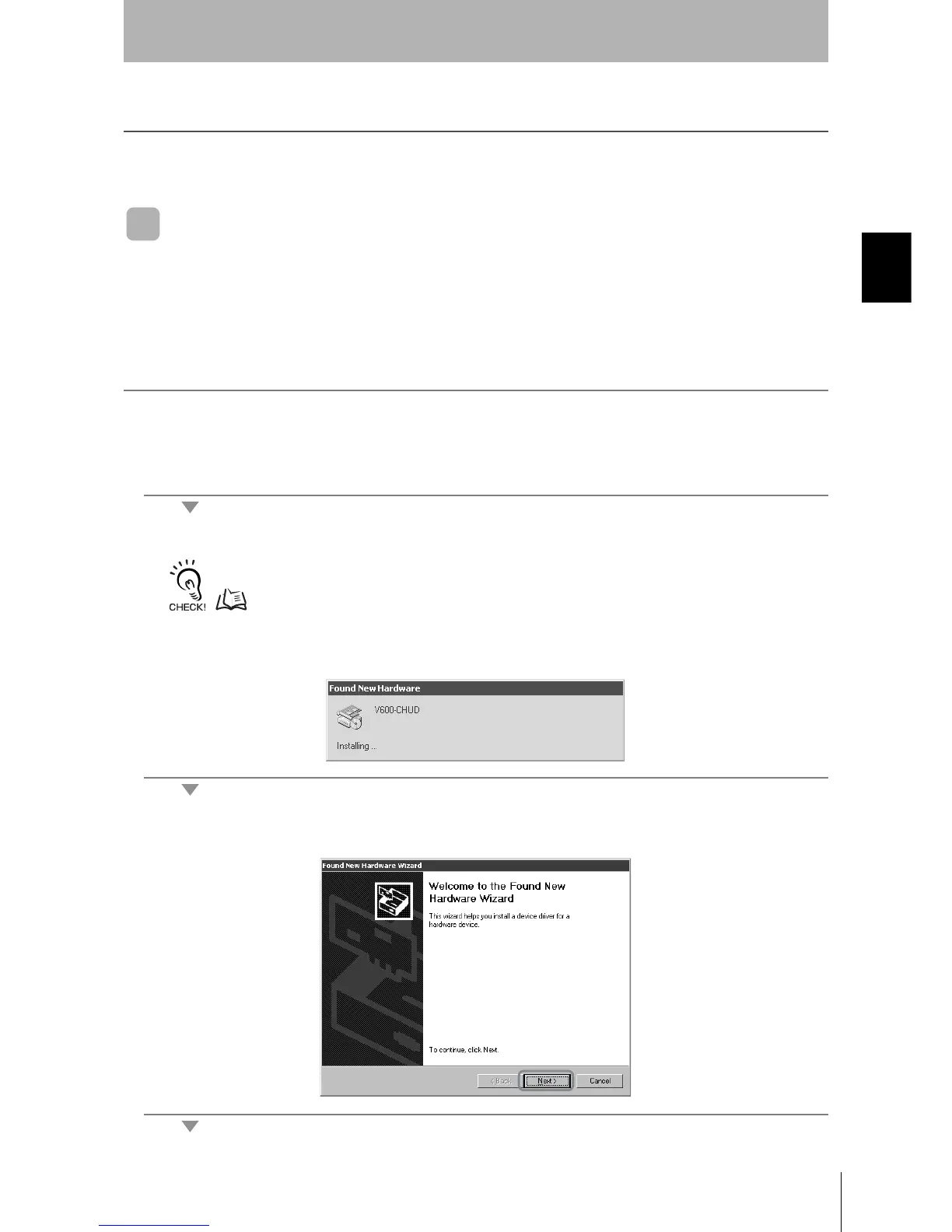
1. Turn ON the power to the personal computer and start Windows 2000.
2. Connect the Hand-held Reader Writer to the personal computer.
For details on connection methods, refer to Connections.
p.18
The following window will be displayed when the Hand-held Reader Writer is connected.
3. When the following window is displayed, click the Next Button.












 To Next Page