47
RFID System
User's Manual
Section 3
l
Command and Response Format
Section 3
Commands
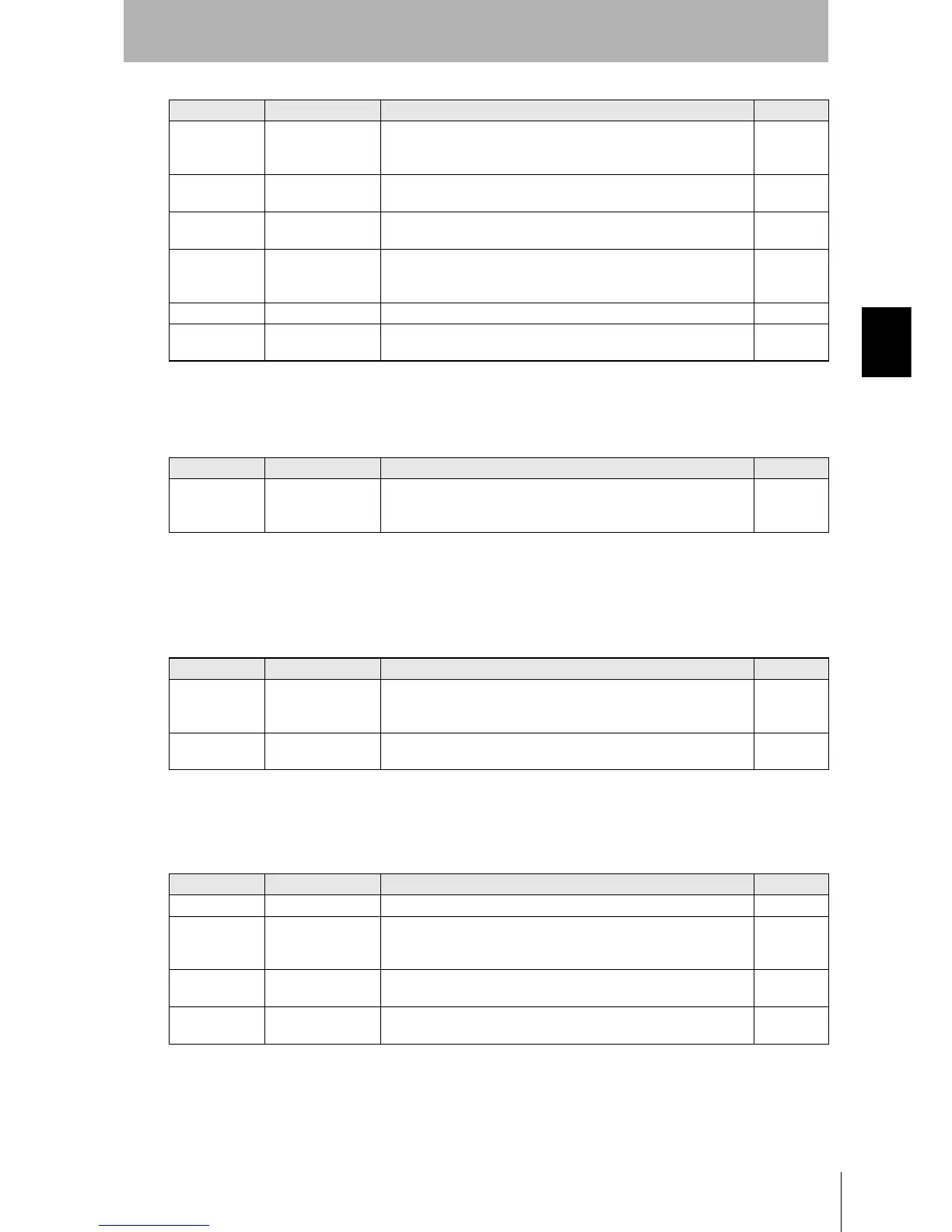
•Communications Subcommands
These commands are used to cancel command execution.
•Host Commands
These commands are used to test communications between the Hand-held Reader Writer and host
device.
•Controller Control Commands
These commands are used to reset the Controller or set serial communications.
uw EXPANSION
BATCH BUTTON
AUTO WRITE
Writes up to 2 Kbytes of data to the Data Carrier in a batch when the
Data Carrier enters the communications area after the activate switch
is pressed.
p.81
CW CALCULATION
WRITE
Writes the calculation results for the memory data to the Data Carrier.
p.82
FL FILL Writes data for the specified number of write bytes beginning from the
write start address specified in the command.
p.83
fl EXPANSION
BATCH
FILL
Writes data for the specified number of write bytes beginning from the
write start address specified in the command. Up to 2 Kbytes of data
can be written in a batch.
p.85
MDC/K DATA CHECK Calculates or compares memory check codes in the Data Carrier. p.86
MDS OVERWRITE
COUNT CONTROL
Controls the number of overwrites for EEPROM Data Carriers.
p.87
Command code Command name Function Page
AA COMMAND PRO-
CESSING TERMI-
NATE
Forcedly ends communications with the Data Carrier.
p.88
Command code Command name Function Page
TS TEST Confirms the communications status between the Hand-held Reader
Writer and host device. The data sent from the host device is returned
as is.
p.89
VS VERSION READ Reads the Hand-held Reader Writer's model information, software ver-
sion and software creation date.
p.89
Command code Command name Function Page
XZ ABORT Resets the Controller. p.90
TR COMMUNICA-
TIONS CONDI-
TIONS SETTING
Sets communications parameters for communications with the host
device. p.91
FN BASIC FUNC-
TIONS SETTING
Sets the Specify Auto Command OFF function and Specify Normal
Operation Output function.
p.92
UL SET INFORMA-
TION READ
Reads the settings data for the Hand-held Reader Writer.
p.93
Command code Command name Function Page












 To Next Page