60
Section 3 Communications Commands
RFID System
User's Manual
Section 3
Commands
BUTTON AUTO READ (UR)
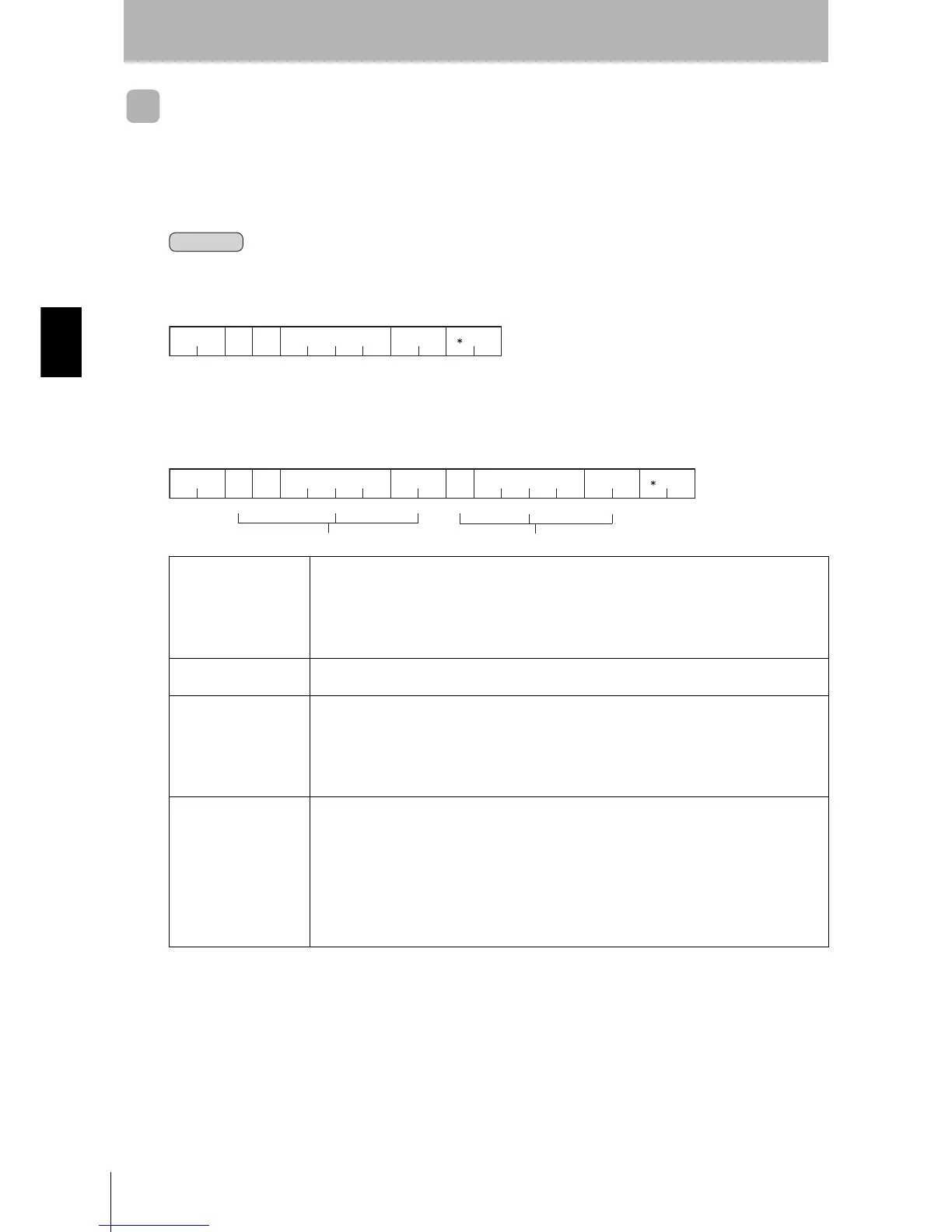
After this command is received by the Hand-held Reader Writer, data will be read from the Data Carrier
after the activate switch is pressed and the Hand-held Reader Writer is close to the Data Carrier. The
Hand-held Reader Writer responds when communications between the Hand-held Reader Writer and
Data Carrier have ended.
Processing Area Number: 1
Processing Area Number: 2
Data setting Sets the code format used to send responses for read data.
A: ASCII
H: Hexadecimal code
When multiple processing areas are used, ASCII and hexadecimal code can be specified at the
same time within a single command frame.
Processing area number
setting
Specifies the processing area number.
Setting range: 1 to 9, A (A = 10)
Read area start address Specifies the start address of the area in the Data Carrier to be read from in 4-digit hexadecimal
code.
Setting range: 0000h to 1FFFh
When multiple processing areas are used, specify the areas in order starting from the smallest
address. The same area cannot be specified twice.
Number of read bytes Specifies the number of bytes to be read from the Data Carrier in 2-digit hexadecimal.
The maximum number of bytes that can be read at one time is 256 bytes.
•ASCII: 256 bytes (256 characters)
•Hexadecimal code: 256 bytes (512 characters)
Setting range: 00h to FFh (00 = 256 bytes)
When multiple processing areas are used, set so that the total number of bytes to be read for all
areas is within 256 bytes, as follows:
Area (1) bytes +...+ Area (N) bytes
≤ 256 bytes
Command
××
UR
××
A/H 1
××
Number of
read bytes
211 4 2
2
CR
Terminator
Read area
start address
Command
code
Data
setting
Processing
area
number
setting
××
Command
code
UR
××
A/H 2
××
Data
setting
Processing
area
number
setting
Number of
read bytes
211 4 2
2
CR
Read area
start address
A/H
Data
setting
1
××
××××
42
Number of
read bytes
Terminator
Read area
start address
Area (1) settin












 To Next Page