EN
$ERXWWKH³NJFRUUHFWLRQ´&DXWLRQIRUVWRULQJ
The unit regularly corrects accuracy automatically when it is not in use.
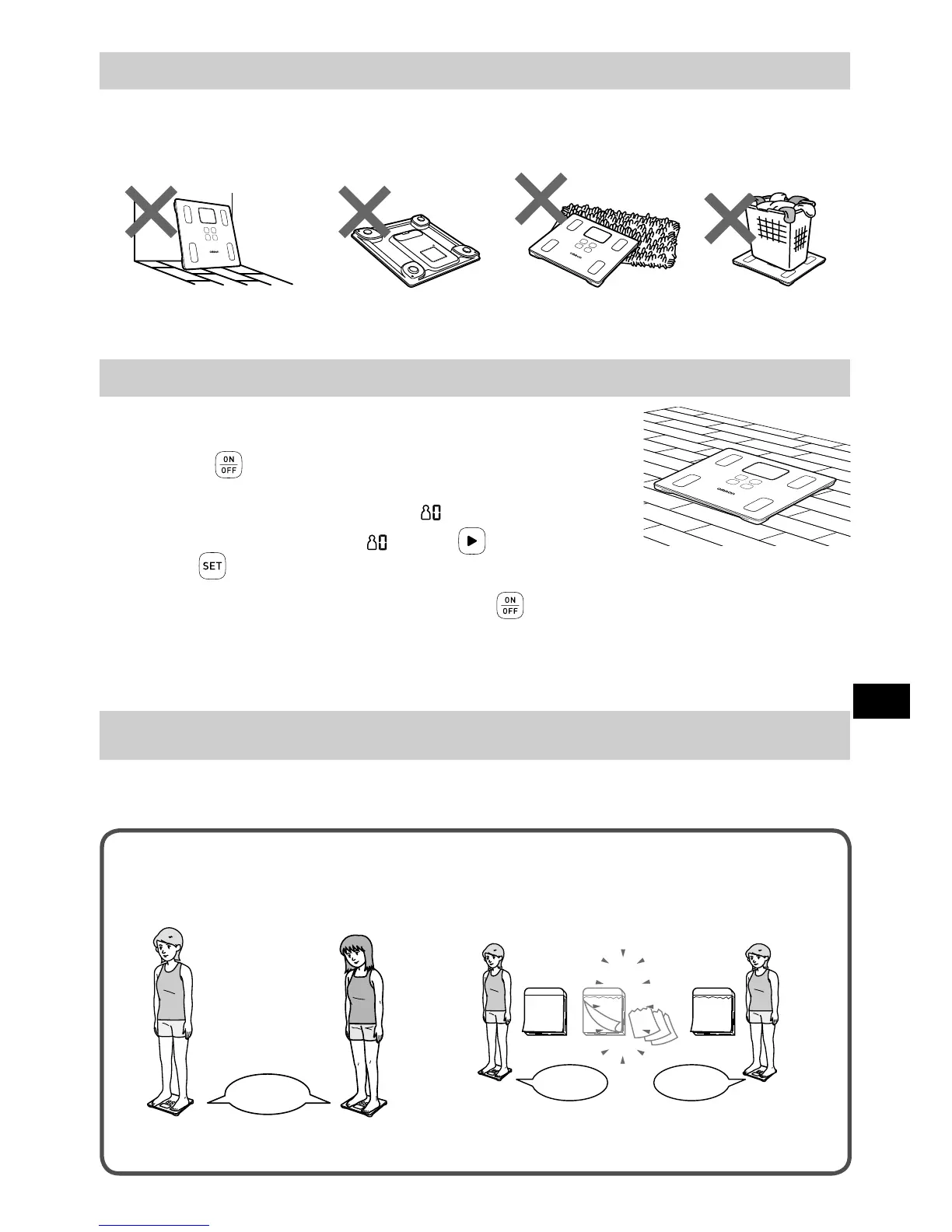
If the unit is placed as shown below this accuracy correction function does not work, implement the
“0 kg correction” before taking the measurement.
The unit is leaning against
the wall or other objects
The unit is placed
upside down
The unit is placed on
an object
An object is placed
on the unit
+RZWRLPSOHPHQWWKH³NJFRUUHFWLRQ´
1.
3ODFHWKHXQLWRQDKDUGDQGÀDWÀRRU
2.
3UHVVWKH EXWWRQWRWXUQRQWKHSRZHU
3.
6HOHFW\RXUSHUVRQDOQXPEHURU³ ´
Select your personal number or “ ” with the button and then
press the
EXWWRQWRFRQ¿UP
4.
:KHQWKH³NJ´LVGLVSOD\HGSUHVVWKH EXWWRQVHFRQGVRUORQJHUWRWXUQ
RIIWKHSRZHU
This completes the “0 kg correction”. Wait for 5 seconds, and then take a measurement.
Operating instructions
7DNHD0HDVXUHPHQW
When person steps onto the unit, it will be powered on to recognize the personal number automatically
and start the measurement.
:URQJSHUVRQDOQXPEHUPD\EHGLVSOD\HGLQWKHIROORZLQJFDVHV
Users of similar body type and body weight
are measured.
Your body weight has changed since last
measurement.
A 62.3 kg
no 1
B 62.7 kg
21
16
30
・・・
30 days later
C 62 kg
C 67 kg
no 1 no 3
If inaccurate recognition continues, select your personal number to take a measurement. (Refer
to Section 9.)


 To Next Page