EN
When necessary
&KDQJHRU'HOHWH<RXU3HUVRQDO'DWD
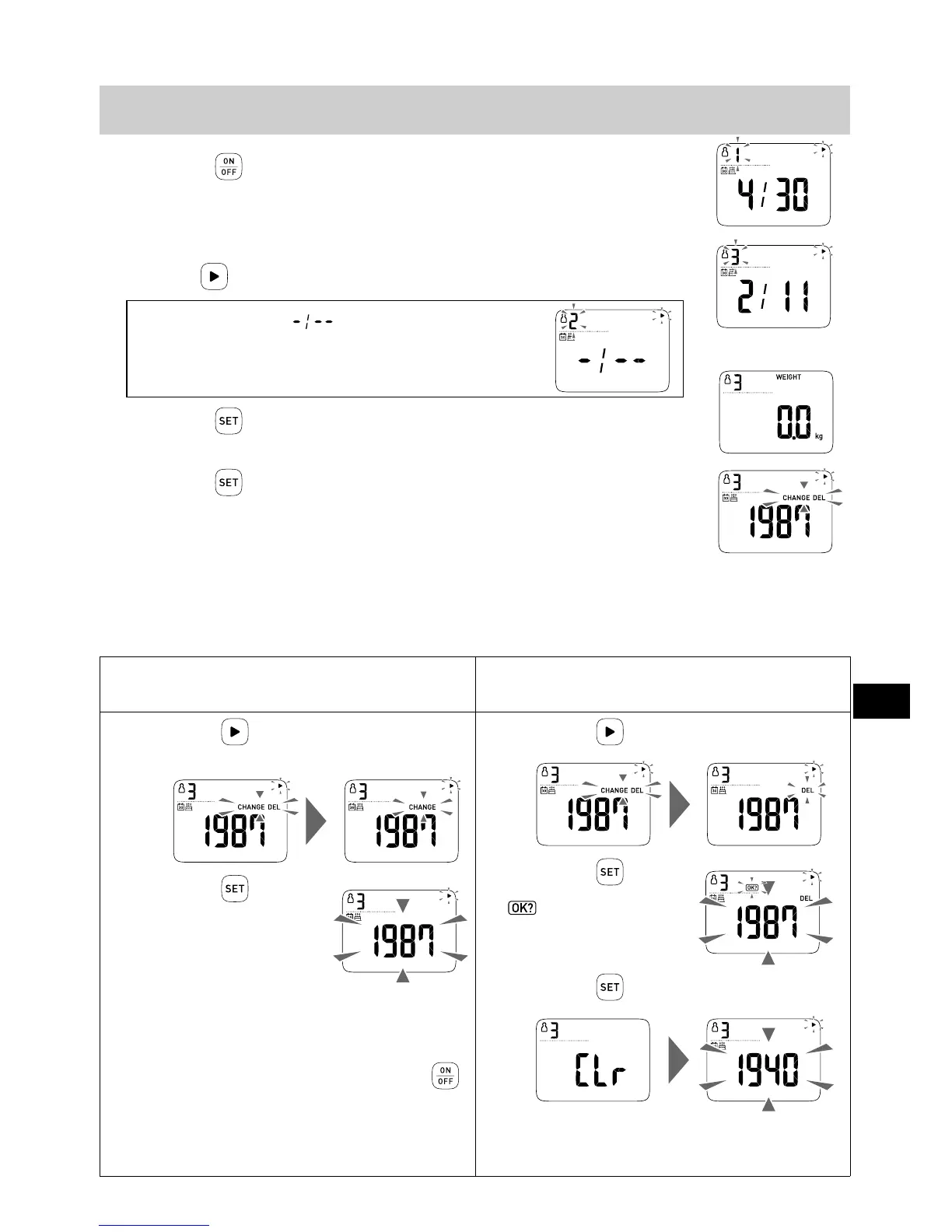
1.
3UHVVWKH EXWWRQWRWXUQRQWKHSRZHU
The power turns on. Personal number “1” blinks.
2.
6HOHFW\RXUSHUVRQDOQXPEHU
Press the button to select the personal number.
When the birth date ( ) is displayed,
Your personal data is not registered in your personal number.
Register your personal data. (Refer to Section 5.)
3.
3UHVVWKH EXWWRQWRFRQ¿UPWKHSHUVRQDOQXPEHU
“0.0 kg” is displayed.
4.
3UHVVWKH EXWWRQ
“CHANGE” and “DEL” blink.
5.
6HOHFW³&+$1*(´RU³'(/(7(´WKHSHUVRQDOGDWD
Even if the personal data are changed, the measurement results will not be changed or deleted.
When using the personal number which has been used by another person, delete the personal data
and then register the personal data again.
&KDQJH\RXUSHUVRQDOGDWD
(The measurement results won’t be deleted)
'HOHWH\RXUSHUVRQDOGDWD
(The measurement results will also be deleted)
1.
3UHVVWKH EXWWRQWRVHOHFW
³&+$1*(´
2.
3UHVVWKH EXWWRQ
The year blinks.
3.
&KDQJH³ELUWKGDWH´³JHQGHU´DQG
³KHLJKW´ZLWKUHIHUHQFHWR6WHS
a6WHSRI6HFWLRQ
To stop any change halfway, press the
button (2 seconds or longer) to turn off the
power.
The untransferred measurement results will
not be changed.
1.
3UHVVWKH EXWWRQWRVHOHFW³'(/´
2.
3UHVVWKH EXWWRQ
blinks.
3.
3UHVVWKH EXWWRQDJDLQ


 To Next Page