Setting Threshold Value
ZW User's Manual
259
Sensor controller operations
9
Direct
Set the threshold value by entering the numerical values directly.
As an example, here is an explanation of the procedure for setting a HIGH threshold value by entering "40.000"
directly.
Operating procedure
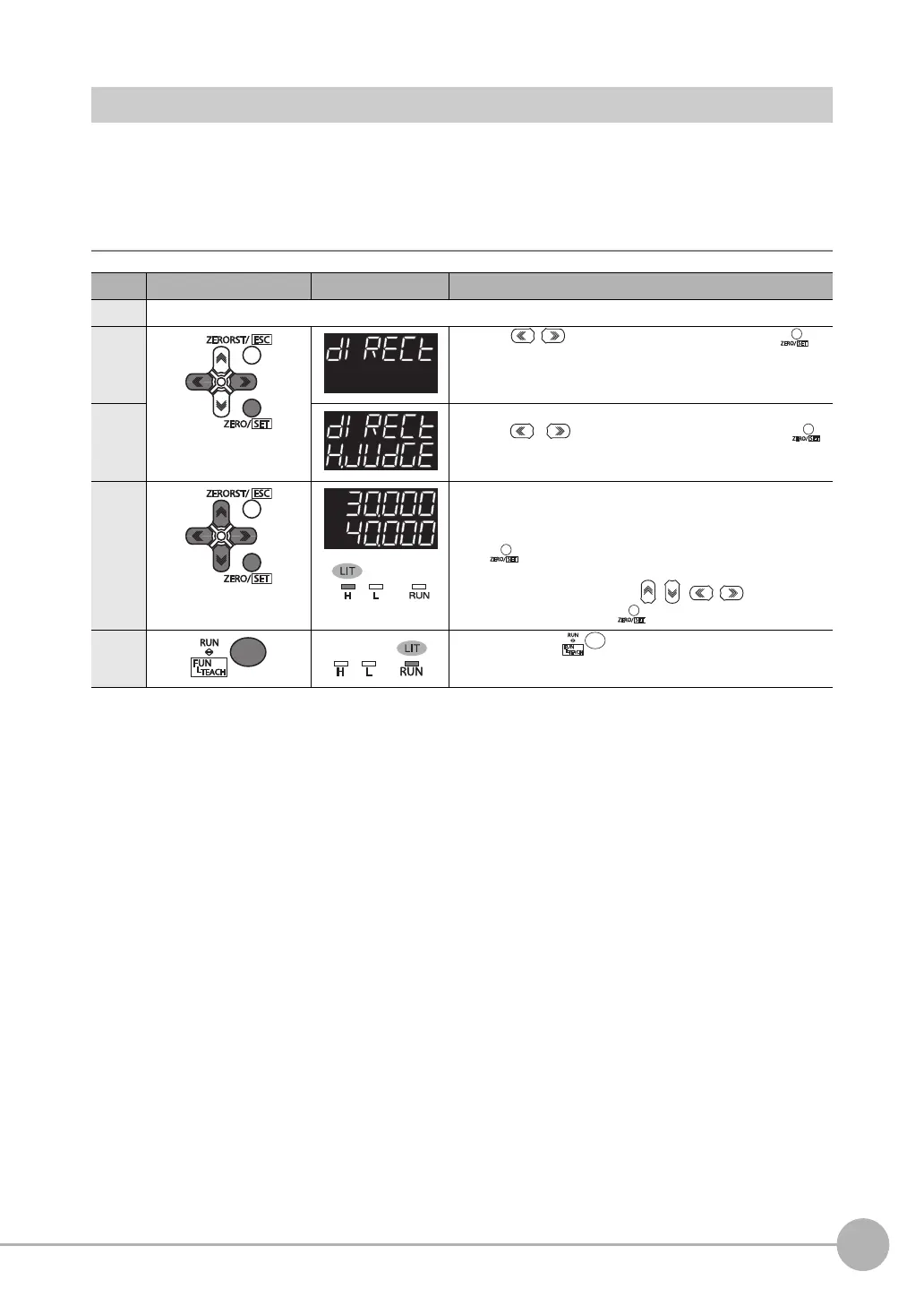
Steps Key operation Display Description
1 to 4 For moving to JUDGE, see steps 1 to 4 on p.258.
5 Press the / key to select DIRECT, then press the
key.
6 Select HIGH THRESHHOLD as the threshold value type.
Press the / key to select H.JUDGE, then press the
key.
7 Set "40.000" as the HIGH threshold value.
The current measured value is displayed on the main display and the
current set threshold value is displayed on the sub-display. (At this
time, the THRESHOLD-H indicator lights up.)
Press key to enter the editing mode, and the sub-display
blinks.
To edit numerical values, use the / / / keys.
Enter "40.000" and press the key.
8 Press and hold the key for two seconds to enter the RUN
mode.



 To Next Page