5
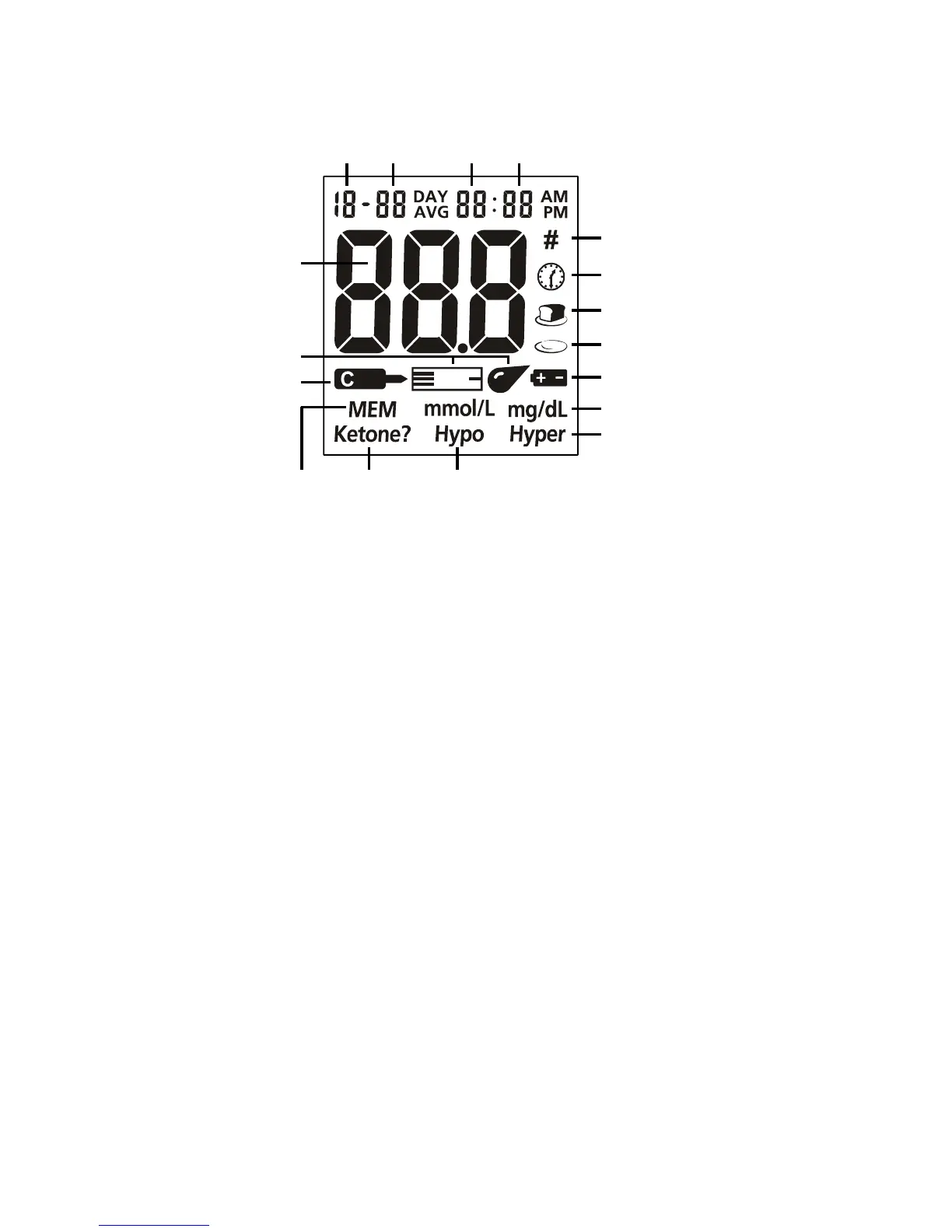
Meter Display
Battery Symbol: Warns when you should replace the battery.
Blood Drop / Strip Symbol: Wait for the Blood Drop / Strip Symbol to appear
before applying the sample. These two symbols appear at the same time.
Pound Sign (#): Appears with the control solution test result or when you mark an
invalid result to prevent it from being included in the average.
Control Solution Symbol: Indicates a control test result. A pound sign (#) will also
be displayed when control solution symbol appears.
Test Result Area: Indicates the test result.
Test Remind Symbol: Appears when reminding you to test blood glucose.
Before Meal Symbol: Appears when before-meal test results are displayed.
After Meal Symbol: Appears when after-meal test results are displayed.
Measurement Unit: Only one unit will be displayed on your meter. It cannot be
adjusted.
Hyper Symbol: Appears when the blood glucose concentration is above the
“Hyperglycemia” (high blood sugar) target level that you have set.
Hypo Symbol: Appears when the blood glucose concentration is below the
“Hypoglycemia” (low blood sugar) target level that you have set.
Ketone: Appears when the blood glucose concentration is above 16.7 mmol/L
(300 mg/dL). This simply suggests that a ketone test is recommended. Consult
your healthcare professional about testing for ketones.
Note: This symbol does not mean that the system has detected ketones. It
recommends that a ketone test should be taken.
MEM: Shows a test result stored in memory.
Month Day Hour Minutes
Pound Sign (#)
Test Remind Symbol
Before Meal Symbol
After Meal Symbol
Battery Symbol
Measurement Unit
Hyper Symbol
Blood Drop


 To Next Page