Remote Controller-Continued
CD
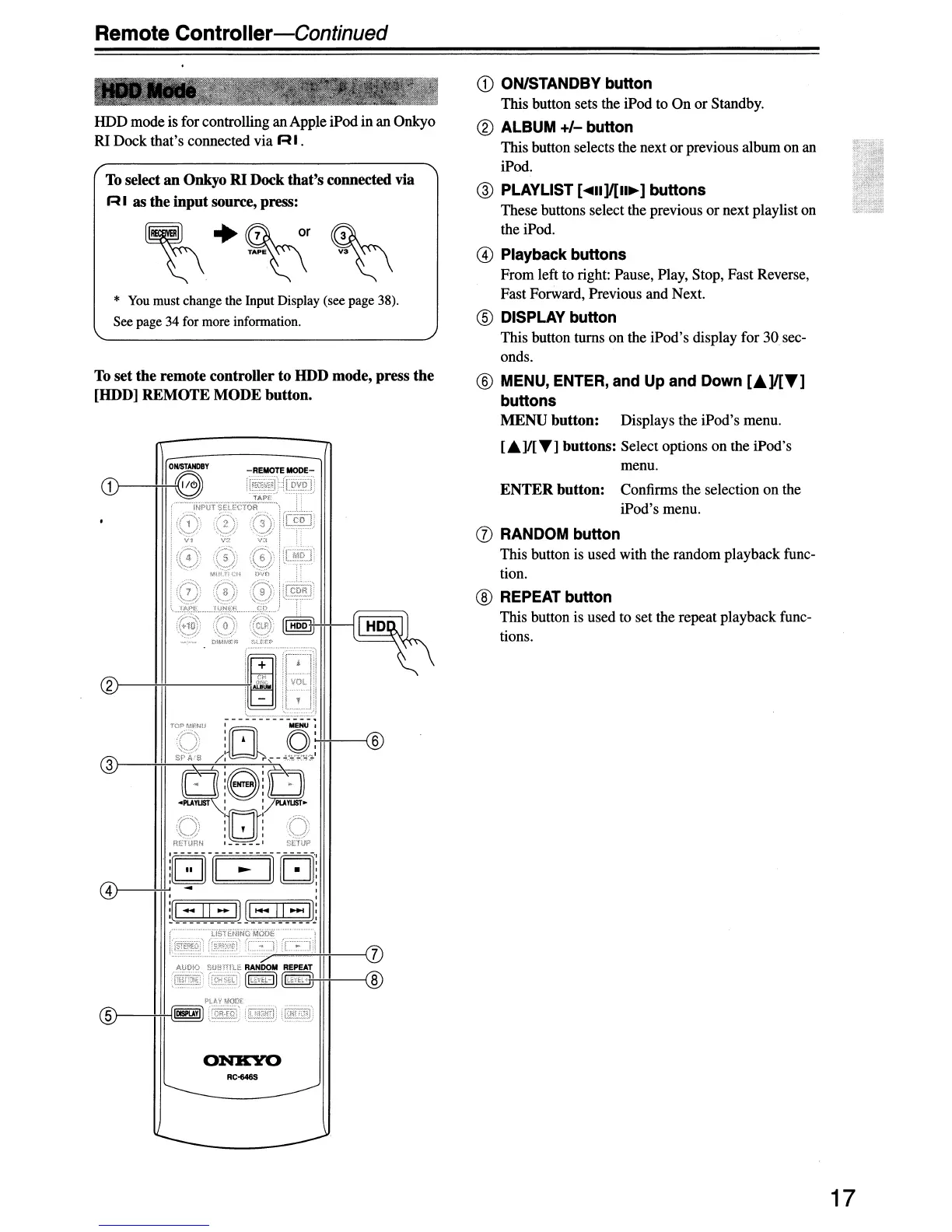
ON/STANDBY button
This button sets the iPod to On or Standby.
® ALBUM
+/-
button
This button selects the next
or
previous album on an
iPod.
@ PLAYLIST [
....
II]/[II~]
buttons
These buttons select the previous or next playlist on
the iPod.
@ Playback buttons
From left to right: Pause, Play, Stop, Fast Reverse,
Fast Forward, Previous and Next.
® DISPLAY button
This button turns on the iPod's display for
30
sec-
onds.
® MENU, ENTER, and Up
and
Down
[.A]/[T]
buttons
MENU
button:
Displays the iPod's menu.
["']I[T]
buttons: Select options on the iPod's
menu.
ENTER
button:
Confirms the selection on the
iPod's menu.
(j) RANDOM button
This button is used with the random playback func-
tion.
® REPEAT button
This button is used to set the repeat playback func-
tions.
*
You
must change the Input Display (see page 38).
See page 34 for more information.
To select an Onkyo RI Dock
that's
connected via
R I
as
the
input
source, press:
51---+H--I
®
HDD mode is for controlling an Apple iPodin an Onkyo
RI Dock that's connected via
RI.
To
set
the
remote
controller
to
HDD mode, press
the
[HOD]
REMOTE
MODE
button.
ONKYO
RC-646S
17


 To Next Page
 Loading...