33
> Before start > Hookup > Setup > Playback > Part Names > Advanced Manual
Troubleshooting | Appendix
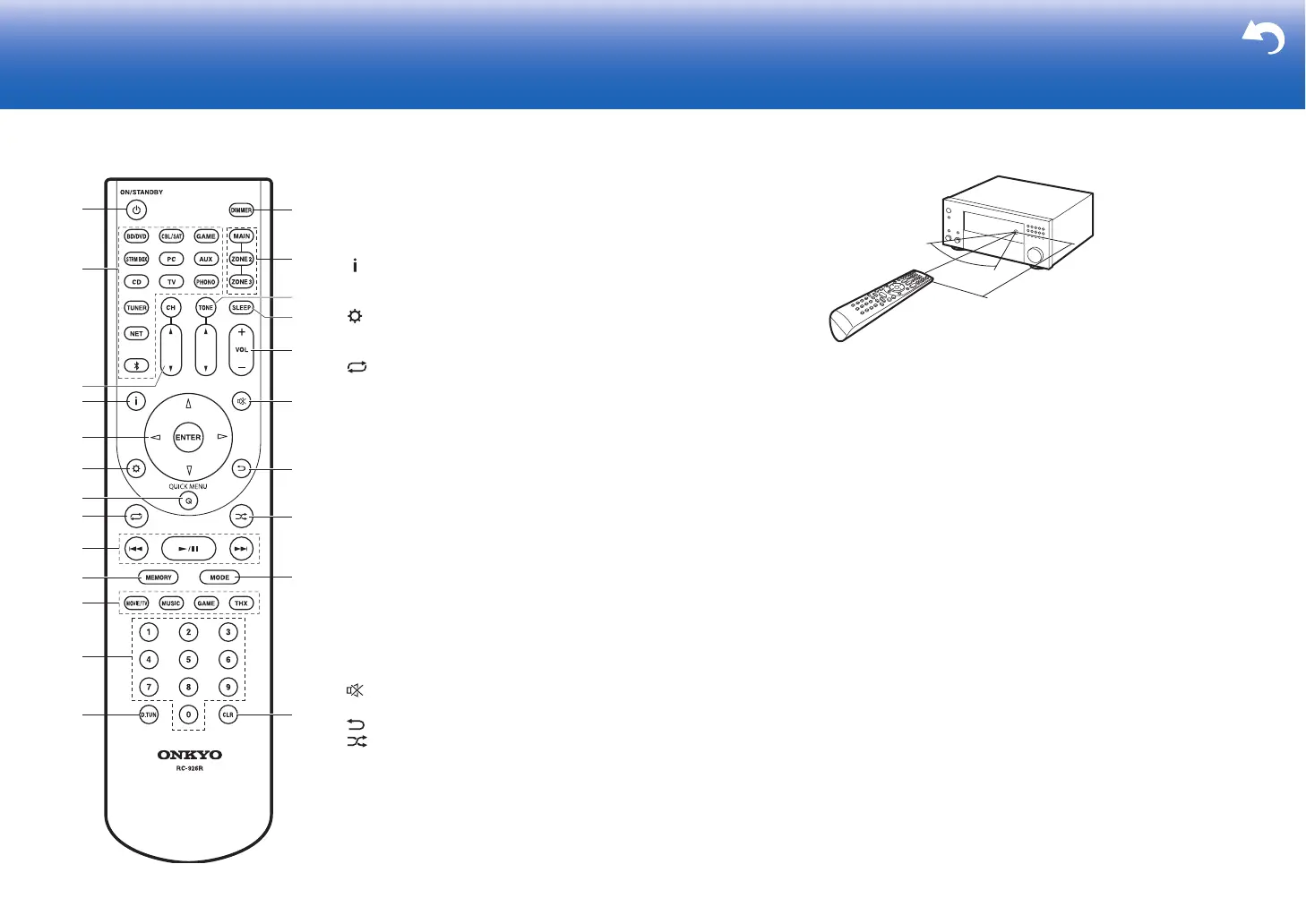
Remote Controller
1. Í ON/STANDBY button: Turns the unit on or into standby mode.
2. Input selector buttons: Switches the input to be played.
3. CH / buttons: Adjust the volume level of the speaker. Press
CH several times to select the speakers, then press / to
adjust the level.
4. button: Switches the information on the display.
5. Cursor buttons and ENTER button: Select the item with the
cursors and press ENTER to confirm your selection.
6. button: Displays the Setup menu.
7. Q (QUICK MENU) button: You can perform common settings on
the TV screen. (
P28)
8. button: You can start repeat play of the Music Server or USB.
9. Play buttons: You can start play of the Music Server or USB.
10.
MEMORY button: Used to register AM/FM radio stations.
11.
LISTENING MODE buttons: Allows you to select the listening
mode. (
P24)
12.
Numbered buttons
13.
D.TUN button: Use to directly input the frequency of AM/FM
stations when tuning.
14.
DIMMER button: You can adjust the brightness of the display in
three steps. It cannot be turned off completely.
15.
MAIN/ZONE 2/ZONE 3 buttons: Controls the multi-zone function.
(
P27)
16.
TONE / buttons: Adjusts the treble and bass. Press TONE
several times to select the item you want to adjust from "Bass"
and "Treble", then press / to adjust the level.
17.
SLEEP button: Set the sleep timer. Select from "30 minutes", "60
minutes", and "90 minutes".
18.
Volume buttons: Allows you to adjust the volume. This button
also cancels the muting.
19.
button: Temporarily mutes audio. Press again to cancel
muting.
20.
button: Returns the display to the previous state.
21.
button: You can start random play of the Music Server or
USB.
22.
MODE button: Switches tuning to an AM/FM station between
automatic tuning and manual tuning.
23.
CLR button: Deletes all characters you have entered when
entering text on the TV screen.
9
10
1
2
4
3
6
8
7
5
11
12
13
14
15
16
17
19
20
21
22
23
18


 To Next Page
 Loading...