EasyManua.ls Logo

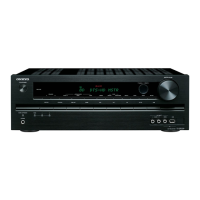
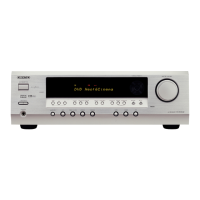
Onkyo TX-SR302 - User Manual

Onkyo TX-SR302
40 pages
Print Icon
To Next Page IconTo Next Page
Loading...
Contents
Thank you for purchasing an Onkyo AV Receiver.
Please read this manual thoroughly before making
connections and plugging in the unit.
Following the instructions in this manual will enable
you to obtain optimum performance and listening
enjoyment from your new AV Receiver. Please retain
this manual for future reference.
TX-SR302
Appendix
Troubleshooting .............................................. 35
Specifications ................................................. 37
Remote controller
Using the remote controller with your other
AV components ............................................ 33
Enjoying music or videos
Enjoying music or videos with the
TX-SR302 .................................................... 17
Speaker setup .................................................. 18
Changing the default settings according
to your connections ...................................... 21
Listening to the radio...................................... 22
Various functions common to all the sources ..
24
Enjoying multi channel sources ..................... 27
Enjoying the listening modes ......................... 28
Audio adjust function ..................................... 30
Recording a source ......................................... 32
Before using
Important Safety Instructions ........................... 2
Precautions........................................................ 3
Features ............................................................. 4
Supplied accessories ......................................... 4
Before Using the TX-SR302 ............................ 5
AV Receiver
Instruction Manual
Facilities and connections
Index to parts and controls ............................... 6
Connecting to audio/video equipment ........... 10
Positioning speakers/Connecting speakers .... 12
Connecting antennas....................................... 14
Connections for remote control ( ) ............. 16
En

Other manuals for Onkyo TX-SR302

Questions and Answers

  • A
    Abigail ParsonsAug 19, 2025
    How to fix no sound on my Onkyo TX-SR302 Receiver?
    • E
      Elizabeth MoonAug 19, 2025
      If your Onkyo Receiver isn't producing any sound, there are several things to check. First, make sure the muting function is deactivated. Next, check all the connections to the receiver to ensure they are properly connected. Also, verify that the input selector is set to the correct input source. If headphones are connected, disconnect them and decrease the volume. Finally, ensure the input signal format is set to “Auto,” not “PCM” or “DTS”.
  • M
    Margaret RobinsonAug 21, 2025
    Why don't the buttons on my Onkyo TX-SR302 Receiver remote controller operate?
    • B
      Bill GuerreroAug 21, 2025
      If the buttons on your Onkyo Receiver's remote controller aren't working, but the buttons on the receiver itself do, try these steps. Ensure that you are pressing the correct mode button on the remote. Check that batteries are properly inserted, and replace them if they are worn out. Make sure you are pointing the remote directly at the receiver's remote sensor and that you are within 16 feet (5 m) of the receiver.
  • R
    Rachel LeonAug 25, 2025
    How to fix an Onkyo TX-SR302 that doesn’t switch on?
    • C
      Christine JimenezAug 25, 2025
      If the AV receiver doesn’t switch on, check the connection of the power cord. If the power cord is connected, there may be external noise interfering with the computer circuits of the AV receiver. Disconnect the power cord, then connect it again.
  • R
    Roy LewisAug 26, 2025
    Why does my Onkyo Receiver power shut off immediately after power on?
    • J
      jason62Aug 27, 2025
      If the power shuts off immediately after powering on your Onkyo Receiver, the amplifier protection circuitry has been activated. Contact your Onkyo Service Center.
  • N
    nathanwilliamsAug 28, 2025
    What to do if no picture appears on the TV screen with my Onkyo TX-SR302?
    • V
      Victoria SantiagoAug 28, 2025
      If no picture appears on the TV screen when using your Onkyo Receiver, first ensure that the TV is set to the correct input for the receiver. Then, verify that the video cable is securely connected between the receiver and the TV. Also, if only the S video connection is made, ensure a video connection is also established, and check both the TV's video input and the receiver's output signal.
  • N
    Nicole SmithAug 30, 2025
    Why is there no sound from the center speaker on my Onkyo Receiver?
    • A
      Alexandra DillonAug 30, 2025
      If you're experiencing very little or no sound from the center speaker of your Onkyo Receiver, first check the speaker connections to ensure they are properly connected. Be aware that no sound is produced from the center speaker when the listening mode is set to “Stereo” or “Orchestra.” Also, verify that the volume level of the center speaker (“Center”) is not set to minimum and that the selected speaker configuration includes the center speaker.
  • C
    Christopher LawrenceSep 1, 2025
    Why is there no sound or very low volume from the subwoofer on my Onkyo Receiver?
    • M
      Maureen WarrenSep 1, 2025
      If you are getting no sound or very low volume from the subwoofer connected to your Onkyo Receiver, check the subwoofer mode setting to ensure it is not set to “Off” and that the setting is appropriate for your setup.
  • A
    ashleyboydSep 3, 2025
    What to do if the sound of the playback source is not heard on my Onkyo TX-SR302?
    • R
      Rachel Johnson DDSSep 3, 2025
      If the sound of the playback source is not heard, select the appropriate input source.
  • M
    Margaret MooreSep 5, 2025
    What to do if the buttons on my Onkyo Receiver do not operate?
    • A
      Adrian KnoxSep 6, 2025
      If your Onkyo Receiver's buttons (both on the remote and the unit itself) aren't responding, it could be due to power supply fluctuations or static electricity. Try disconnecting the power cord and then reconnecting it to reset the system.
  • G
    Gina SnyderSep 7, 2025
    How to eliminate hum or low-frequency noise from my Onkyo Receiver?
    • C
      Carla ParksSep 8, 2025
      If you are getting hum or low-frequency noise from your Onkyo Receiver, try adjusting the placement of the audio connection cables on the rear panel to reduce the hum.

Summary

Before Using

Important Safety Instructions

Essential guidelines to prevent fire, electric shock, and ensure safe operation.

Precautions

Important notices regarding installation, operation, and compliance with regulations.

Features

Overview of the amplifier and tuner capabilities of the AV receiver.

Supplied Accessories

List of items included with the TX-SR302 AV receiver.

Before Using the TX-SR302

Installing the Batteries

Guide on how to insert batteries into the remote controller.

Using the Remote Controller

Instructions on pointing the remote and its operating range.

Facilities and Connections

Index to Front Panel Controls

Identification and description of front panel controls and indicators.

Index to Display Indicators

Explanation of the AV receiver's display indicators and their functions.

Index to Rear Panel Connections

Identification and description of rear panel connection terminals.

Connecting to Audio;Video Equipment

Detailed instructions on connecting various audio and video components.

Positioning Speakers;Connecting Speakers

Guidance on optimal speaker placement and connection for surround sound.

Connecting Antennas

How to connect the supplied FM and AM indoor antennas.

Connections for Remote Control (RI)

How to connect and use Onkyo components via the RI terminal for remote control.

Enjoying Music or Videos

Connecting Power and Selecting Sources

Steps for connecting the power cord and turning the AV receiver on and selecting a source.

Speaker Setup

Configuring speaker channels and crossover frequencies for optimal sound.

Specifying Speaker Distances

Specifying speaker distances for accurate surround sound timing.

Setting Subwoofer Modes

Setting subwoofer modes and adjusting speaker relative volume balance.

Changing Default Settings

Customizing digital input assignments and source display names.

Listening to the Radio

Manual tuning and preset channel selection for FM/AM radio stations.

Presetting and Erasing Radio Stations

Presetting and erasing radio stations for easy selection.

Common Functions: Speakers, Muting, Headphones

Controlling speaker systems, muting, and using headphones.

Common Functions: Display, Brightness, Sleep Timer

Changing display information, controlling brightness, and using the sleep timer.

Common Functions: Volume Balance and Signal Format

Adjusting speaker volume balance and setting input signal formats.

Enjoying Multi Channel Sources

How to use analog multi-channel inputs for surround sound.

Enjoying Listening Modes

Explanation of surround sound formats like Dolby Digital, DTS, and DSP modes.

Selecting Listening Modes

Selecting different listening modes and their compatibility with sources.

Audio Adjust Function

Adjusting bass, treble, late night, and cinema filter settings.

Audio Adjust Function Details

Detailed explanation of bass, treble, late night, panorama, and center width.

Recording a Source

Instructions for recording audio/video signals and mixing sources.

Remote Controller

Controlling Other AV Components

Controlling other Onkyo components using the TX-SR302 remote via RI connection.

Using the RC-479 S Remote

Basic steps for selecting modes and operating components with the remote.

RC-479 S Remote Button Functions

Detailed button functions for CD and Tape modes on the remote.

Appendix

Troubleshooting Guide

Guide to diagnosing and resolving common issues with the AV receiver.

Troubleshooting Guide

Further troubleshooting for tuner, recording, and other issues.

Onkyo TX-SR302 Specifications

General IconGeneral
Channels5.1
THD (Total Harmonic Distortion)0.08%
Audio DecodingDolby Digital, DTS
Weight8.5 kg
Digital Inputs2 Optical, 1 Coaxial
Frequency Response10Hz-100kHz
Input Sensitivity and Impedance200 mV/47 k-ohms
Speaker Impedance6 Ohms
Amplifier TypeDiscrete
Total Harmonic Distortion0.08%
Video Inputs/Outputs1 composite video output
Audio Inputs/Outputs1 Analog Audio Output
Digital Audio Inputs2 optical
Signal-to-Noise Ratio100 dB (Line, IHF-A)
Signal-to-Noise Ratio (Line, IHF-A)100 dB

Related product manuals