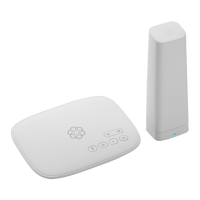
Installing Ooma is easy! This guide will walk you installing the Base Station and creating your
Ooma account. You will finish by connecting the Ooma Battery Backup and testing your setup
in different locations to find the best signal strength.
Getting Started
Package Contents
Ooma Telo Base Station
AC Adapter
Ooma Battery Backup
(May not be included with your bundle)
USB Power Cables USB ElbowEthernet Cable
LTE Adap t e r
Connect LTE Adapter to Base Station
STEP 1
Make sure your Base Station is unplugged. Use the provided USB elbow to connect the
4G LTE Adapter to the USB port on the back of the Base Station.
4G PLACEMENT ADVISORY
For the best 4G signal, the LTE Adapter should be placed in an area of
your house with good cellular reception. It should ideally be located
as close as possible to a window.
The adapter should not be placed in a corner, against a wall, or
within 5 feet of a large metal object like a water heater or refrigerator.
54



 To Next Page