You’re All Set!
Pick up the phone and listen for the Ooma dial
tone to confirm that your setup is complete.
Make your first phone call
Pick up the phone you connected to the Ooma
Base Station and dial like you normally would.
Call a friend or family member and experience
firsthand the quality of Ooma PureVoice™
technology. While you’re at it, you might want
to tell them about Ooma!
Set up your voicemail
Pick up the phone connected to the Ooma
Base Station and press the key on the Base
Station. The system will walk you through
configuring your account and recording a
personal greeting.
What’s Next?
Check out My Ooma
Access your online control panel at
my.ooma.com. There, you’ll unlock your
system’s full functionality:
■ Check voicemail and call logs
■ Configure preferences and set up advanced features
■ Update your 911 address
■ Purchase additional services and add-ons
■ And much more!
The first time you log in, our Setup Wizard will
help you configure our most popular features.
Transfer your phone number
In most areas, you can port your existing
number to Ooma for a one-time fee. You must
maintain your current phone service until the
porting process is completed. This usually
takes about 1–3 weeks.
To check availability, to learn more, or to get
started, please visit: my.ooma.com/port
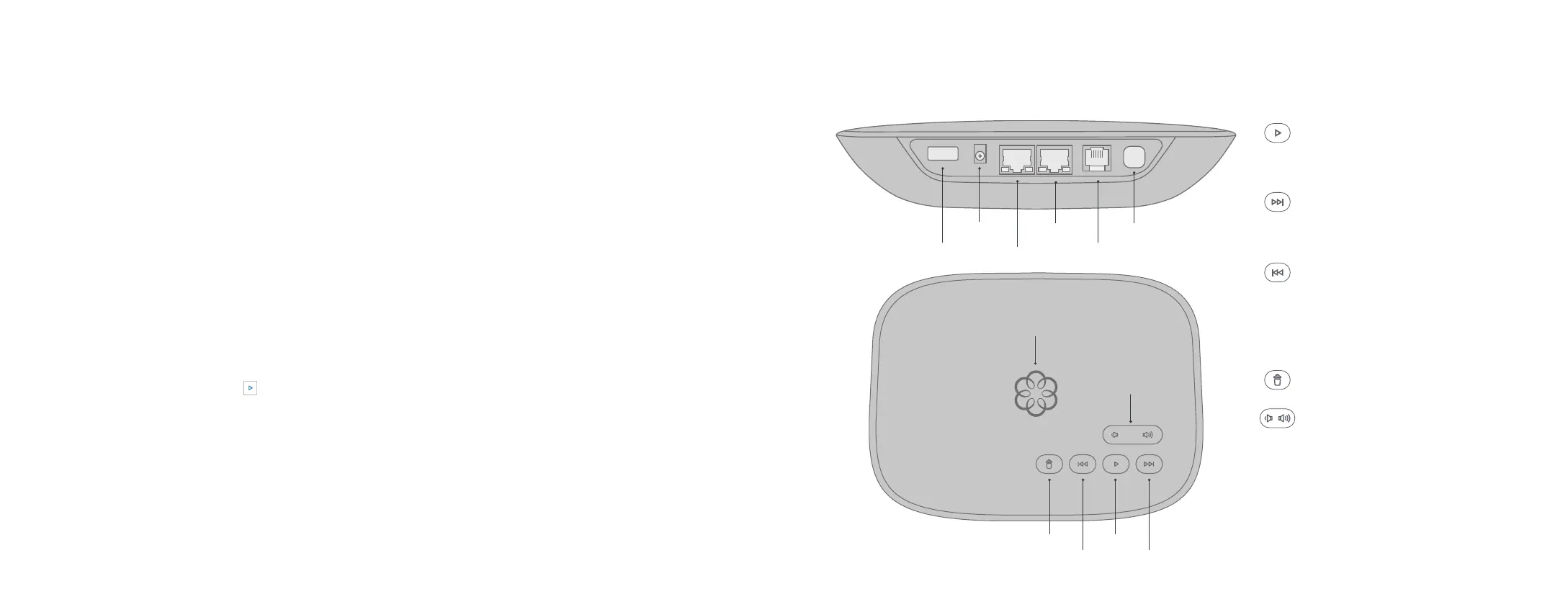
Telo Base Station Quick Reference
Fast Forward
Delete
Rewind
Play
System Status
USB
POWER
HOME
INTERNET
PHONE
Page Key
Volume
Play KeyPress to hear your voicemail
messages. Press again to stop
playback. Key will blink when there
are new messages.
Fast Forward KeyDuring voicemail
playback, press to skip to the next
message. Press and hold to toggle
Do Not Disturb.
Rewind KeyDuring voicemail
playback, press once to replay the
current message and twice to skip
to the previous message.
Press to adjust brightness of the
status light.
Delete KeyDuring voicemail playback,
press to delete the current message.
Volume Adjustment KeyPress to
adjust the volume level.
Page Key (on rear of Base
Station)Press to locate your Ooma
handsets. Press-and-hold for three
seconds to register a new cordless
Ooma device such as an HD3
Handset or Linx.
1110



 To Next Page