Plug in Ethernet Cable (Optional)
STEP 2
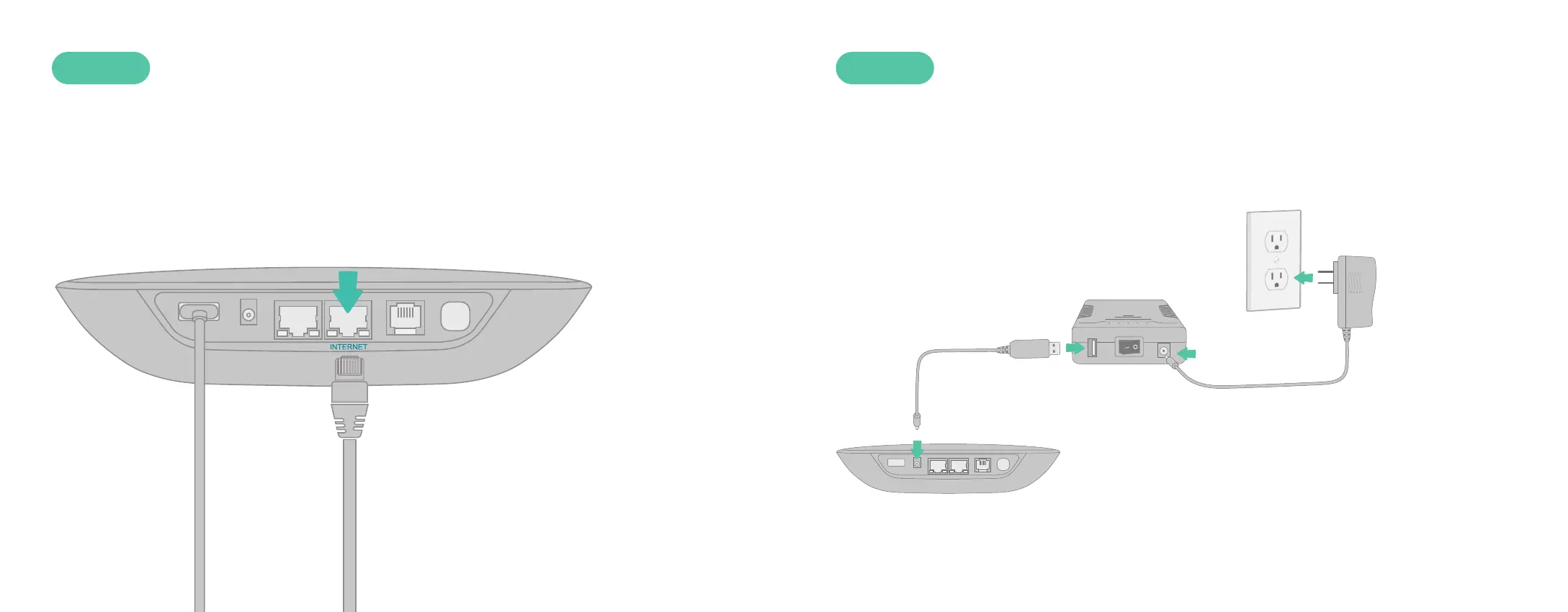
If you plan to use the LTE Adapter as a backup Internet connection, use the
included Ethernet cable to connect your Base Station to your existing router.
Insert one end of the Ethernet cable into the INTERNET port on the back
of the Base Station. Connect the other end of the cable to an open port on
your router.
Connect Battery Backup (Optional)
STEP 3
If your bundle includes Ooma Battery Backup, use the included USB power
cable to the Base Station. Then use the AC adapter to connect the Battery
Backup to a wall outlet, as shown below. Turn the Battery Backup’s power
switch to ON.
With this configuration, the Battery Backup will charge from the wall outlet
while also powering the Base Station. If your power goes out, the Battery
Backup will continue to power the Base Station.
6 7



 To Next Page