Page 23
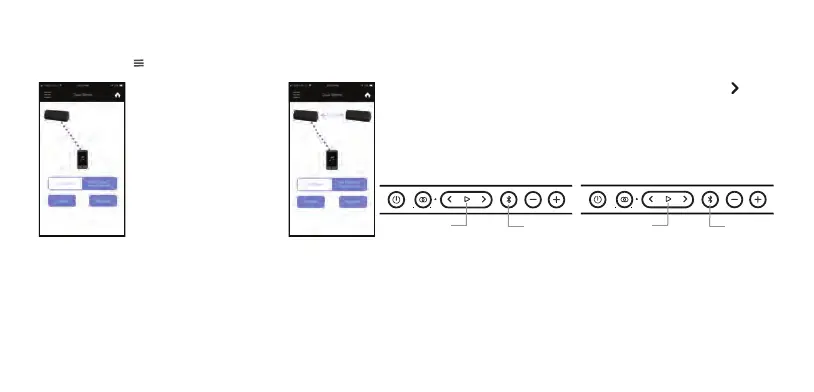
Press ‘Connect’ to connect
two OontZ Angle 3 Pro
speakers in OontZ Wirless
Dual Stereo mode.
Select the Menu in the upper left hand corner of the app and select ‘Dual Stereo’ from the menu.
Disconnecting and Reconnecting the OontZ Angle 3 Pro speakers.
– Press ‘Disconnect’ to disconnect the two OontZ Angle 3 Pro connected speakers.
– The Play/Pause Button White Light on the second speaker will turn off and the speakers will be disconnected from each other.
– To reconnect press ‘Connect’ with both OontZ Angle 3 Pro speakers turn on.
Playing the audio from a video in OontZ Wireless Dual Stereo
– To play the audio from a video or TV in OontZ Wireless Dual Stereo you will need to connect the Play Control Speaker to your device
or TV using a the 3.5mm Stereo Audio Cable, allowing the audio and video to play in sync with each other. If the Play Control Speaker
is connected over Bluetooth to your device or TV there will be a delay in the audio playback from a video.
After a few seconds the second speaker Play/Pause Button Light will
be lit solid White. The Play Control Speaker will say “Left Channel” and the
second speaker will say “Right Channel”. The speakers are connected
together for Left Channel - Right Channel and you are ready to play.
Play Control Speaker
Left Channel
Lit Blue
Lit Green
Second Speaker
Right Channel
Blue Light off
Lit White
Using the OontZ app for OontZ Wireless Dual Stereo














 To Next Page