Page 24
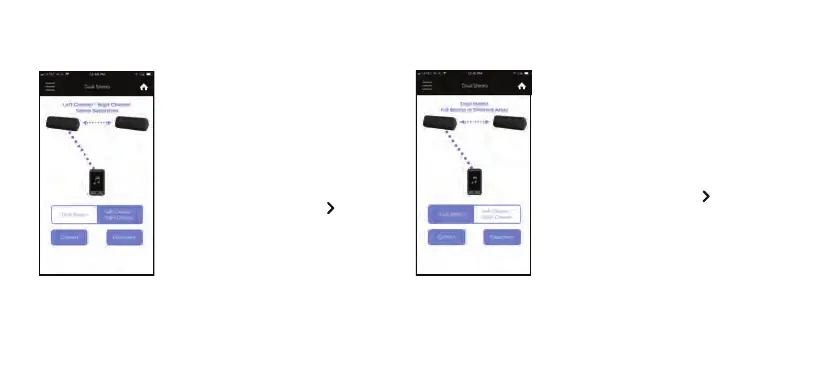
Use Dual Stereo when placing the two
speakers in different areas, and both
speakers will play in full stereo.
– With the speakers connected together for
Left Channel - Right Channel, you can
change the speakers to Dual Stereo.
–
To change to Dual Stereo, press ‘Dual
Stereo’.
–
The Play/Pause Button Light on the
second speaker will change from solid
White to solid Orange.
–
Both speakers will say “Dual Stereo” and
you are ready to play.
Using the OontZ app for OontZ Wireless Dual Stereo
Use Left Channel - Right Channel for
incredible left and right stereo seperation.
– With the speakers connected together for
Dual Stereo, you can change the speakers
to Left Channel - Right Channel.
–
To change to Left Channel - Right Channel,
press ‘Left Channel Right Channel’.
–
The Play/Pause Button Light on the
second speaker will change from solid
Orange to solid White.
– The Play Control Speaker
will say “Left
Channel” and the second speaker will say
“Right Channel” and you are ready to play.














 To Next Page