Page 7
12.10.12 Issue 1
2.0 Thermocode iQ Printer System
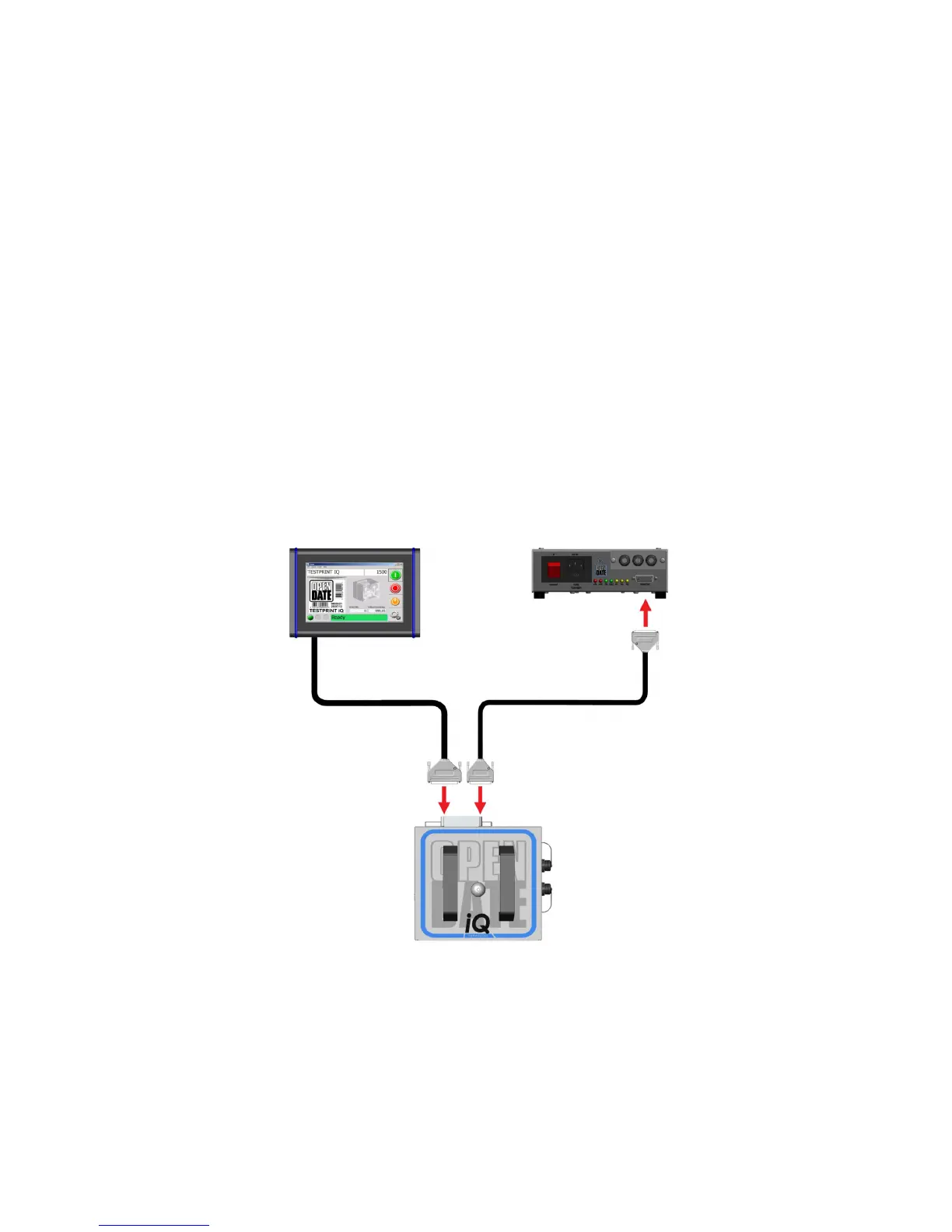
A standard Thermocode iQ thermal transfer printer system consists of these hardware components:
Printer Pt. No. PRI785000
Display Pt. No. DIS785100
Power Supply Pt. No. POW783000
PSU to Printer Cable (2m) Pt. No. CAB783000
The printer contains the system computer which drives the printing mechanism and the display. It has
a user removable magazine for ribbon replacement.
The display has a touch screen for configuring and operating the printer, and shows information about
the printer status. It connects to the printer using a captive “D” connector cable.
The power supply has connections for print triggering and interfacing with external equipment. Three
software programmable relays can be set to indicate printer status to external equipment. The power
supply is connected to the printer using a 2 metre long “D” to “D” cable.
3.0 System Diagram
4.0 System Connection
! See IMPORTANT SAFETY INFORMATION on page 6 before making connections.
Disconnect the power supply by removing the mains cable before connecting or disconnecting system
components.
Make all connections to external equipment (iQ Software Manual) and connect the iQ system as
shown before powering up.
TOUCHSCREEN DISPLAY
Pt. No. DIS785100
POWER SUPPLY
Pt. No. POW783000
POWER SUPPLY CABLE
Pt. No CAB783023
IQ PRINTER
Pt. No. PRI785000



 To Next Page