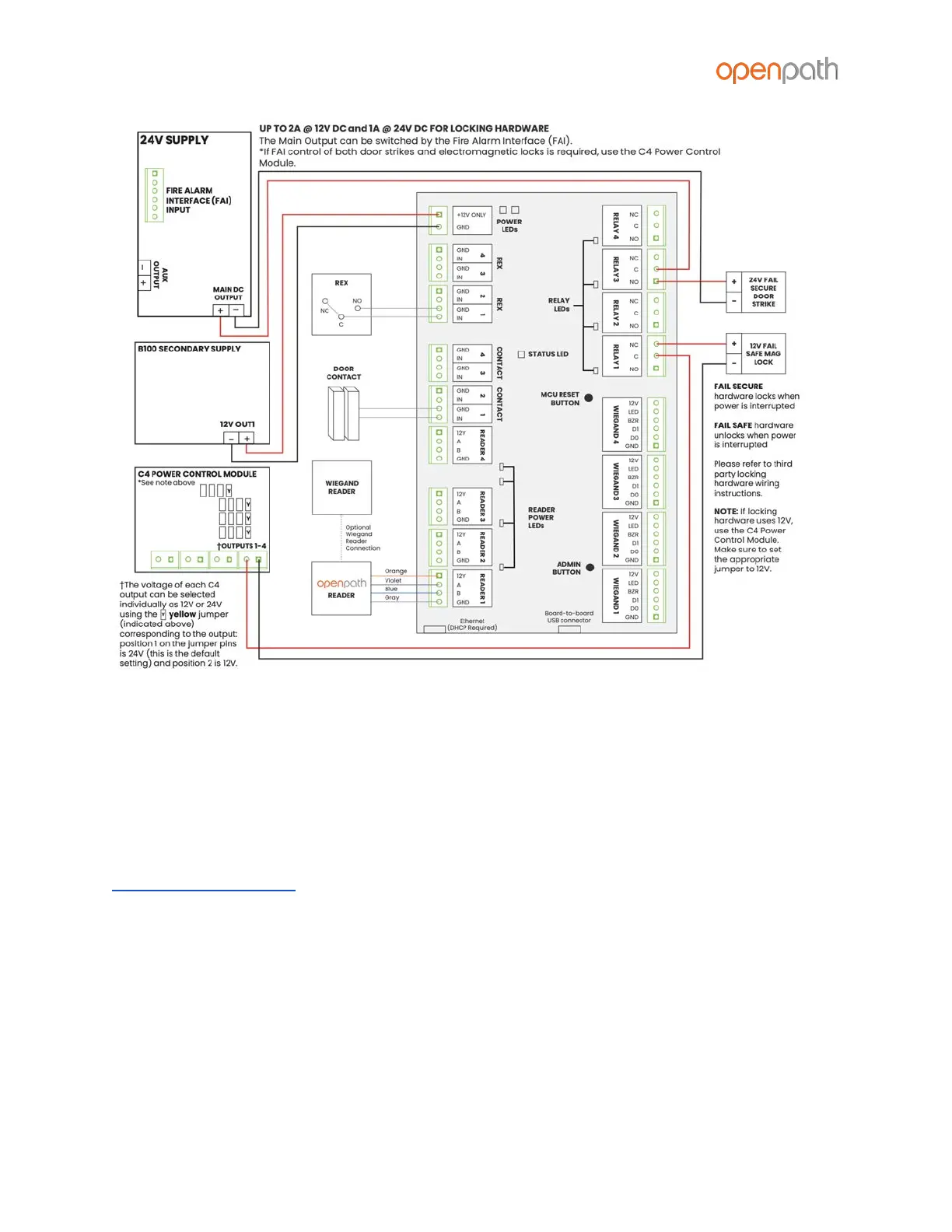
Figure 25: OP-4ESH-24V Wiring Diagram
All of this is configured as one Entry in the Openpath Control Center. We recommend
matching port numbers (READER 1 with CONTACT 1, for example). When setting up
Sites in the Control Center using Quick Start, Entries will default to matching READER 1
with CONTACT 1, RELAY 1, and so on. For more complex Entry setups, you’ll need to
manually add Controls to the Entry. For the example above, you’d need to add an
additional Entry/Exit Hardware Control to the Entry. For more information, refer to the
Openpath User Guide.
This example contains:
● An Openpath Reader on READER 1 port (also connected to a Wiegand reader,
optional)
● A door contact sensor on CONTACT 1 port
● A REX on REX 1 port
● A 24V fail secure door strike on RELAY 3
● A 12V fail safe electromagnetic lock on RELAY 1



 To Next Page