GETTING STARTED
7
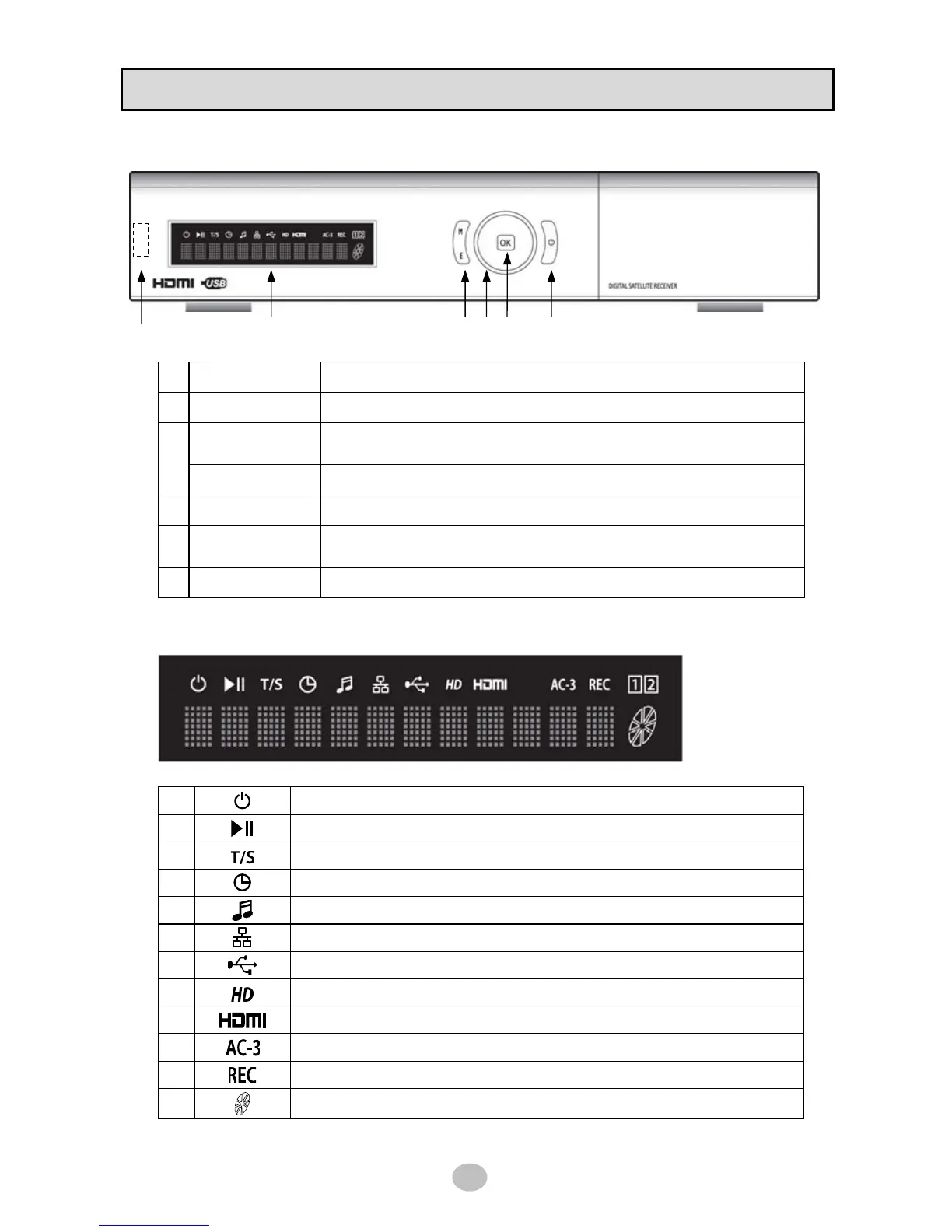
1.2 Front panel
1 USB USB 2.0 Interface
2 VFD DISPLAY Vaccum Fluorescent Display
MENU
Normal mode : Display the main menu
Menu mode : Exit menu mode
3
EXIT Return to previous menu
4 NAVIGATION Up/Dn : Channel change, Left/Right : Volume control
5 OK
Normal mode : Display channel list
Menu mode : Select menu item
6 STAND BY Stand by mode [ON/OFF]
※ VFD icon description
1
Turned on in stand by mode
2
Indicates PLAY / PAUSE in playback mode
3
Turned on when Time shift is activated
4
Turned on when Timer setting is stored
5
Turned on in MP3 play mode
6
Turned on as Ethernet connection is established
7
Turned on as USB device is connected
8
Indicates that current channel is High Definition
9
Turned on when HDMI connection is established to TV
10
Indicates that current channel has DOLBY DIGITAL Audio
11
Turned on while in recording
12
Turned on in playback mode
1
2 3 4 5 6


 To Next Page