SETUP MENU OPTIONS
27
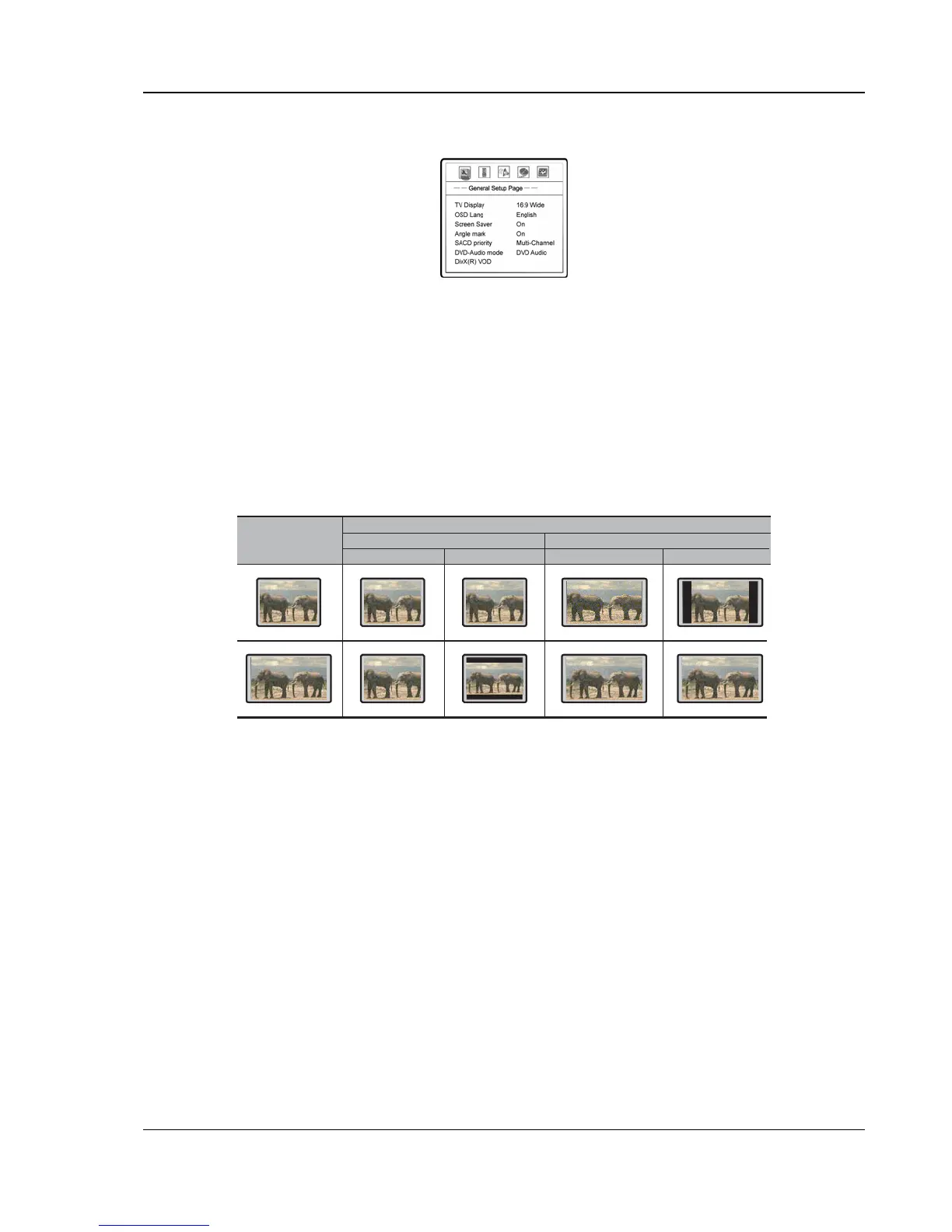
General Setup Page
1. TV Display: To set the aspect ratio of the player’s output image to match your TV. The options
are :
• 4:3 Pan/Scan – 4:3 TV Pan and Scan. Choose when the display is 4:3. Both sides of
widescreen image are clipped.
• 4:3 Letterbox – 4:3 TV Letterbox. Choose when the display is 4:3. Widescreen image is
displayed in “letterbox” format with black borders on top and bottom.
• 16:9 Wide – Choose when the display is 16:9. 16:9 materials will be displayed in its native
aspect ratio, and 4:3 materials will be stretched.
• 16:9 Wide/SQZ – 16:9 TV Wide/Squeeze Mode. Choose when the display is 16:9. 16:9
materials will be displayed in its native aspect ratio, and 4:3 materials will be displayed with
black borders on both sides to maintain 4:3 aspect ratio.
DVD Content
TV Screen Appearance
4:3
16:9
Pan-Scan Letterbox Wide Wide/SQZ
16:9
4:3
2. OSD Lang: On-Screen Display Language. To set the language of on-screen display, menus
and prompts.
3. Screen Saver: To turn on/off the screen saver function. When the screen saver is on, a moving
logo will appear instead of the static image after 2 minutes of inactivity. This is designed to
minimize the burn-in issue for plasma and CRT display devices.
4. Angle Mark: To turn on/off the display of angle mark when DVD content with multiple available
angles is played.
5. SACD Priority: To select which audio tracks to play for SACD (Super Audio CD). The options
are:
• Multi-Channel – Play the multi-channel surround audio
• 2-Channel – Play the 2-channel stereo audio
• CD MODE – Play the CD layer of a hybrid SACD disc
6. DVD-Audio Mode: To select which portion of a hybrid DVD-Audio disc to playback. The
options are:
• DVD-Audio – Play the DVD-Audio portion of the disc with surround audio
• DVD-Video – Play the DVD-Video portion of the disc with Dolby Digital or DTS audio



 To Next Page