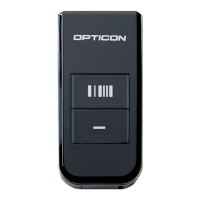
The Opticon OPN-2005/OPN-2006/PX-20/RS-3000 are Bluetooth companion scanners designed for barcode data acquisition, functioning primarily as either a Bluetooth keyboard (HID) or a Virtual COM Port (VCP). These devices are supplied with a Bluetooth application that enables their full Bluetooth capabilities, providing a user interface that relies on two physical keys and barcode scanning for configuration and operation, as they lack a display or traditional keyboard.
Function Description:
The core function of these devices is to scan barcodes and transmit the data wirelessly via Bluetooth to a remote host device such as a PC, laptop, or mobile device. They support two main Bluetooth interface modes:
- Bluetooth Keyboard (HID) Mode: In this mode, the scanner emulates a keyboard, transmitting each character of barcode data as keyboard presses. This allows for direct input into any document or application that accepts keyboard input without requiring special software on the host device. The scanner can reconnect to a paired host device quickly without re-pairing, provided the host retains pairing information.
- Virtual COM Port (VCP) Mode: In VCP mode, the scanner transmits data as serial data, mimicking a traditional serial port. This mode requires the host device to open a Bluetooth Virtual COM port, often using applications like Hyperterminal or Appload's RS232 monitor, to receive the data.
The scanners can operate as either a master or a slave device in VCP mode. As a master, the scanner initiates the connection to a remote host device whose Bluetooth address must be configured on the scanner. As a slave, the scanner becomes discoverable and connectable, allowing a remote host device to initiate the connection.
Important Technical Specifications:
While specific hardware specifications like processor speed or memory capacity are not detailed in this document, the manual highlights several crucial software and compatibility aspects:
- Minimum Required Operating System (OS) Version:
- OPN-2005: RBLV0038
- OPN-2006: RBNV0047 (and Boot loader RANV0016)
- PX-20: RBMV0047 (and Boot loader RAMV0016)
- RS-3000: RBZV0047 (and Boot loader RAMV0016)
Users can check the installed OS and application version via USB-VCP by scanning the 'Z1' menu label or using Appload (Utilities > Show software version).
- Bluetooth Versions: The devices support Secure Simple Pairing, which allows pairing without requiring a PIN code entry on the host device, indicating compatibility with Bluetooth 2.1+ or newer for enhanced security and ease of use. If the host device does not support Bluetooth 2.1+, a PIN code may be required.
- USB Connectivity: The scanners also support USB-VCP (COM port) and USB-HID (keyboard) when not connected to Bluetooth, providing a wired alternative for data transmission and software loading.
- Software Upgradability: The OS and application software are designed for future updates, with new features and bug fixes expected. Updates are available on the Opticon website.
- Battery: The devices feature a low battery warning (yellow/orange LED blinking 10 times for 1 minute before automatic shut-off) and a battery check function, accessible via serial command
<ESC>]BATT<CR> in VCP mode or by scanning specific barcodes in HID mode.
Usage Features:
The devices offer a comprehensive set of features to enhance usability and flexibility:
- Configuration via Barcodes (Universal Menu Book): All settings, including barcode decoders, prefixes, suffixes, read modes, buzzer/LED settings, and Bluetooth configurations, are configured by scanning specific barcodes found in the Opticon Universal Menu Book or generated online via
opticonfigure.opticon.com. This barcode-driven interface compensates for the lack of a display.
- Key-based Operations:
- Trigger Key: Used to initiate barcode scans, manually reconnect to a paired device (hold for 5 seconds), and wake up an iPhone/iPad from standby in iOS mode.
- Clear Key: Used to make the device discoverable and connectable (hold for 5 seconds), manually disconnect from a host (hold for 5 seconds), and halt the application or OS during troubleshooting.
- Pairing and Connection Management:
- Discoverable/Connectable Mode: Activated by holding the clear key for 5 seconds, making the scanner visible to remote devices for 2 minutes (default, configurable up to 10 minutes).
- PIN Code Configuration: The default PIN code is the last 4 digits of the Bluetooth address. Users can set a fixed PIN code or enter a random PIN code using numeric direct input barcodes.
- Auto Reconnect: The scanner attempts to automatically reconnect for about 1 minute after losing connection (configurable).
- iOS Compatibility (iPhone/iPad Mode): When enabled, the trigger key can toggle the iOS onscreen keyboard and wake the device from standby. It is recommended to disable the passcode lock on the iOS device to prevent barcode data from being entered as a passcode.
- Memorizing Barcodes: The application supports memorizing scanned barcodes if the Bluetooth connection is lost, allowing them to be transmitted once the connection is re-established.
- Bluetooth Local Name Configuration: The Bluetooth name of the device can be configured to include the last four digits of its Bluetooth address or its serial number.
- Alternative Applications: Besides the default Bluetooth application, Opticon provides other software options:
- Software V3727x (OPN-2001 simulation): Turns the scanner into an OPN-2001 compatible batch scanner, allowing stored barcode data retrieval via USB or Bluetooth. Note: This mode has limitations, such as no laser aiming, fixed scan angle, and limited 2D symbology configuration via OPN-2001 application.
- Software V3793x (Batch application): Enables the scanner to function as a batch scanner that saves data as a file, retrievable via OseComm or NetO32 Windows applications. It also allows the device to act as a USB Mass Storage device, storing barcodes in a comma-separated file accessible via any file explorer.
Maintenance Features:
The manual outlines several troubleshooting and maintenance mechanisms designed to recover the device from various states, especially given the absence of a display:
- Restart Mechanisms:
- Automatic Restart: A watchdog timer restarts the device after 3 seconds if the OS crashes. This does not apply if only the application crashes.
- Manual Restart: If the application crashes but the OS is still running, pressing and holding both the trigger and clear keys for at least 20 seconds (until a short beep) will restart the device.
- Halting the Application: After a manual restart (short beep), continuing to hold both keys and then releasing the trigger key first will halt the application. The LED will blink yellow/orange, indicating readiness for new application or OS software to be loaded. To exit this state, press both keys for 20 seconds.
- Halting the Operating System (for corrupt OS): After a manual restart (short beep), continuing to hold both keys and then releasing the clear key first will halt the Operating System. The LED will blink red, indicating readiness for a new OS to be loaded. To exit this state, press both keys for 3 seconds.
- Software Upgrading: Easy software upgrading is facilitated via USB-VCP using Appload. However, when in USB-HID mode, it's necessary to switch back to Bluetooth-VCP or USB-VCP default to load software.
These features collectively ensure the device's reliability, configurability, and ease of maintenance, making it a versatile tool for various barcode scanning applications.

 Need help?
 General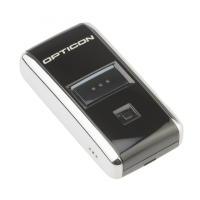

 To Next Page