EasyManua.ls Logo

Opticon OPN2003 - User Manual

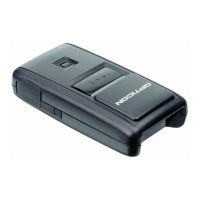
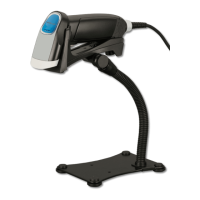
Opticon OPN2003
19 pages
Print Icon
To Next Page IconTo Next Page
Loading...
1
CAUTION: This information is subject to change without prior notice.
Copyright 2011, Opticon Sensors Europe BV, all rights reserved.
This manual may not, in whole or in part, be copied, photocopied, reproduced, translated or converted to any
electronic or machine readable form without prior written consent of Opticon Sensors Europe.
THE GENERAL USE AND FUNCTIONING OF THE BAR CODE SCANNER IS DESCRIBED IN THIS DOCUMENT. ALSO
GENERAL SETUP INSTRUCTIONS TO GET STARTED ARE DESCRIBED IN THIS DOCUMENT. FOR FURTHER
INSTRUCTIONS CONSULT OPTICON OR YOUR LOCAL DEALER.
OPN2002/3 batch demo application
(Version RFG35415)
The batch demo application for the OPN2002/3 demonstrates its capabilities to store
barcode data in a file and retrieve this file onto a local PC. The files can either by retrieved
by using the OPN2002/3 as USB Mass Storage Device (MSD) or can be received using the
NetO protocol by using USB-VCP and/or the CRD2000 multi cradle.
Since the OPN2002/3 terminals don't have a display to show any instructions this demo
application implements a user interface that consists entirely of using just the 2 keys to
scan barcodes. This brief setup guide describes all features as well as handling instructions.
More product details, additional support and more configuration options to customize this
application to your own preferences (by using the Universal menu book) will be updated at
www.opticon.com
1 Capabilities of the Batch demo application
The following features are currently supported:
Scans and stores barcodes into a database file on the internal RAM disk.
Retrieve the barcode data file on a local PC or laptop using the NetO protocol by
either USB-VCP or the CRD2000 multi cradle.
*new* Use the OPN200/3 as USB Mass Storage Device (MSD) to retrieve the
barcode data file.
OSE Universal menu book support to configure all barcode decoders, pre- and
suffixes, read modes and various other options.
Storing of configurations in non-volatile memory to allow all settings to be
restored after a reset.
Configurable output format of the database file
Easy software upgrading by USB -VCP or the CRD-2000 multi cradle (RS232) using
Appload.

Other manuals for Opticon OPN2003

Questions and Answers

Overview

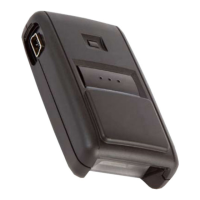
The Opticon OPN2002/3 is a compact, portable barcode scanner designed for batch data collection and retrieval. It functions primarily as a data logger, storing scanned barcode data internally and allowing for transfer to a host PC or laptop. The device supports various interfaces for data retrieval and offers extensive customization options for its operation and data output format.

Function Description:

The OPN2002/3's core function is to scan and store unique barcode data into an internal database file on its RAM disk. Each record in this database can include the barcode data itself, a quantity, the serial number of the OPN2002/3, and a date/time stamp. The device is designed for simplicity, utilizing only two keys for all operations: a trigger button for scanning and adding barcodes, and a small delete key for decrementing quantities or deleting records. Visual and auditory feedback (good read beep, green LED for adding, orange/red LED for decrementing/error) guide the user during scanning.

Data retrieval from the OPN2002/3 can be achieved through three primary methods:

  1. USB Mass Storage Device (MSD): The device can act as a portable mass storage device when connected via USB, allowing users to copy/move the 'DATA.TXT' file containing scanned barcodes using a standard file browser.
  2. USB Virtual Com Port (USB-VCP): Data can be transferred to a host PC or laptop using Opticon's NetO32 application via a mini-USB cable. This method requires the installation of specific USB-VCP drivers.
  3. CRD2000 Multi-Cradle: For OPN2002 models, data can also be transferred via the CRD2000 multi-cradle using the NetO32 application. This cradle supports both USB and RS232 interfaces and is particularly useful for managing multiple OPN2002 devices.

The OPN2002/3 supports customization through the OSE Universal Menu Book, which allows users to configure various operational parameters without needing to alter the device's source code. This includes settings for barcode decoders, prefixes, suffixes, read modes, buzzer settings, LED options, and output format.

Important Technical Specifications:

  • Operating System (OS) Versions:
    • For USB-VCP and CRD2000 support: OPN2002 requires RBGV0212 (or higher), OPN2003 requires RBFV0212 (or higher).
    • For USB-MSD support: OPN2002 requires RBGV0220d (or higher), OPN2003 requires RBFV0220d (or higher).
  • Host Application: Minimum NetO32 version 2.07 is required for data transfer via USB-VCP or CRD2000.
  • Memory: Limited RAM disk size for data storage (approximately 125kB on OPN2003, 900kB on OPN2002).
  • Database File: 'DATA.TXT' is the default filename for stored barcode data.
  • Barcode Field Size: Default 40 characters, configurable from 1 to 99 characters.
  • Quantity Field Size: Default 6 characters, configurable from 1 to 8 characters.
  • Battery Life: The OPN2002/3 will retain barcode data for several days after the battery goes dry, but the internal clock will reset if the battery is completely drained. The OPN2002 battery empties quicker than the OPN2001, operating normally for about 30 days when rarely used.
  • Laser Aiming: The OPN2002 does not support laser aiming (laser dot) and cannot change its scan angle to shorten the laser line.
  • Bluetooth Capabilities: This specific batch demo application does not implement Bluetooth. A separate Bluetooth demo application (RFG35312) is available for OPN2002.

Usage Features:

  • Barcode Scanning: Trigger button activates the laser for scanning. A good read produces a beep and a green LED.
  • Quantity Management: Scanning an existing barcode increments its quantity. Using the small delete key decrements the quantity. If a barcode not in the database or with zero quantity is scanned with the delete key, a low error beep and red LED are produced.
  • Database Output Formatting: Highly customizable output format for the 'DATA.TXT' file, including:
    • 16 date formats and 2 time formats (hh:mm:ss, hh:mm).
    • 7 field separators (Comma, Semicolon, Pipe, Slash, Tab, LF, CR).
    • Configurable barcode and quantity field sizes.
    • Option to delete records when quantity reaches zero or to keep them with a quantity of '0'.
    • Option to allow scanning of negative quantities.
    • Customizable field output sequence (up to 5 fields: barcode, date, time, quantity, serial number).
  • Software Loading: New OS or application software can be loaded using the Appload utility via mini-USB cable (for both OPN2002/3) or CRD2000 cradle (for OPN2002 only). USB-VCP interface must be selected for software loading.
  • Restart Mechanisms:
    • Automatic: A watchdog timer restarts the OPN200x after 3 seconds if the OS crashes.
    • Manual: Holding the trigger or delete key for at least 20 seconds initiates a manual restart if the application crashes but the OS is running.
  • Halting Application/OS: Specific procedures involving key presses and USB cable insertion allow halting the application (LED blinks orange) or the operating system (LED blinks red) to facilitate loading new software in case of crashes.

Maintenance Features:

  • Software Updates: Opticon provides regular software updates (OS and application) and bug fixes, available for download from their website.
  • Driver Installation: USB drivers for USB-VCP and CRD2000 are available on the Opticon website and must be installed on the host PC for proper communication.
  • Database Deletion: The internal database file can be erased by scanning a specific barcode label ("+-FORMAT +"). In USB-MSD mode, the file can also be deleted manually using a file browser.
  • Time Configuration: If the battery is completely drained, the internal clock resets to 1-1-1970 00:00, requiring re-configuration using Appload.
  • CRD2000 Multi-Cradle Management: When using multiple OPN2002s with the CRD2000, specific NetO32 settings (RS232 configuration, polling and timing, terminal IDs based on serial numbers) are required to prevent data collisions. Only one OPN2002 should be placed in the cradle at a time for software loading.

Opticon OPN2003 Specifications

General IconGeneral
BrandOpticon
ModelOPN2003
CategoryBarcode Reader
LanguageEnglish

Related product manuals