Command Request Mode (C18=3)
PC or Remote Display Continuous Sending Mode (C18=5)
In this mode, the indicator can receive ASCII commands as listed below
Command Name
T Tare
Z Zero
P Print
R G.W/
N.W
C Kg/lb
G G.W
Function
Save and clear tare
Zero gross weight
Print the weight
Read gross weight or net weight
Kg/lb conversion
Check gross weight at net weight
mode
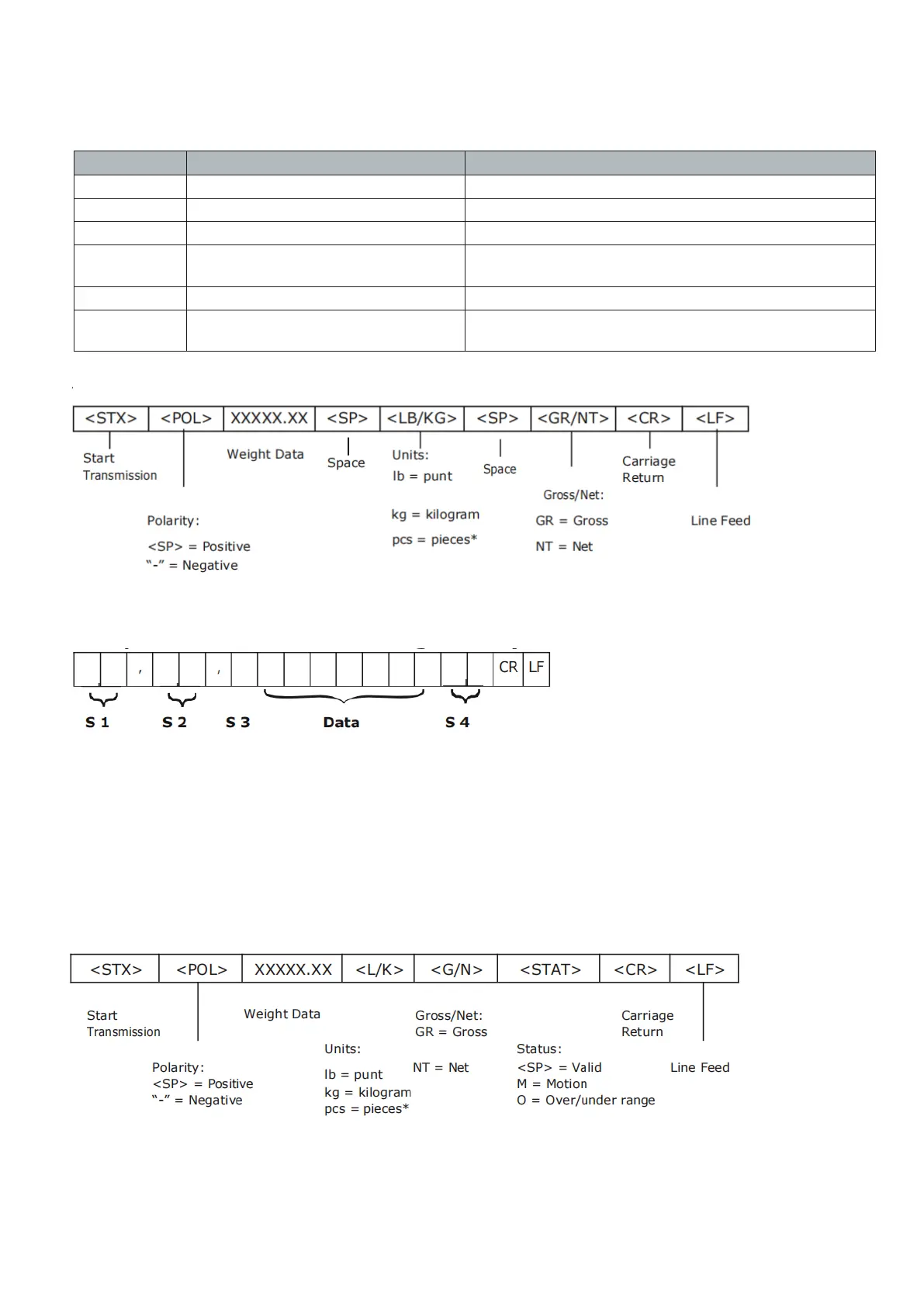
The R command will trigger the indicator to output the following data format:
Computer Continuous Sending Mode (C18=4)
S1: weight status, ST=standstill, US=not standstill, OL=overload
S2: weight status, GS=gross mode, NT=net mode
S3: weight of positive and negative, “+” or “-”
Date: weight value, including decimal point
S4: “kg” or “lb”
CR: carrige return
LF: line feed
- 19 -


 To Next Page