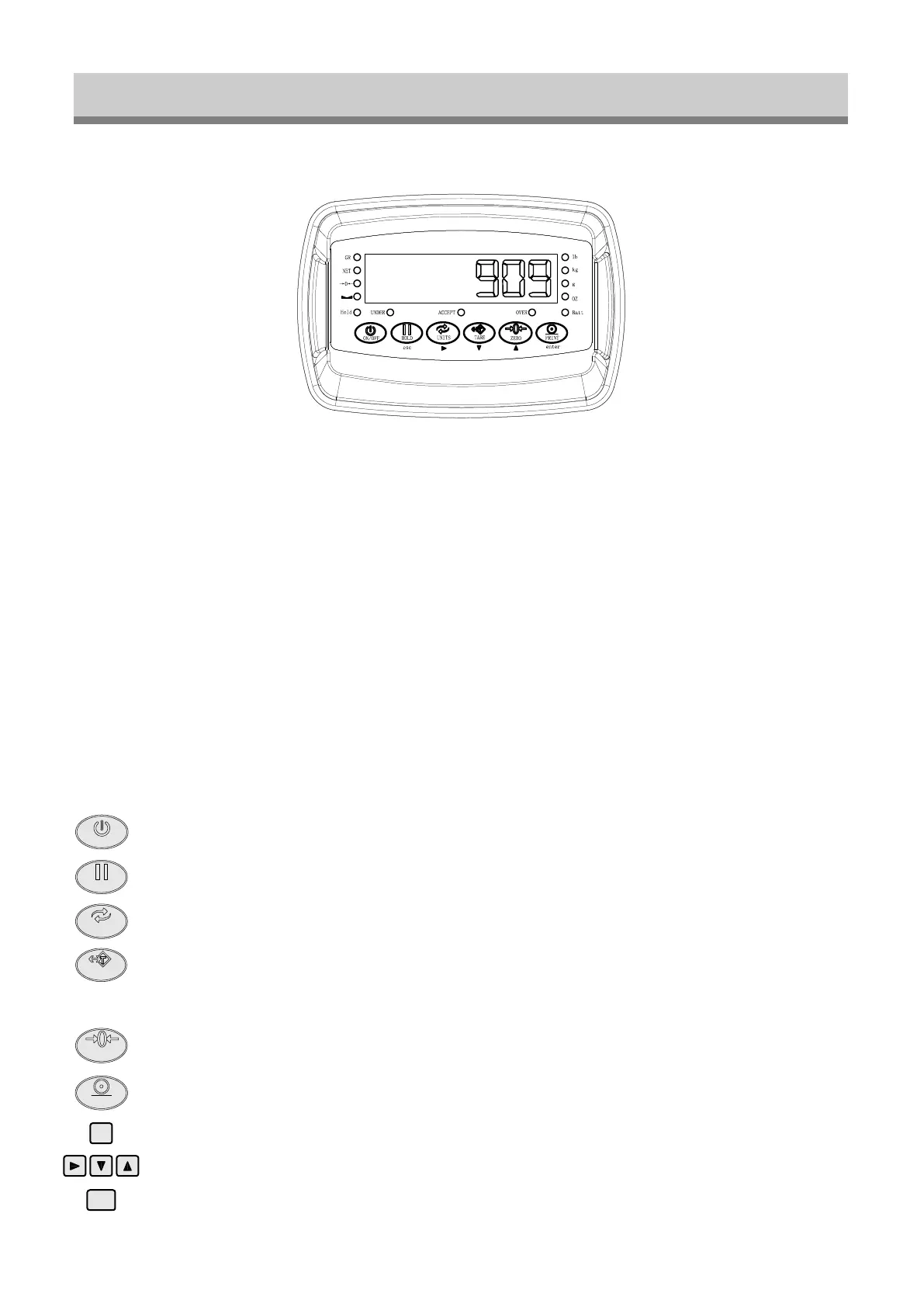
DISPLAY AND KEY DESCRIPTION
FIRST PANEL
1. Display lamp
lb lamp: ON when the weight unit is pound [lb]
kg lamp: ON when the weight unit is kilogram [kg]
g lamp: ON when the weight unit is gram [g]
oz lamp: ON when the weight unit is oz [oz]
Batt: GREEN when the battery is full, Red when it is low
GROSS lamp: ON when the current weight is GROSS weight
NET lamp: ON when the current weight is NET weight
ZERO lamp: ON when the current weight is 0lb (0kg)
HOLD lamp: ON when the weight is hold
UNDER lamp: ON when the weight below min value
ACCEPT lamp: ON when in normal weight
OVER lamp: ON when overload
2. Keyboard
ON/OFF
Powers the Indicator On or Off if held for 2 seconds
Holds the weight (5 Hold options; can be changed in parameter settings)
HOLD
Shifts between weighing units
1. Resets the scale to zero when there is something on the scale (ex. Tare out the weight
of a pallet to weigh only the product on it)
2. Clears the tare to see the gross weight
UNITS
TARE
Zero’s the scale
ZERO
Print data
Save and Exit
Enter
PRINT
esc
enter
Arrow keys
- 4 -


 To Next Page