36
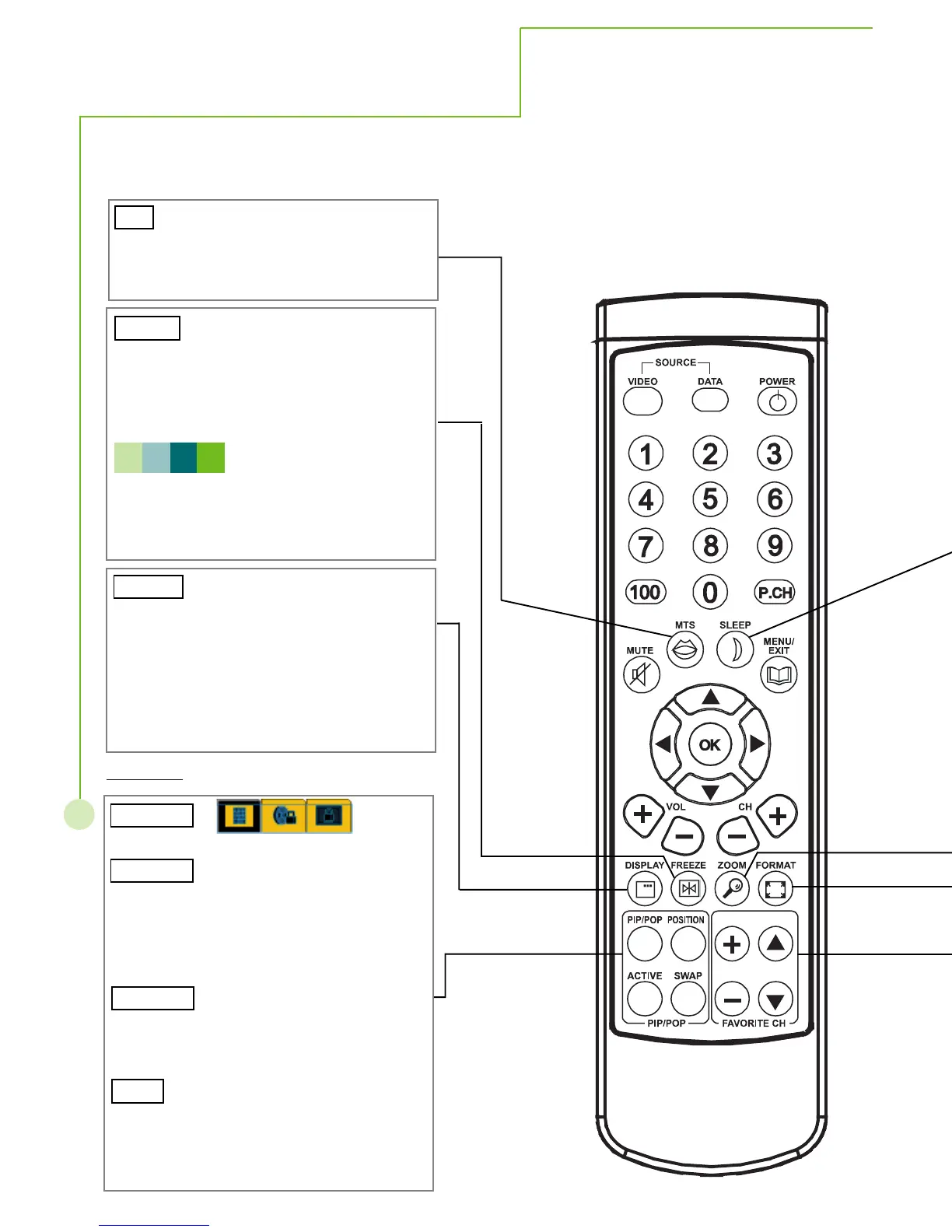
Toggle among full screen, PIP, POP, and
POP3.
To select an active window on PIP/POP mode
and the volume activates along with the active
window only. Please notice the OSD menu ca
be called up when the active window is on PO
mode.
To change the position of the sub image amon
four corners in PIP mode. This function does
not support HDTV, anglog and digital.
To swap the main and sub images in PIP/POP
mode. This function does not support some
PIP/POP/POP3 combinations, reading the
Hot Key Functions
There are some hot key functions on remote control. It helps easy and quick to
use these functions.
Freeze the image to look at the detail content
This function only works on full screen mode.
Do not freeze the image for a long time. It ma
cause after-image (please refer to the trouble-
shooting page).
After the freeze, only the keys of Zoom, UP,
Left, Right, Down, Power, Mute and Vol +
will function normally. And only pressing the
freeze key could unfreeze the situation.
Three lines information will show up on the rig
upper corner. The first line is the source
selection: TV, AV1, AV2, HDTV, Digital, and
Analog. The second line is the connector typ
channel number, or the resolution of the image
The third line is the remaining time to enter in
sleep mode.
Change TV sound mode in NTSC system if
available.There are Mono, SAP, and Stereo
mode for selecting.
PIP/POP
N O T E



 To Next Page