EasyManua.ls Logo

Optoma Projector - Introduction; Interactive Pen

Optoma Projector
89 pages
Print Icon
To Next Page IconTo Next Page
To Previous Page IconTo Previous Page
Loading...
11
English
Introduction
6
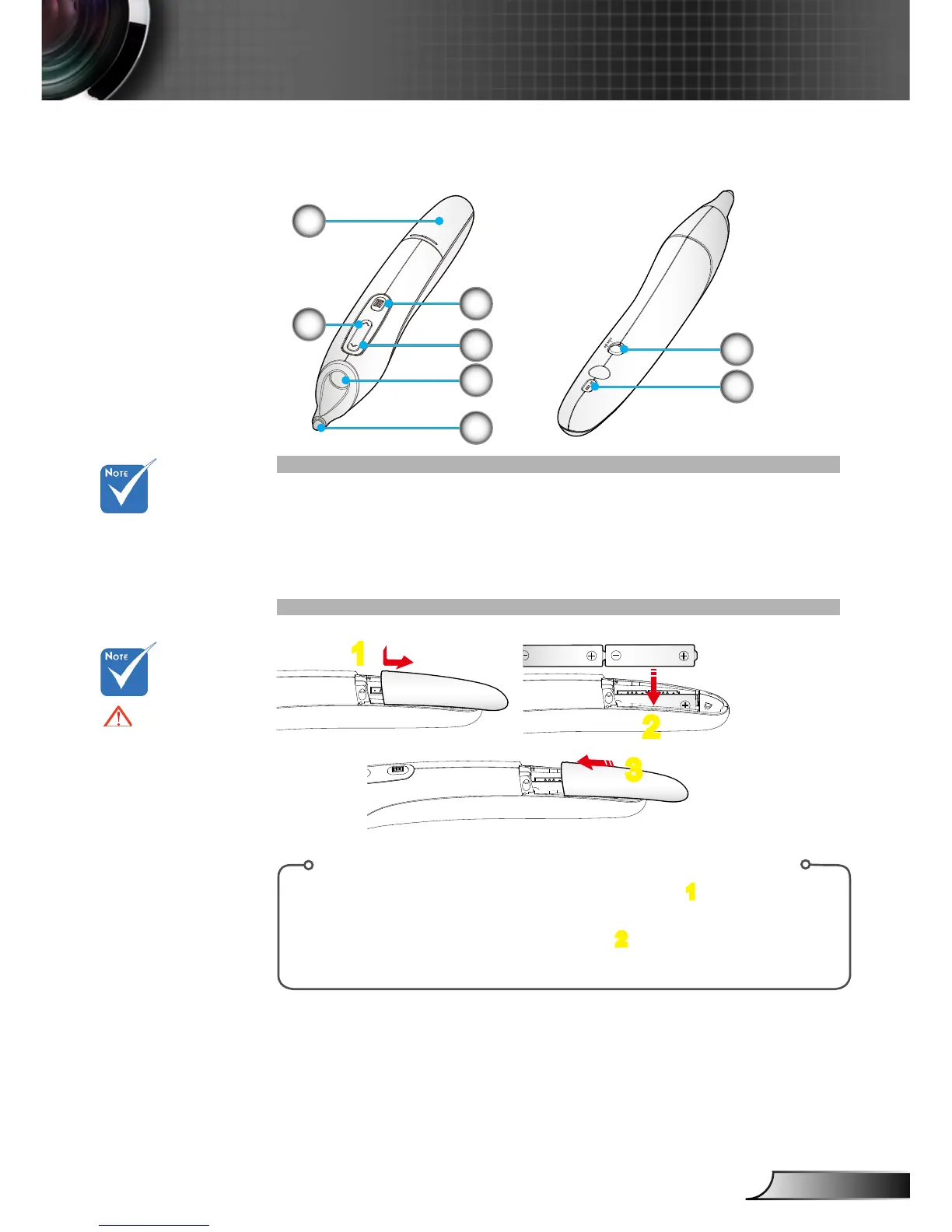
1. Battery Cover
2. Mouse Right Click
3. Menu
4. Mouse Left Click
Interactive Pen
5
1
8
7
4
3
2
Battery Installation:
1. Press rmly and slide the battery cover off. 1
2. Install new batteries (AAA). Ensure that you have the batter-
ies’ polarity (+/–) aligned correctly. 2
3. Slip the cover back over the batteries until it snaps into place.
5. Lens
6. Nib
7. Power On/Off
8. LED Indicators
1
2
3
The interactive
pen is optional
accessory.
Warning:
Danger of explosion
if battery is incor-
rectly replaced.
Replace only with
the same or equiva-
lent type recom-
mended by the
manufacturer.
Dispose of used
batteries according
to your local regula-
tions.
Do not mix different
types of batteries
or new and old bat-
teries.

Table of Contents

Other manuals for Optoma Projector

Related product manuals