How to use the Optoma Presenter
Optoma Presenter application allows remote desktop from a host
PC to be displayed on the network display through Ethernet, USB,
or Wireless transports. It can adapt to different network settings
(DHCP, xed IP, and direct link by USB/Ethernet cable).
This software can be downloaded from web page.
Before using this function, a USB cable is needed to connect the
Projector and PC Host directly. When the connection is OK, the PC
will show a USB device disk.
Select “Optoma Presenter”, and then run “autorun.exe” to start USB
Display.
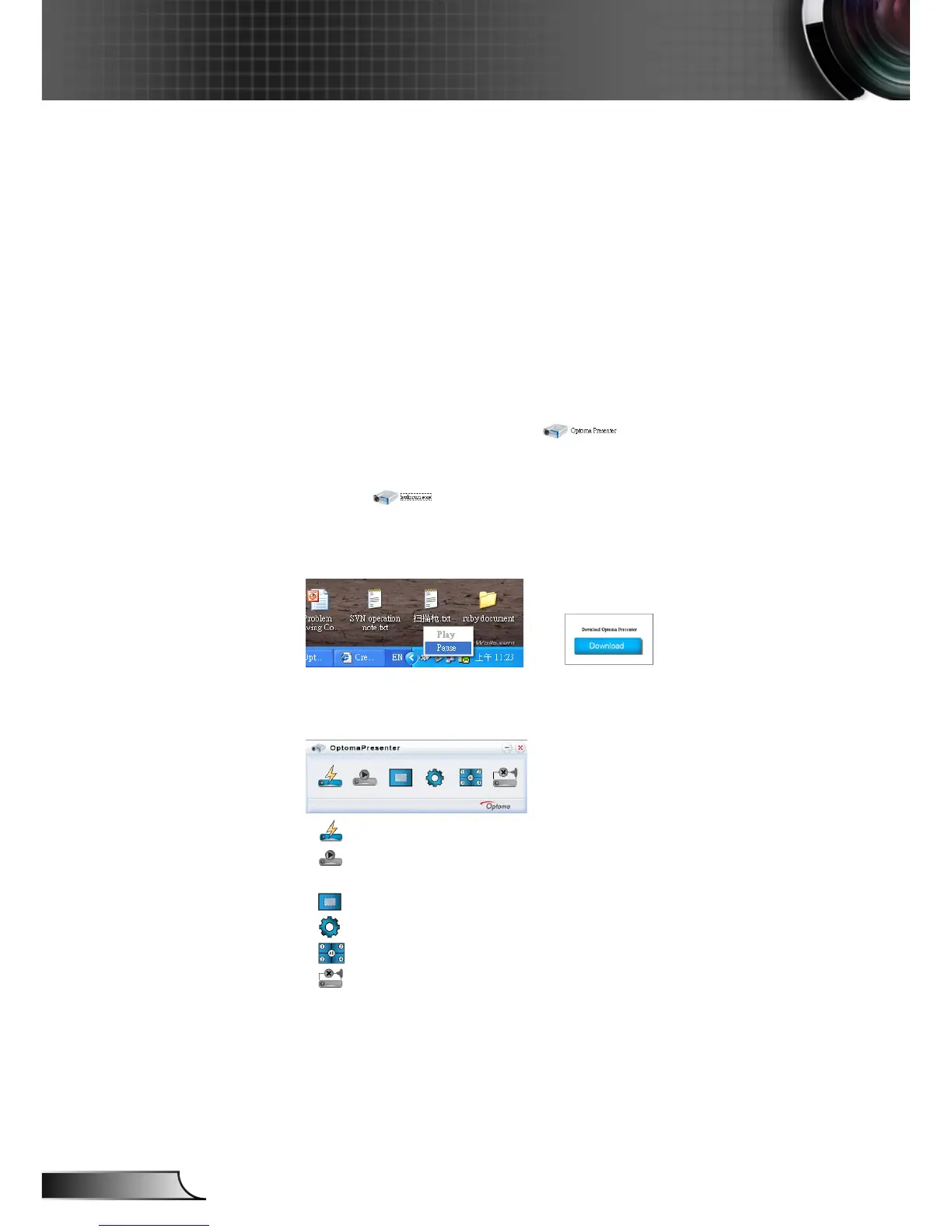
1. Press the Autorun icon in the right-down region to pause or play the
USB display.
-->
2. After installation in PC, double click the program of Optoma Pre-
senter to enter main window.
• : Connect and search network display.
• : Stop/Start displaying desktop contents to connected network
display.
• : Select display region.
• : Congure Optoma Presenter.
• : Manage all connected network displays.
• : Disconnect all connections.











 To Next Page