Manual for Tire Pressure Monitoring Systems, TPMS
4/20
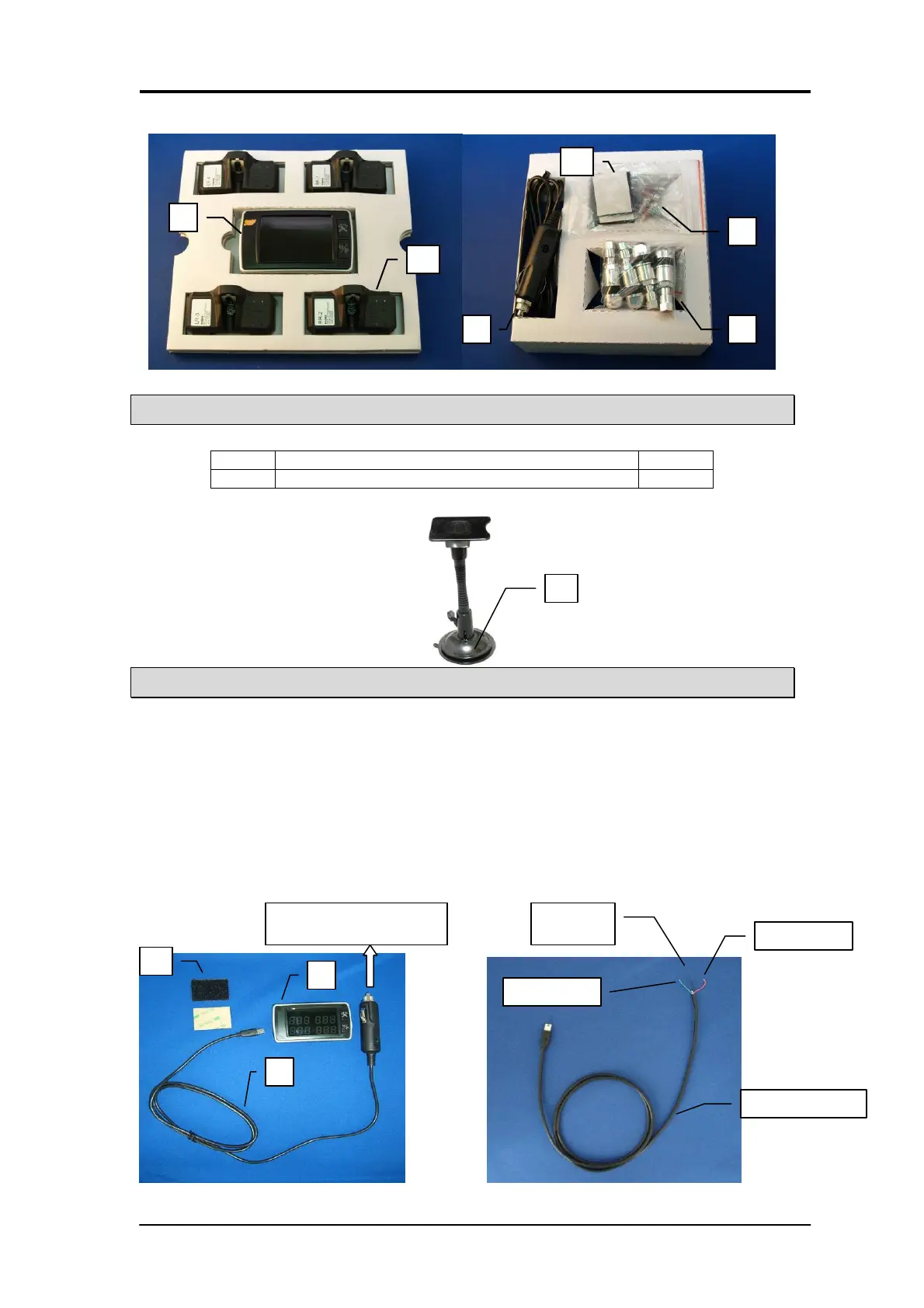
Optional Accessory Part
NO. Accessory Name Quantity
H Magnetic windshield holder 1
Display Unit Installation
1. Plug in one side of C the power cable connection into A the display located on the side.
( or cut the cigar jet , plug the power cable with ACC, VCC, Negative into fuse box)
Note: Pluging the power cable with ACC, VCC, Negative into fuse box will allow the display
unit to receive signals 24 hours a day , the LED light will turn on only when ACC is on and the
LED light will be off when ACC is turned off.
2 Install the display unit in front of driver at an appropriate position.
Stick the Velcro B into the bottom of the display unit A, and Stick the unit into the
convenient place.
3. Connect the power cable C into the vehicle’s cigarette lighter socket for power connection.
4. After set up the monitor please take off the protection film from the panel of monitor.
Plug into car power socket
ACC (Green)
Negative
(Black)
VCC (Red)


 To Next Page