EasyManua.ls Logo

Orion COMBI 3601VT - Note for the Replacing of Memory IC

Orion COMBI 3601VT
69 pages
Print Icon
To Next Page IconTo Next Page
To Previous Page IconTo Previous Page
Loading...
NOTE
FOR
THE
REPLACING
OF
MEMORY
IC
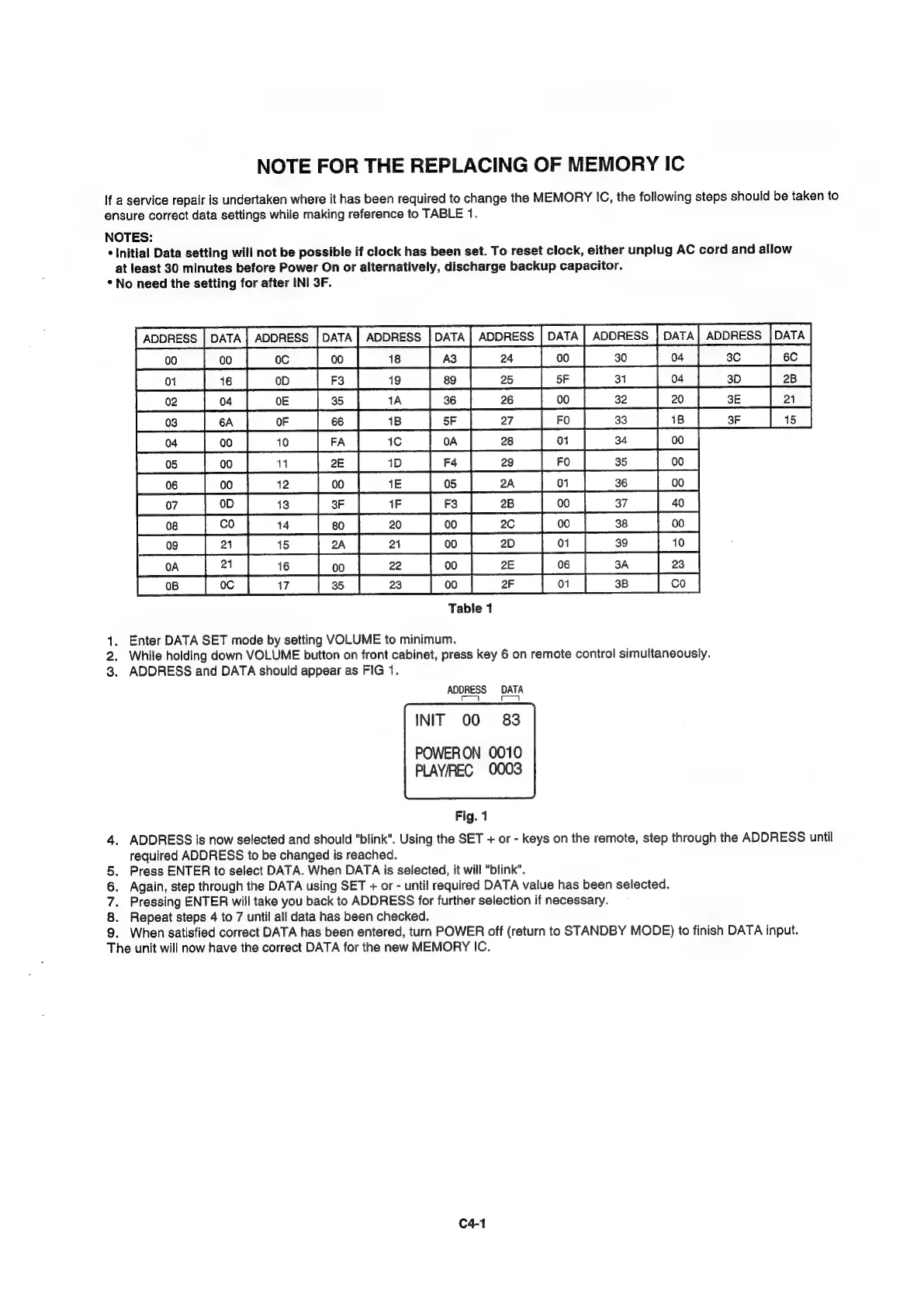
If
a
service
repair
is
undertaken
where
it
has
been
required
to
change
the
MEMORY
IC,
the
following
steps
should
be
taken
to
ensure
correct
data
settings
while
making
reference
to
TABLE
1.
NOTES:
*
Initial
Data
setting
will
not
be
possible
if
clock
has
been
set.
To
reset
clock,
either
unplug
AC
cord
and
allow
at
least
30
minutes
before
Power
On
or
alternatively,
discharge
backup
capacitor.
*
No
need
the
setting
for
after
INI
3F.
Table
1
1.
Enter
DATA
SET
mode
by
setting
VOLUME
to
minimum.
2.
While
holding
down
VOLUME
button
on
front
cabinet,
press
key
6
on
remote
control
simultaneously.
3.
ADDRESS
and
DATA
should
appear
as
FIG
1.
ADDRESS
DATA
[esse
See
oe
INIT
00
83
POWERON
0010
PLAY/REC
0003
Fig.
1
ADDRESS
is
now
selected
and
should
"blink".
Using
the
SET
+
or
-
keys
on
the
remote,
step
through
the
ADDRESS
until
required
ADDRESS
to
be
changed
is
reached.
Press
ENTER
to
select
DATA.
When
DATA
is
selected,
it
will
"blink".
Again,
step
through
the
DATA
using
SET
+
or
-
until
required
DATA
value
has
been
selected.
Pressing
ENTER
will
take
you
back
to
ADDRESS
for
further
selection
if
necessary.
Repeat
steps
4
to
7
until
all
data
has
been
checked.
When
satisfied
correct
DATA
has
been
entered,
turn
POWER
off
(return
to
STANDBY
MODE)
to
finish
DATA
input.
he
unit
will
now
have
the
correct
DATA
for
the
new
MEMORY
IC.
>
4OONOM
C4-1