EasyManua.ls Logo

Orion COMBI 3601VT - Preparation for Servicing

Orion COMBI 3601VT
69 pages
Print Icon
To Next Page IconTo Next Page
To Previous Page IconTo Previous Page
Loading...
SERVICING
FIXTURES
AND
TOOLS
JG154
Used
to
connect
the
test
point
of
SERVICE
and
GROUND
|
3@162C/JG162D
Used
to
connect
the
Syscon
PCB
and
Main
PCB
Used
to
connect
the
Syscon
PCB
and
salpet
CRT
PCB
PREPARATION
FOR
SERVICING
JG154
Cable
JG162C
Cable
(10
Pins)
JG162D
Cable
(11
Pins)
JG162Y
Cable
(5
Pins)
How
to
use
the
Servicing
Fixture
1.
Unplug
the
connector
CP351,
CP757
and
CP302
then
remove
the
TV/VCR
Block
from
the
set.
2.
Unplug
the
connector
CP810,
CP820
and
CP850,
then
remove
the
Main
PCB
from
the
VCR
Block.
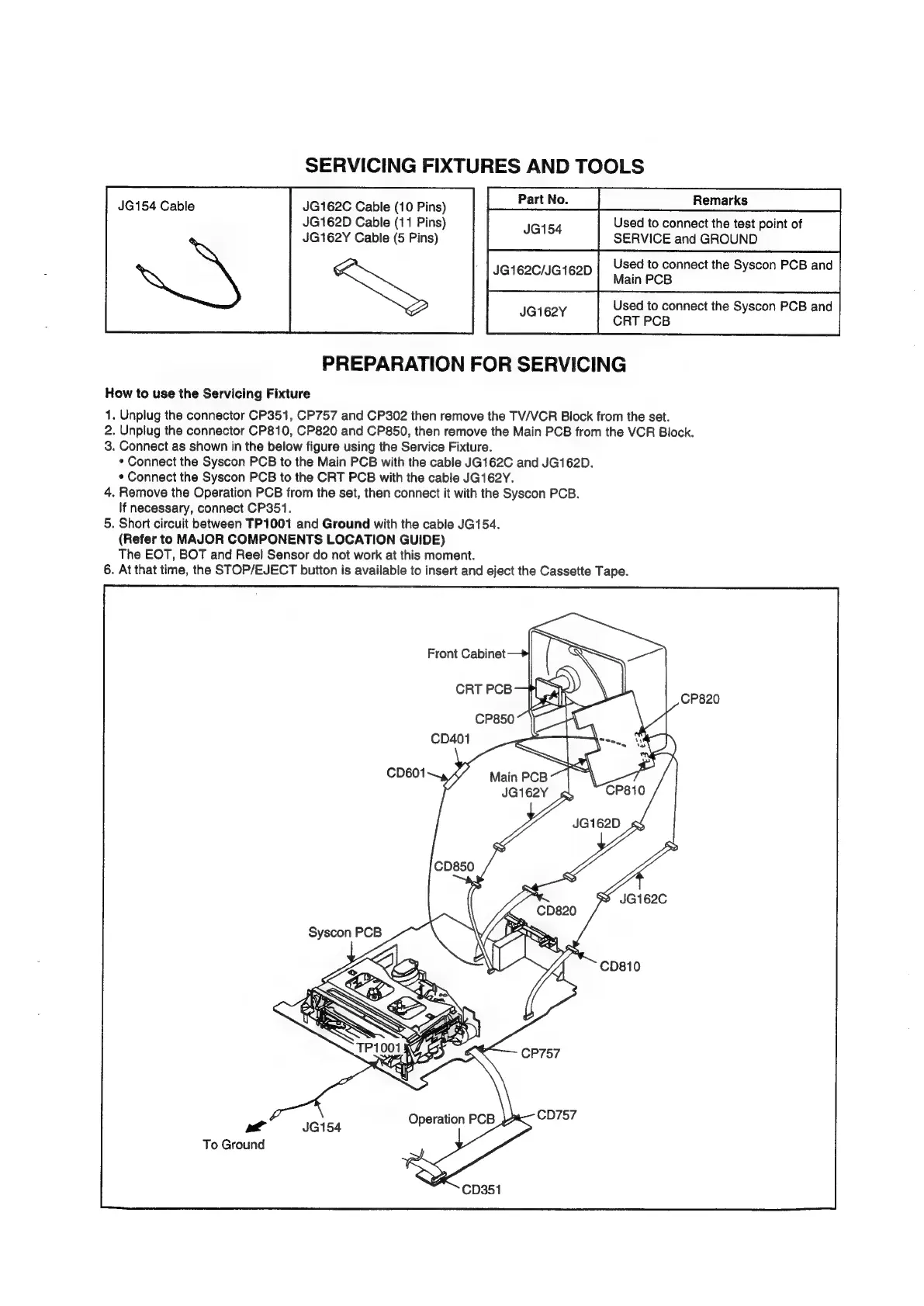
3.
Connect
as
shown
in
the
below
figure
using
the
Service
Fixture.
*
Connect
the
Syscon
PCB
to
the
Main
PCB
with
the
cable
JG162C
and
JG162D.
¢
Connect
the
Syscon
PCB
to
the
CRT
PCB
with
the
cable
JG162Y.
4.
Remove
the
Operation
PCB
from
the
set,
then
connect
it
with
the
Syscon
PCB.
lf
necessary,
connect
CP351.
5.
Short
circuit
between
TP1001
and
Ground
with
the
cable
JG154.
(Refer
to
MAJOR
COMPONENTS
LOCATION
GUIDE)
The
EOT,
BOT
and
Reel
Sensor
do
not
work
at
this
moment.
6.
At
that
time,
the
STOP/EJECT
button
is
available
to
insert
and
eject
the
Cassette
Tape.
ly
a
To
Ground