22
Changing Your Code
User codes are unique to each user and can be 4,5 or 6 digits in length. Users can change their
code at any time by following the procedure below:
Before changing your code, it is strongly recommended to note the new code. If you
forget your code later it must be changed by a master user of the system or the
installation company.
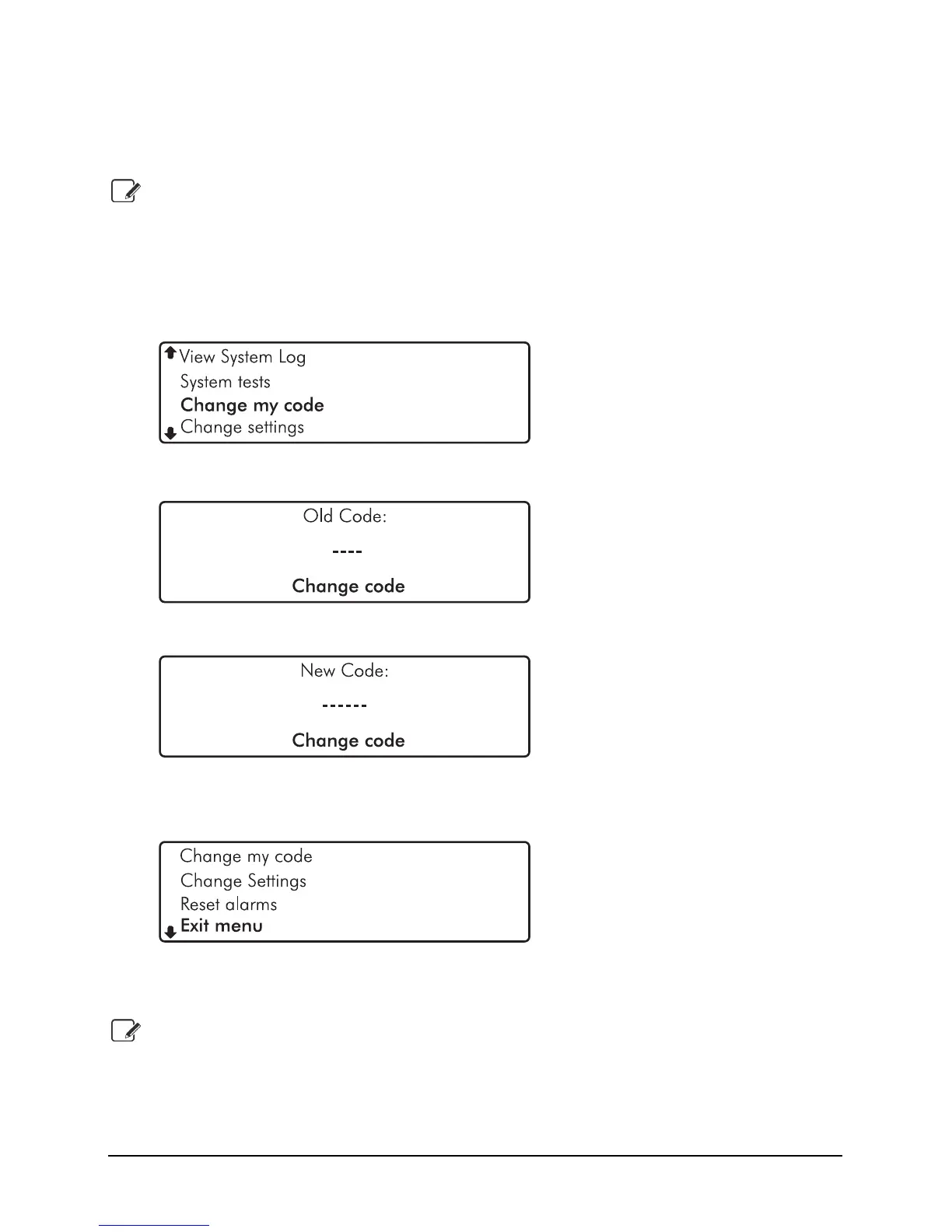
1. Enter code or present tag to select the user menu.
2. From the user menu, use the
U andD keys to scroll to ‘Change my code’:
3. Press E or k to select, the ‘Change code’ menu is now displayed:
4. Enter your old passcode, if correct you will be prompted for a new code:
5. Enter your new code then press
E or k to confirm. The system will return back to
the user menu screen:
6. Use the
U andD keys to scroll to ‘Exit menu’ option then press E or k to return
to the home screen.
If after entering your new code the screen returns to the ‘Enter New Code’ screen, the
code you have entered is invalid. Please try again with a different code.


 To Next Page