OSAKA – USER MANUAL – F 500 / F 500-RS – V.1 – Page 1
information see the section on programming events through the
clock.
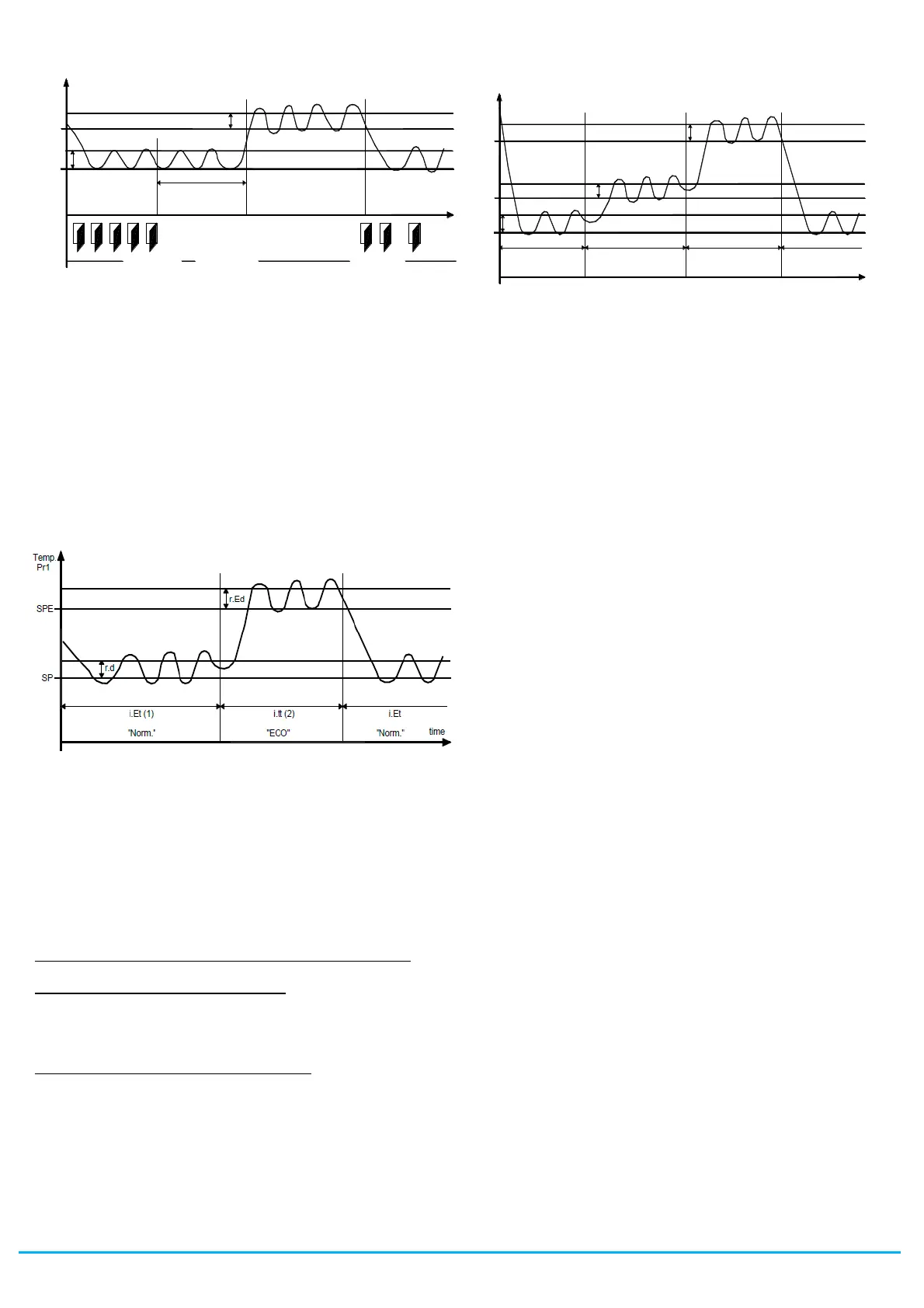
Example of automatic switching between Eco mode and normal
mode. During working hours the door is frequently opened and the
controller stays in normal mode. When the door has not been
opened for time “i.Et”, the controller switches to Eco mode. As soon
as the door is opened again, the controller reverts to normal mode.
This function requires use of a digital input configured as “i.xF” = 1,
2 or 3 (door open input)
If “i.Et” = oF, selection of Eco/Norm. mode via the digital input
configured as door, is deactivated.
If “i.tt” = oF, switching the mode from Eco to Normal due to time-out
is deactivated.
(1) – The time i.Et is reset every time the door is opened. In the
case shown, the door is always closed.
(2) – The time i.tt stops when the door is opened and the instrument
immediately switches to "normal" mode. In the case shown, the
door is always closed.
When in economical mode, the label “Eco” is displayed.
If “i.dS”= Ec, in economical mode the instrument displays “Eco” all
the time. Otherwise the label "Eco" appears approx. every 10
seconds alternating with the normal display set by the “i.dS”
parameter.
Selection of Eco mode is always also combined with the function of
turning off the Auxiliary output if used as a window light (“o.Fo”= 3).
"TURBO – NORMAL – ECONOMICAL" MODE OPERATION
"Turbo" mode can be selected manually:
– by pressing the STAND-BY key if parameter "t.UF" = 4
– by pressing the DOWN/AUX key if parameter "t.Fb" = 4
– by a digital input if parameter “i.xF” = 8
"Turbo" mode can be selected automatically:
- on leaving Eco mode (only if “r.HC” = C3)
- every time the instrument is switched on (only if “r.HC” = C3 and
Pr1 > SPE+r.Ed)
The instrument quits "turbo" mode automatically at the end of time
“r.tC” or manually using the programmed command (key or digital
input) and the instrument always returns to normal mode.
"Turbo" mode can be applied manually, for example when the user
wishes to lower the temperature of the products quickly after
loading the refrigerator.
However, "Turbo" mode is applied automatically to restore product
temperature at the end of economical mode.
Setting “r.HC” = C3 gives the following operating cycle:
(1) - The time i.Et is reset every time the door is opened and in the
case shown the door is always closed.
(2) – The time i.tt stops when the door is opened and the instrument
immediately switches to "Turbo" mode. In the case shown, the door
is always closed.
When switched on, the instrument starts in the mode it was in when
it was switched off ("Normal" or “Eco”) unless the temperature at
switch-on is > SPE+r.Ed. In this case (see fig.) a "Turbo" cycle is
automatically initiated.
After time “r.tC” the instrument automatically enters "Normal" mode.
If the door is opened frequently the instrument stays in "Normal"
mode. If however it is not opened for time “i.Et” it automatically
switches to "Eco" mode.
The instrument remains in "Eco" mode until the door is opened
again or, if set, until the time-out “i.tt”.
On leaving "Eco" mode the instrument therefore runs a "Turbo"
cycle to allow product temperature to be restored, after which it
reverts to "Normal" mode and so on.
When “turbo” mode is on, this is indicated by the characters “trb”
shown on the display, alternating with the normal display.
The Set point "SP" can be set with a value between the
programmed value in parameter. “S.LS” and the programmed
value in parameter “S.HS”.
The Set point "SPE" can be set with a value between the
programmed value in parameter. “SP” and the programmed value
in parameter “S.HS”.
The Set point "SPH" can be set with a value between the
programmed value in parameter. “S.LS” and the programmed
value in parameter “SP”.
Note: in the examples that follow, the Set point is generally
indicated as "SP" and the histeresis as “r.d”, how when operating
the instrument will work according to the Set point and histeresis
selected as actives.
4.3 - MEASURING AND DISPLAY
All the parameters concerning measuring are contained in the group
“
]
In”.
Via the parameter “i.SE” it is possible to select the type of probes
that one wishes to use and which can be: thermistores PTC KTY81-
121 (Pt), NTC 103AT-2 (nt) or Pt1000 (P1).
Via the parameter “i.uP”, it is possible to select the temperature
unit of measurement the desired measurement resolution (C0=°C /
1° ; C1=°C / 0.1° ; F0= °F / 1°; F1= °F / 0.1°).
The instrument allows the measuring to be calibrated, that can be
used for re-calibrating the instrument according to application
needs, through the parameters “i.C1” (for the input Pr1),“i.C2” (for
the input Pr2) ,“i.C3” (for the input Pr3) ,“i.C4” (for the input Pr4).
The functions carried out by Pr2, Pr3 and Pr4 probes is defined by
the parameters “i.P2”, “i.P3” and “i.P4”
This parameters can be configured for the following functions:
= EP - Evaporator probe: used to managing the defrost and the
evaporator fans (see relative functions).
= Au - Auxiliary Probe: can be used as a display-only probe but it is
also possible to assign temperature alarms to it (possible uses:
product probe, anti-freeze probe, etc.)
r.E d
SPE
SP
r.d
P r1
T e m p .
"E C O "
i.E t
"N orm ."
tim e
D O O R
"N orm ."
D A Y (s ho p o p e n ) N IG H T (s h o p c los e ) D A Y (s ho p o p e n )
S PH
T e m p .
r.H d
tim e
P r1
r.tC
SP
r.d
S PE
r.Ed
r.tC
"T u r b o" "N orm ." "E CO "
i.E t (1 ) i.tt (2 )
"T u r b o"
r.H C = C 3


 To Next Page
 Loading...