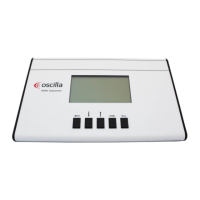
Key related texts at the bottom of the picture:
Above the left key, the word LEFT or RIGHT indicates the chosen ear at the moment.
Above the up and down keys, the ID number for storing data is shown.
Above the right key, the word PRINT or TRANSMIT is shown. This indicates if a press on the key will print out
the test, or transmit it to a PC.
Pump indicator:
In the lower right corner a pump indicator is shown. This follows the physical pump that delivers the pressure
during the tympanogram measurement. The pump has a limited travel range, and it may happen that it runs all
the way to the limits and is unable to deliver more air. This will cause the “LEAK” message to appear. If this
happens repeatedly during a test, remove the probe and wait for the indicator to return to the starting position.
3. Using the menus
To use the menu system, press the MENU key. This enters the main menu, and the arrow keys are now used to
control the menu.
Left button – Used to go back in the menu, or adjust a setting
Down button – Moves the menu selection bar down
Up button – Moves the menu selection bar up
Right button – Used to enter the selected menu, or adjust or activate the selected menu item
Menu button – Used to enter or leave menu
4. The memory
The tympanometer has a built in memory for 20 complete tests. Each test is stored under an identification
number from 1 to 20. A stored test includes all data seen on the display, both the graphic and numeric data for
the tympanogram and the reflex test graph. These data are stored for both ears.
After taking a test, it is stored under the currently selected ID number and the currently selected ear. The ID
number is displayed in the bottom of the screen, above the up and down arrow keys. These two keys are used
to select the ID number. The selected ear is displayed above the left arrow key, and this key is used to toggle
between left and right ear. When a new ID is selected, or the ear is changed, the data from the new location is
recalled to the display. If a test is performed, the stored data is overwritten with the new test data.


 To Next Page
 Loading...