7
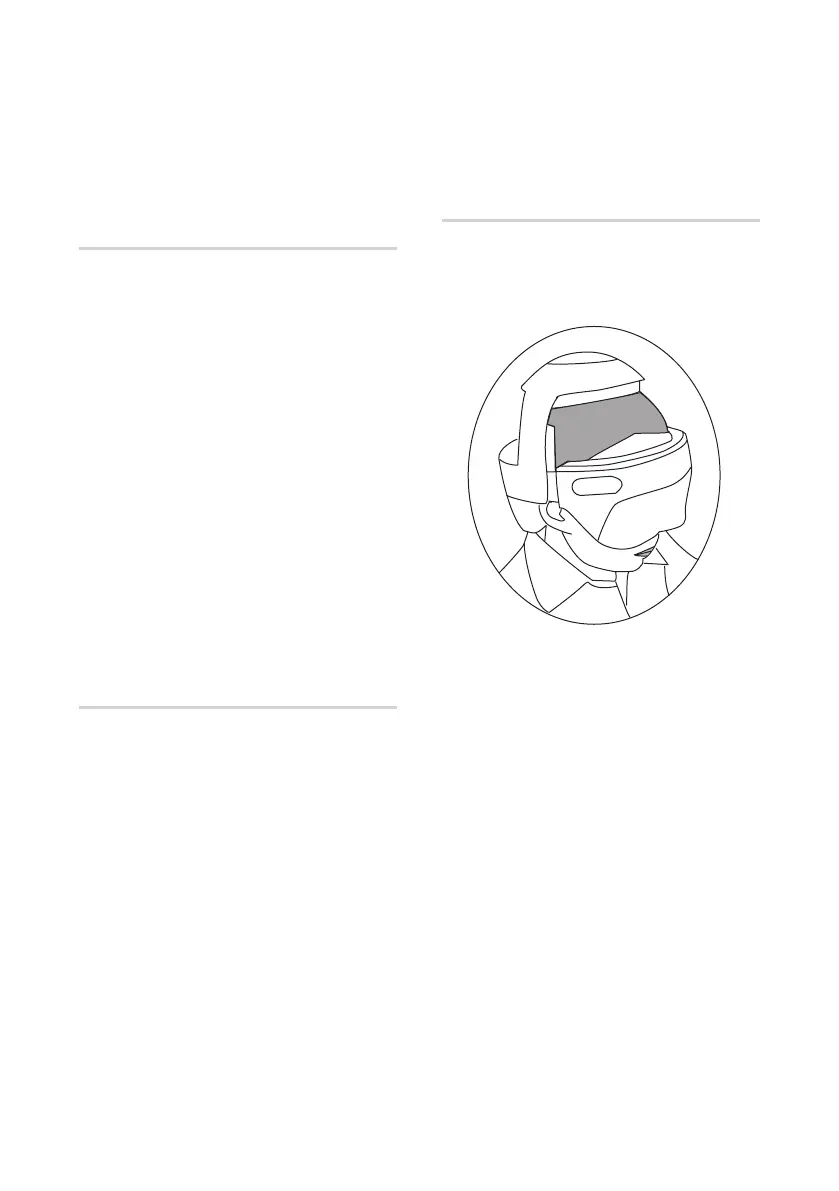
Putting on uCrown Smart
• Put on the uCrown Smart on your head as
illustrated below.
Operation
Pairing uCrown Smart with your
smart device
• Turn on the Bluetooth on your smart
device.
• Download the OSIM Relax & Relieve App*.
• Launch the OSIM Relax & Relieve App on
your smart device.
• Follow the instructions on the OSIM Relax
& Relieve App to pair with uCrown Smart.
• After pairing successfully, the display
screen on the product will show ‘Mode 3’.
• Follow the instructions on the OSIM Relax
& Relieve App to unpair with uCrown
Smart if there is need to.
Compatibility of OSIM Relax &
Relieve App
• Compatible with selected smart devices
running on iOS version 11.0 and above or
Android version 8.0 and above.
• All smart devices require compatible
connectivity using wireless (Wi-Fi or cellular
data networks) and Bluetooth-LE 4.0 and
above.
• For updates on OSIM Relax & Relieve App,
please visit the respective App stores.
*Availability will vary according to country.
Please visit www.OSIM.com for further updates.



 To Next Page