28 29
About Start up Handling Options Warnings More info
Filter replacement
If you experience reduced sound quality, it is time to change the
lters.
Please refer to the following pages for instructions on how to replace
the appropriate lters. Please notice that there are two dierent wax
lters for the custom heraing aid.
IMPORTANT NOTICE
Always use the same type of wax lter as was originally supplied with the
hearing aid.
If you are in any doubt about the use or replacement of wax lters, contact
your hearing care professional.
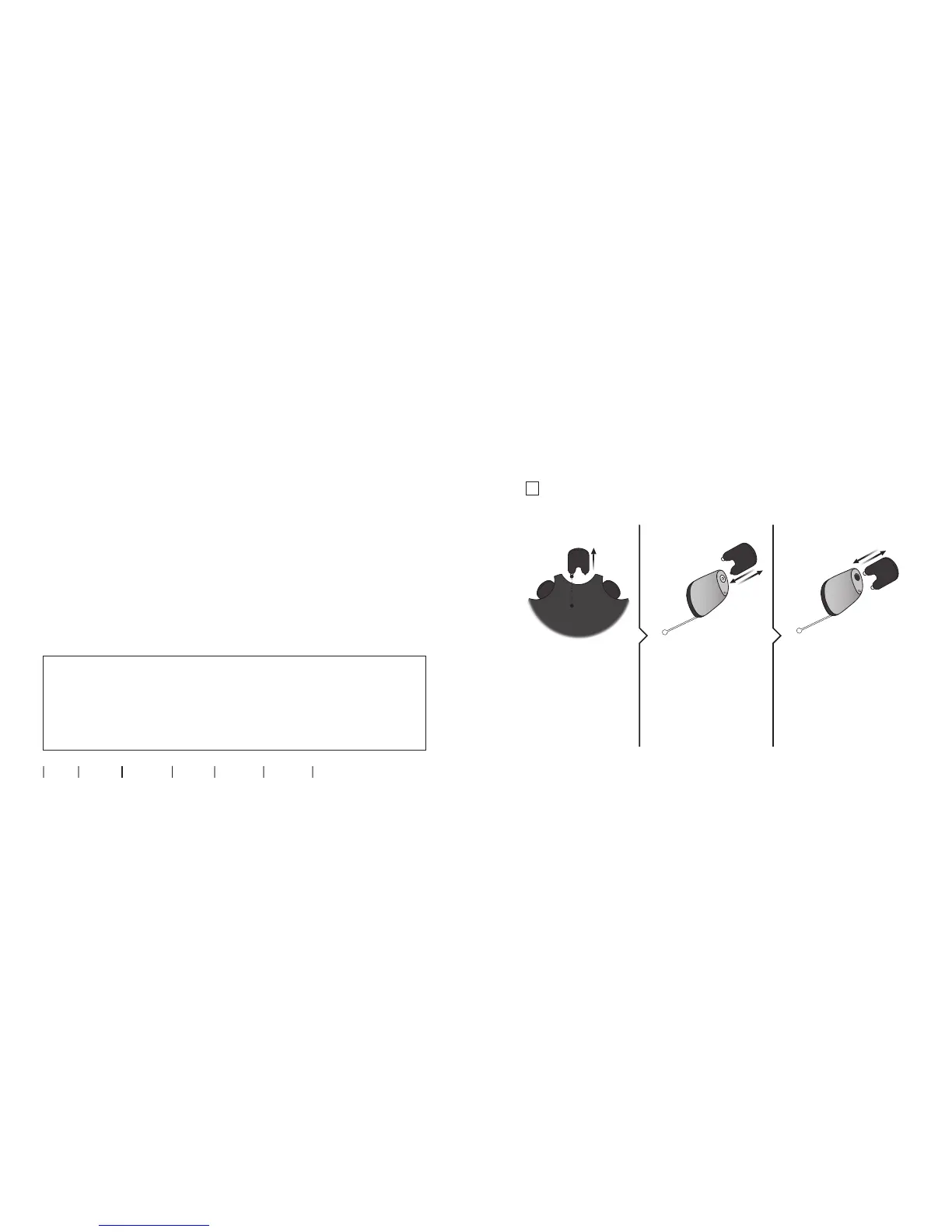
Replace ProWax miniFit lter
(non-wireless IIC & CIC V2 75)
2. Remove 3. Insert
Remove the tool from
the shell. The tool
has two pins, one
empty for removal
and one with the
new ProWax mini
lter.
Push the empty pin
into the ProWax mini
lter in the hearing
aid and pull it out.
Insert the new ProWax
mini lter using the
other pin, remove the
tool and throw it out.
1. Tool
New
lter









 To Next Page