EasyManua.ls Logo

oticon Nera2 - Replace Prowax Filter (All Hearing Aids Except Non-Wireless IIC & CIC 75); Replace T-Cap Filter (Hearing Aids with 10 Batteries)

oticon Nera2
32 pages
Print Icon
To Next Page IconTo Next Page
To Previous Page IconTo Previous Page
Loading...
30 31
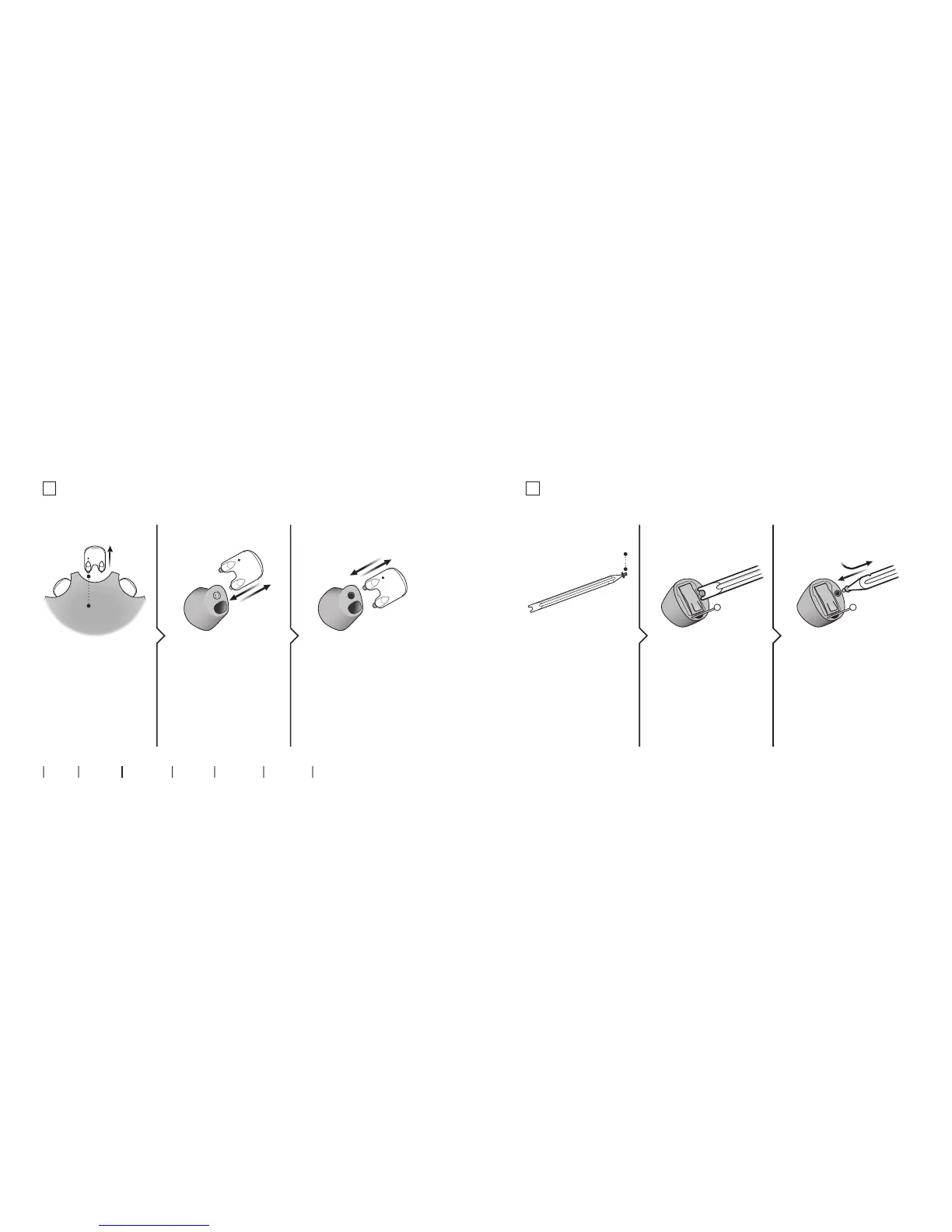
Replace ProWax lter
(all hearing aids except non-wireless IIC & CIC V2 75)
2. Remove 3. Insert
Remove the tool from
the shell. The tool
has two pins, one
empty for removal
and one with the new
ProWax lter.
Push the empty pin
into the ProWax lter
in the hearing aid
and pull it out.
Insert the new ProWax
lter using the other
pin, remove the tool
and throw it out.
1. Tool
About Start up Handling Options Warnings More info
New
lter
Replace T-Cap lter
(hearing aids with 10 batteries)
2. Remove 3. Insert
Remove the tool from
the packaging. The
tool has two ends,
one for removal and
one with the new
T-Cap lter.
Push the tool fork
under the top edge
of the used T-Cap
lter and lift it out.
Insert the new T-Cap
lter and remove the
tool by twisting it
slightly. Throw the tool
out after use.
1. Tool
new lter

Related product manuals