EasyManua.ls Logo

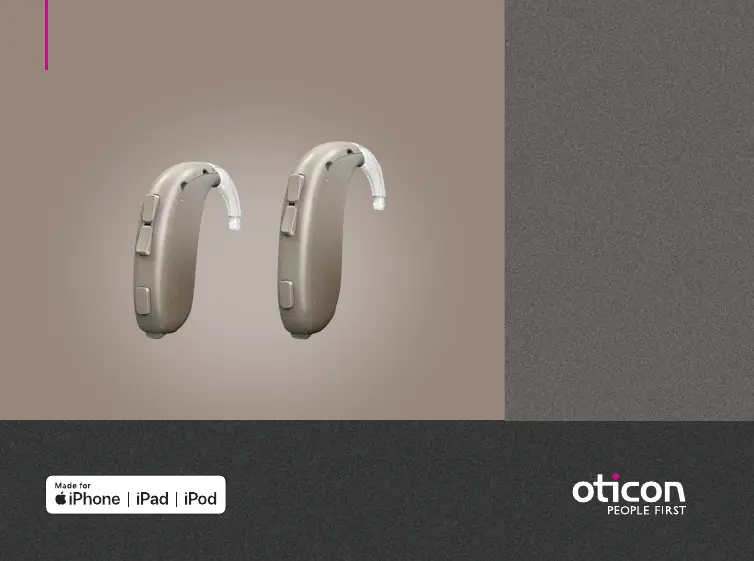
oticon Xceed Series - User Manual

oticon Xceed Series
40 pages
Print Icon
To Next Page IconTo Next Page
Loading...
Instructions for use
BTE SP
BTE UP
Oticon Xceed
Oticon Xceed Play

Questions and Answers

  • R
    Robert SmithAug 10, 2025
    Why is my oticon Xceed not working and has no sound?
    • D
      Daniel LawsonAug 10, 2025
      If your Oticon Hearing Aid has no sound, it could be due to several reasons. The battery might be dead, so try replacing it. Alternatively, the mold could be clogged, requiring cleaning. Also, check if the microphones are muted and unmute them if necessary.
  • E
    Elizabeth CookAug 16, 2025
    What does beeping and orange flashes mean on my oticon Xceed?
    • B
      Brittany BlakeAug 16, 2025
      If your Oticon Hearing Aid plays 8 beeps, 4 times consecutively, and/or repeatedly flashes orange 4 times with small pauses, your hearing aid needs a microphone service check.
  • W
    Willie RobinsonAug 22, 2025
    What to do if my oticon Xceed Hearing Aid has intermittent sound?
    • C
      Carla BuchananAug 22, 2025
      If you're experiencing intermittent or reduced sound with your Oticon Hearing Aid, consider these possibilities: The sound outlet may be clogged, so try cleaning the mold. Moisture might be affecting the device; wipe the battery with a dry cloth. Also, a dead battery could be the cause, so replace it to see if that resolves the issue.
  • C
    Christina SalinasAug 27, 2025
    How to fix pairing issues with my oticon Xceed Hearing Aid on an Apple device?
    • F
      Fernando WrightAug 28, 2025
      If you're having pairing issues with your Oticon Hearing Aid and an Apple device, it might be due to a failed Bluetooth connection or only one hearing aid being paired. To resolve a Bluetooth connection failure: 1. Unpair your hearing aid via Settings?General?Accessibility?Hearing Devices?Devices ?Forget this device. 2. Turn Bluetooth off and on again. 3. Open and close the battery drawer on the hearing aid. 4. Re-pair the hearing aid.
  • A
    Amy GainesSep 3, 2025
    Why does my Oticon Hearing Aid make a squealing noise?
    • B
      Bobby WrightSep 3, 2025
      A squealing noise from your Oticon Hearing Aid can occur due to a few reasons. The mold might be inserted incorrectly; try re-inserting it. Earwax accumulation in the ear canal could also be the cause, in which case you should have your ear canal examined by your doctor. If your ear has grown, contact your hearing care professional.

Summary

Hearing Aid Components

Replacing the Hearing Aid Battery

Step-by-Step Battery Change Process

Provides a detailed guide on removing, uncovering, inserting, and closing the battery drawer with a new battery.

Wearing and Cleaning the Hearing Aid

Mold and Tube Care

Audio Adjustments: Program and Volume

Modifying Sound Volume

Explains how to use the volume button to increase or decrease sound, including audible and LED feedback for level changes.

Pairing with iPhone

Step-by-Step iPhone Pairing Guide

Provides a detailed, illustrated guide for pairing the hearing aids with an iPhone via Bluetooth settings and accessibility options.

Wireless Accessories and App Control

Battery Drawer Security

Tinnitus SoundSupport Guide

Intended Use and Target Population

Explains Tinnitus SoundSupport as a tool for temporary relief from tinnitus, targeting adults and requiring professional fitting.

Tinnitus SoundSupport Adjustments

Sound Options and Programs

Details how Tinnitus SoundSupport is programmed for tinnitus relief and discusses selecting preferred sound options and programs.

Mute and Volume Control for Tinnitus

Explains the mute function's effect on environmental sounds and how volume controls are adjusted for tinnitus relief sound.

Tinnitus SoundSupport Volume Control and Usage Limits

Adjusting Volume Per Ear

Guides users on how to change Tinnitus SoundSupport volume individually for each ear using the push button.

Adjusting Volume in Both Ears

Explains how to adjust Tinnitus SoundSupport volume simultaneously in both hearing aids by using one aid's controls.

Daily Usage Recommendations

Warns about potential hearing damage from prolonged use at high volumes and advises following hearing care professional recommendations.

Professional Guidance: Tinnitus SoundSupport

Volume Control and Wearing Time

Details maximum wearing time based on volume levels and explains the default deactivation and activation of volume control for HCPs.

Safety Warnings: Tinnitus Support and General Use

Potential Side Effects and Precautions (Tinnitus)

Alerts users to potential concerns like tinnitus worsening or hearing threshold changes and advises immediate consultation if symptoms occur.

General Hearing Aid Safety

Covers safe usage, the limitations of hearing aids, proper use, and risks associated with misuse or sharing devices.

Choking Hazards and Small Parts

Highlights the risk of choking on batteries and small parts, recommending secure storage and tamper-resistant drawers.

Safety and Device Precautions

Battery Safety and Explosive Environments

Advises on battery handling, potential risks of explosion, and avoiding use in explosive environments for BTE UP models.

Implant Precautions and Device Issues

Discusses potential hearing aid dysfunction, electromagnetic exposure limits, and precautions for users with active implants like cochlear implants.

General Safety and Handling Guidelines

Environmental and Chemical Hazards

Warns against exposure to radiation, extreme heat, microwave drying, and chemicals that can damage the hearing aid.

Device Operation and Interference

Covers power instrument use, potential side effects, interference issues, aircraft use, external equipment connection, and accessory compatibility.

Professional and User Health Advice

Medical Evaluation for Hearing Aid Users

Emphasizes the importance of medical evaluation by a physician before purchasing a hearing aid for users with hearing loss.

Hearing Loss Management and Waivers

Troubleshooting Common Issues

Sound and Pairing Problems

Provides solutions for issues like no sound, intermittent sound, squealing noise, and Bluetooth pairing problems with Apple devices.

Durability and Environmental Protection

Mobile Phone Compatibility

Personalized Hearing Aid Settings

Auditory and Visual Indicators

Indicator Signals for Accessories and Warnings

oticon Xceed Series Specifications

General IconGeneral
StyleBehind-the-Ear (BTE)
Directional MicrophonesYes
Feedback ManagementYes
Maximum Power Output142 dB SPL
Tinnitus SoundSupportYes
Water ResistanceIP68
Noise ReductionYes
Feedback CancellationYes
RechargeableNo
Channels16
Battery Size13
Wireless ConnectivityBluetooth
BrainHearing TechnologiesBrainHearing technologies such as OpenSound Navigator, OpenSound Optimizer, Speech Rescue LX, and Spatial Sound LX
ProgramsMultiple

Related product manuals