The meter calculates and shows the flow, maximum and average velocity values.
4. Select Save.
The information is saved to a data file.
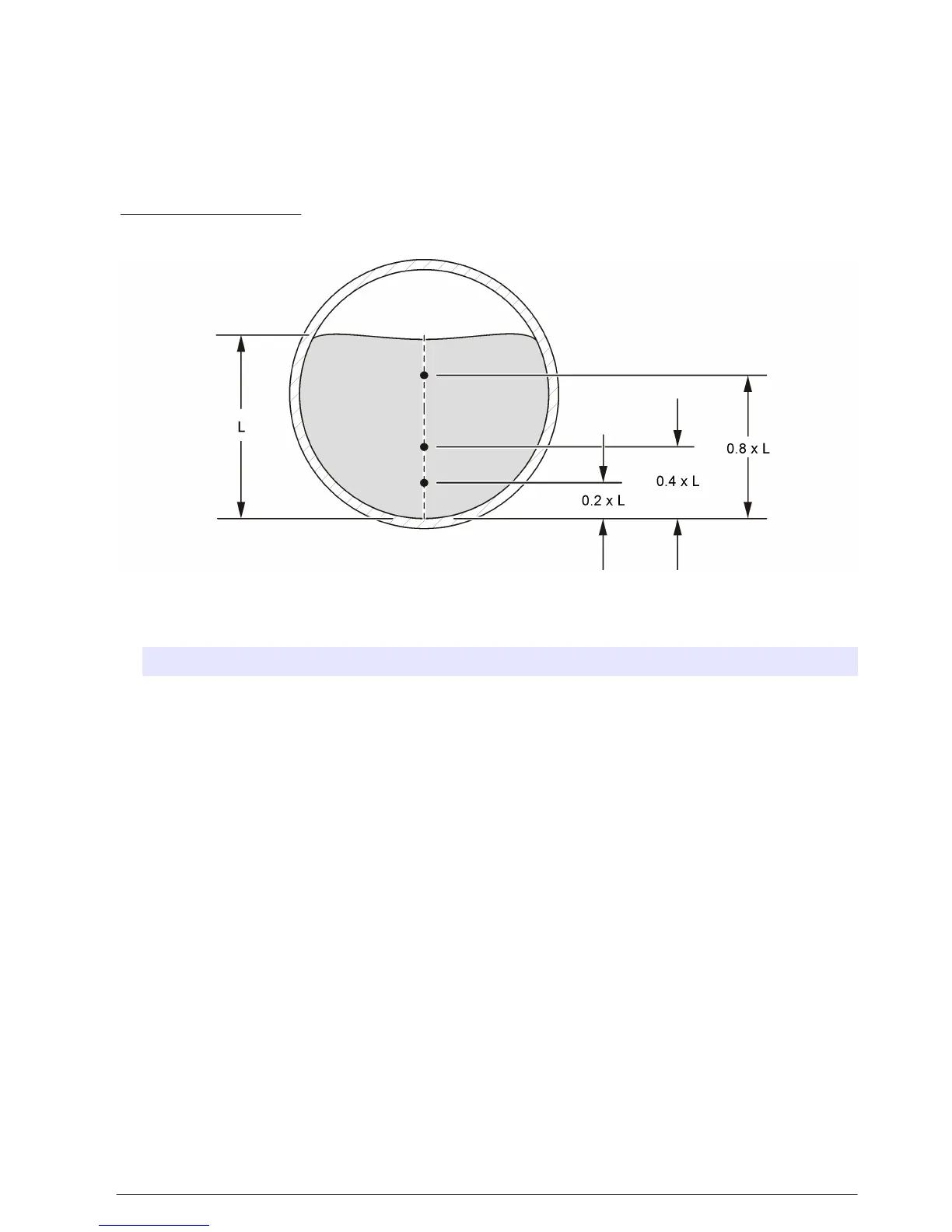
0.2/0.4/0.8 method
Do measurements at one, two or three points to calculate an average velocity. Each point represents
a percentage of the maximum depth as measured on the center line as shown in Figure 13.
Figure 13 2-4-8 profile
1. In the Select Method menu, select 0.2/0.4/0.8.
2. Select one of the options.
Option Description
One point One-point measurement at 0.4 x maximum depth
Two point Two-point measurement at 0.2 and 0.8 x maximum depth
Three point Three-point measurement at 0.2, 0.4 and 0.8 x maximum depth
3. For the selected option, select a measurement point. The meter shows the sensor adjustment
information.
4. If necessary, adjust the sensor as necessary.
5. Select Capture.
The meter gets information from the sensor and shows the velocity value in numerical and
graphical form.
6. If necessary, select Setup to change the Y-axis range or the data filter parameters.
7. Push OK.
8. Do steps 3–7 for all of the other measurement points then push OK to return to the list of
measurement points.
9. Select Flow.
10. Select Save to save the information to a data file.
Velocity/Level Integration measurement method
Measurements are done at 10 different depths. The results from all segments are integrated to
calculate the flow value.
• Select Prev or Next to go to another measurement.
• Select Main to return to the Select Method menu.
English
25



 To Next Page