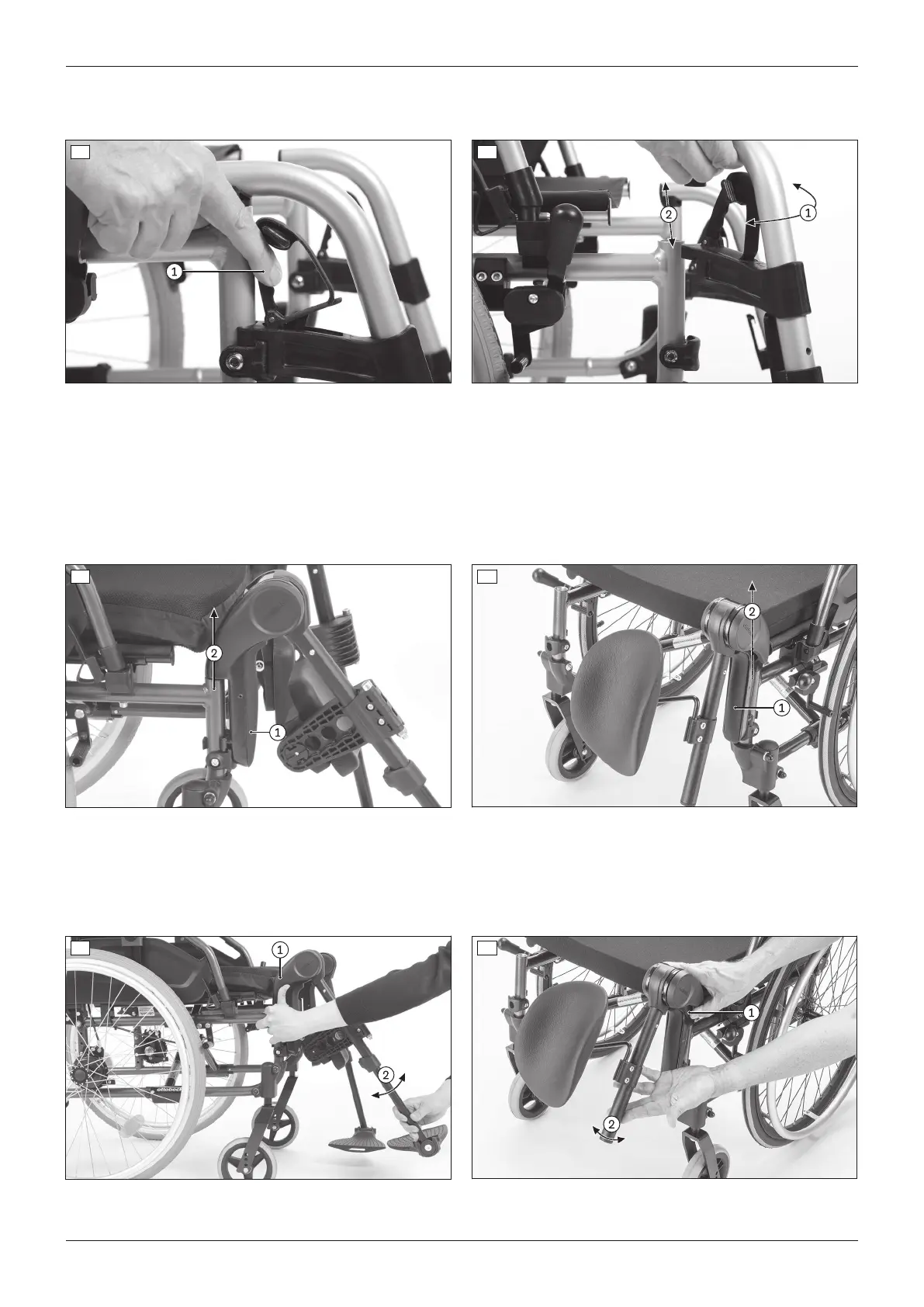
2) Swing the leg support into the direction of travel until it engages.
3) Fold the foot plate down.
6 7
Removing the leg support – elevating leg support/amputation leg support
1) Activate the release lever (see fig.8/see fig.9, item1).
2) Pull the leg support up and off (see fig.8/see fig.9, item2).
Attaching the leg support – elevating leg support/amputation leg support
1) Insert the leg support into the leg support retainer from above (see fig.8/see fig.9, item2).
2) Push the leg support down until it engages.
8 9
Adjusting the angle of the elevating leg support/amputation leg support
1) Hold the leg support and turn the release lever upwards to the stop (see fig.10/see fig.11, item1).
2) Set the angle (see fig.10/see fig.11, item2).
3) Let go of the release lever. The leg support will automatically snap into place in the next free position.
10 11
16
Use
Start M2S, Start M2












 To Next Page