WARNING
Incorrectly adjusted anti-tipper
Risk of falling as a result of incorrectly adjusted anti-tipper.
► The anti-tipper may only be adjusted by qualified personnel.
The anti-tipper prevents the wheelchair from tipping backwards when overcoming obstacles and going uphill. It is
set for a maximum ground clearance of 50mm and so that the anti-tipper rollers, as a minimum, project fully bey
ond the largest diameter of the drive wheels.
The tip-assist makes overcoming obstacles easier for the attendant.
7.14.1 Anti-tipper
A mounted anti-tipper must always be active.
When overcoming obstacles (suchas steps and curbs that are not lowered) upwards, the anti-tipper rollers con
tact the ground.
When overcoming obstacles (suchas steps and curbs that are not lowered) downwards, the anti-tipper has to be
deactivated by the user or attendant to avoid damaging the anti-tipper.
Activation
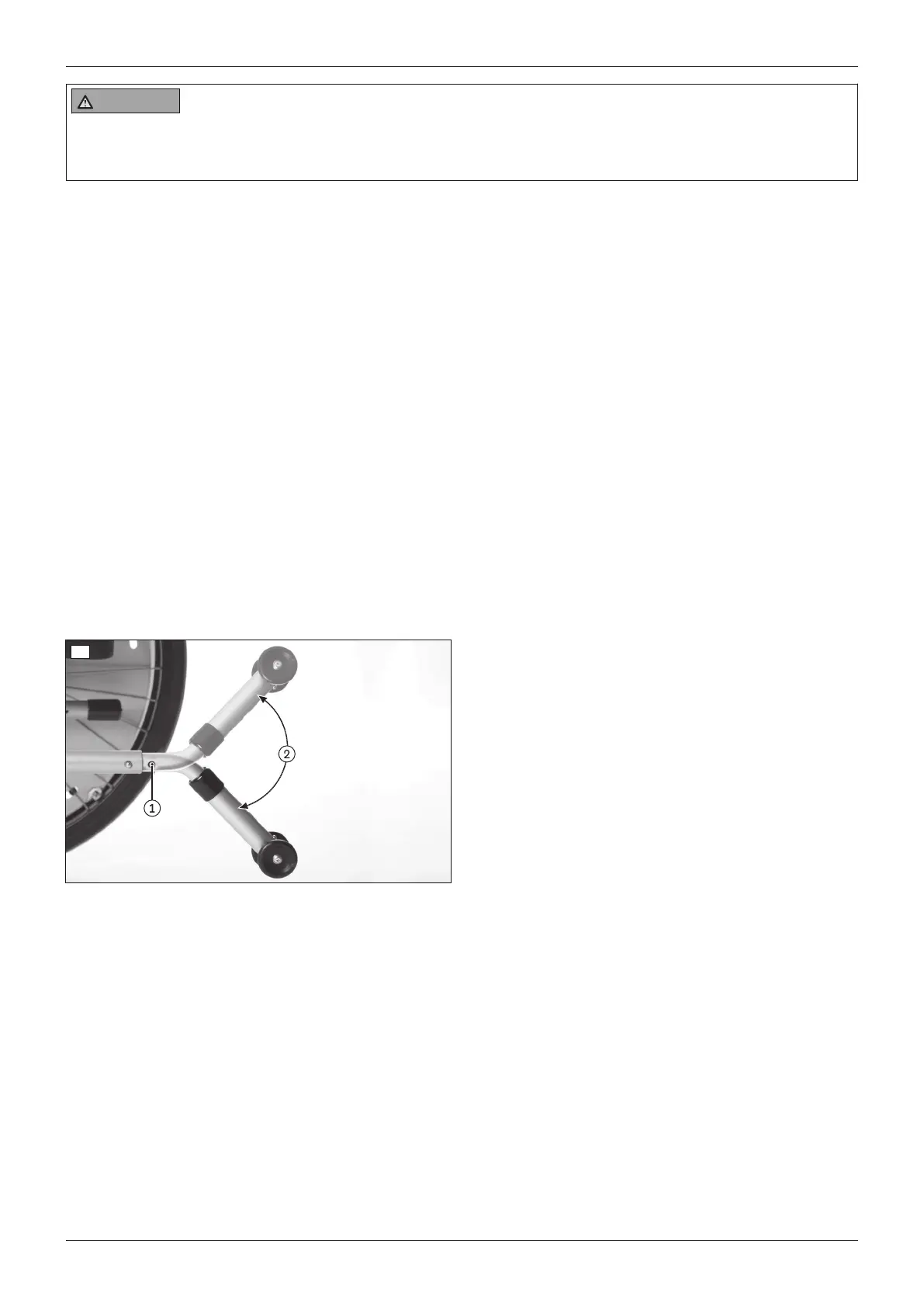
1) Depress the spring button on the upper tube section of the anti-tipper (see fig.49, item1).
2) Rotate the anti-tipper down by 180° (see fig.49, item2).
3) Allow the spring button to engage.
→ The anti-tipper is activated.
Deactivation
1) Depress the spring button on the upper tube section of the anti-tipper (see fig.49, item1).
2) Rotate the anti-tipper upwards by 180° (see fig.49, item2).
3) Allow the spring button to engage.
→ The anti-tipper is deactivated.
49
7.14.2 Tip-assist
For this wheelchair type the tip-assist is integrated into the frame (see fig.50).
1) At an obstacle, place one foot on the tip-assist and push down.
2) Slightly tip the wheelchair by simultaneously pressing down on the push handles.
30
Use
Start M2S, Start M2












 To Next Page