ConnectionusingtheGPSPort
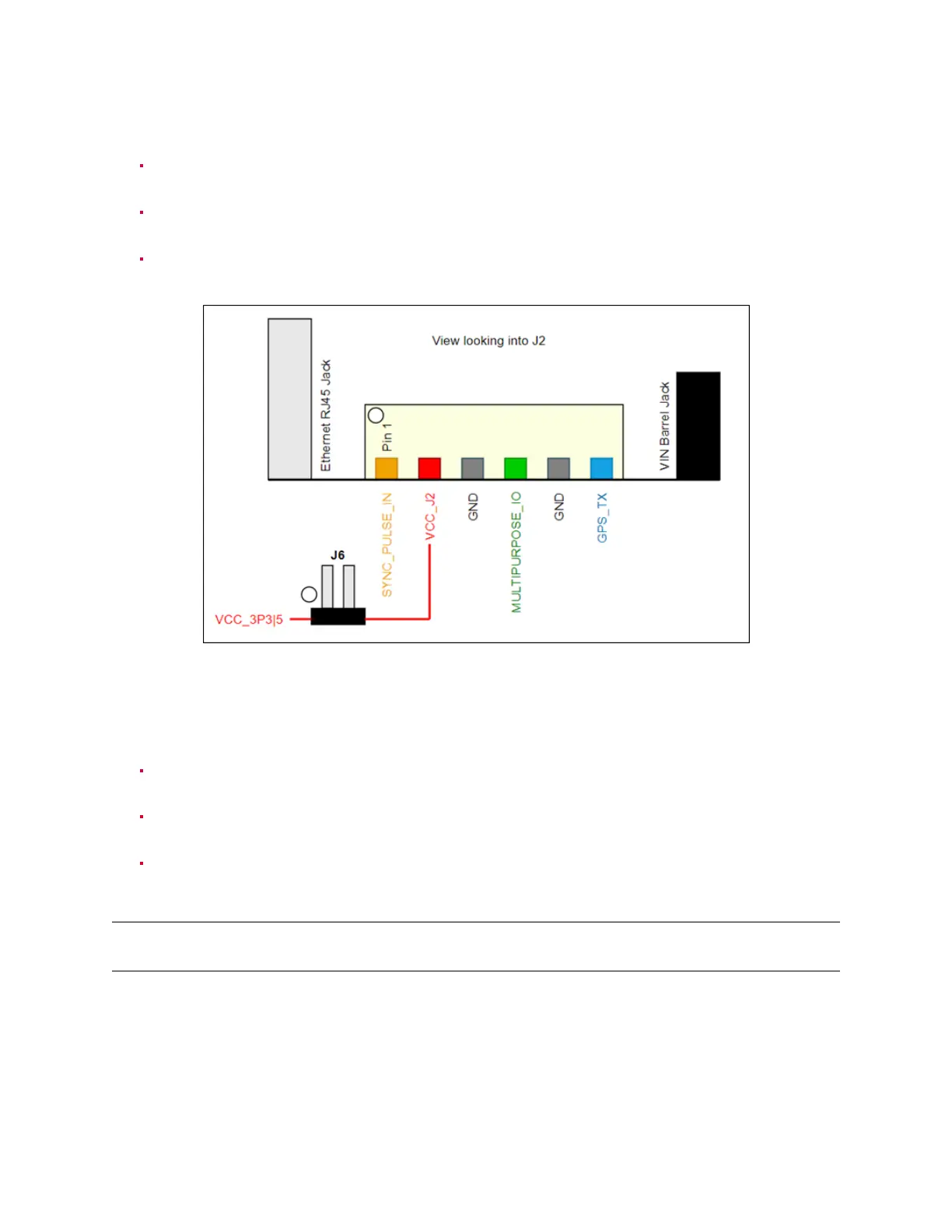
Connect the PPS output from your GPS to the sync_pulse_in pin of the GPS connector to be
pluggedontheOusterInterfaceBox,picturedbelowinyellow.
ConnecttheNMEAUARToutputfromyourGPStothemultipurpose_iopinoftheGPSconnector
tobeplugged ontheOusterInterfaceBox,picturedbelowin magenta.
Connect the ground output from your GPS to the GND pin of the GPS connector to be plugged
ontheOusterInterfaceBox, picturedbelowingray.
Figure8.1: J2Circuitry
ConnectionusingthePinout4x2pinheaderJ7
Connect the PPS output from your GPS to the sync_pulse_in pin of the Ouster Interface Box,
picturedbelowinyellow.
ConnecttheNMEAUARToutputfromyourGPStothemultipurpose_iopinoftheOusterInterface
Box,picturedbelowingreen.
Connecttheground output fromyour GPS tothe GND pinofthe Ouster InterfaceBox, pictured
belowingray.
Note: PleasenotetheVoltageandCurrentrequirementsfromtheHardwareUserManualinthetables
below.
24



 To Next Page