25
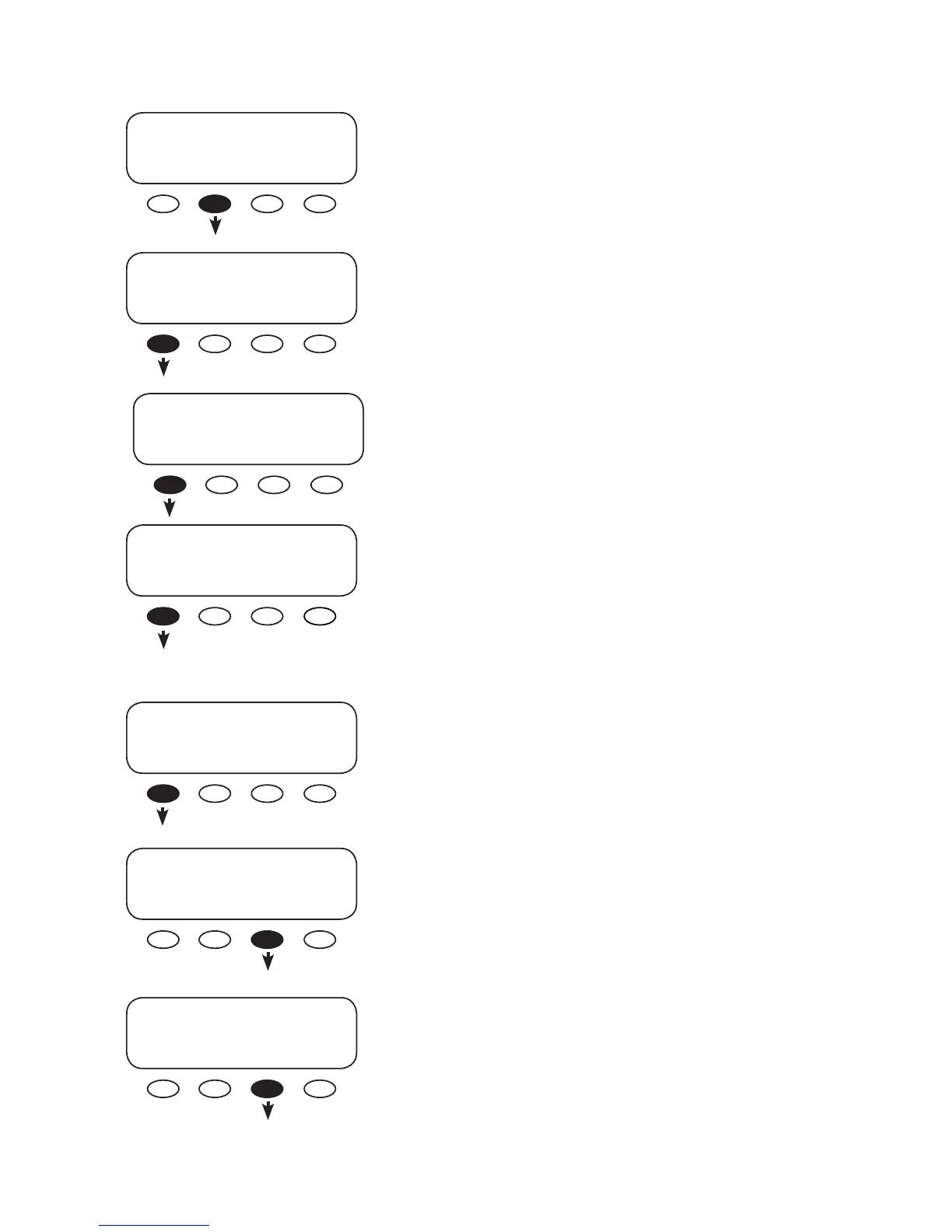
The return amps screen allows the user to set the end of
charge amps using the <INC> and <DEC> soft keys. Press the
<DOWN> soft key to view the battery voltage screen.
ADV/DC/CHARGE--------------
return amps
DOWN INC DEC TOP
ADV/DC/CHARGE---------------
battery charge
DOWN INC DEC TOP
Press the <CHARGE> soft key.
ADV/DC/PAGE 2----------------
choose category
PG1 CHARGE AUX PG3
Set the end of charge voltage using the <INC> or <DEC>
soft keys. Next, press the <DOWN> soft key.
Press the <INC> or <DEC> soft keys to determine the
amount of time the charge parameters must be met before
they considered an accurate state of charge. The default
period is one minute. By establishing a time, momentary
spikes in voltage are accounted for. Press the <DOWN> soft
key to view the charge factor screen.
ADV/DC/CHARGE---------------
parameters met time
minutes
DOWN INC DEC TOP
Set the charge factor (see page 14) using the <INC> and
<DEC> soft keys. When nished, press the <DOWN> soft key.
ADV/DC/CHARGE--------------
charge factor %
DOWN INC DEC TOP
Press the <ADV> soft key.
ADV/DC/CHARGE--------------
charge parameters
complete
TOP ADV MAIN
Press the <DC> soft key.
ADV--------------------------------
choose device:
FX CC DC MATE



 To Next Page