10 Preparation
Additional devices to be connected to medical electric devices have to be in com-
pliance with IEC or ISO norms. Additionally, all configurations have to be in com-
pliance with normative requirements for medical systems (see IEC 60601-1-1 or
Section 16 of the third revision of IEC 60601-1, respectively). The person or per-
sons who connect additional devices to medical electric devices are system con-
figurators and are thus responsible for ensuring that the system is in compliance
with the normative requirements for systems. Be advised that local law takes prec-
edence over the normative requirements detailed above.
When setting up the remOVE DC Impulse please make sure that the user has clear,
unobstructed line of sight to the status display.
When setting up the remOVE DC Impulse please make sure that environmental
factors do not impair the user’s perception of acoustic signals generated by the
remOVE DC Impulse.
Do not connect the remOVE DC Impulse to the power supply unless a protective
earthing conductor is present in order to avoid electrocution.
Before use of product please follow the steps detailed below:
1. Place the device on a stable surface in sufficient distance to the wall, ensuring
that the device can immediately be disconnected from power supply if neces-
sary.
2. Connect the power cord to the remOVE DC Impulse and connect the power
cord to the power supply.
3. Connect the foot-activated switch and the DC cord to the remOVE DC Impulse.
4. Connect the remOVE DC Cutter to the DC cord.
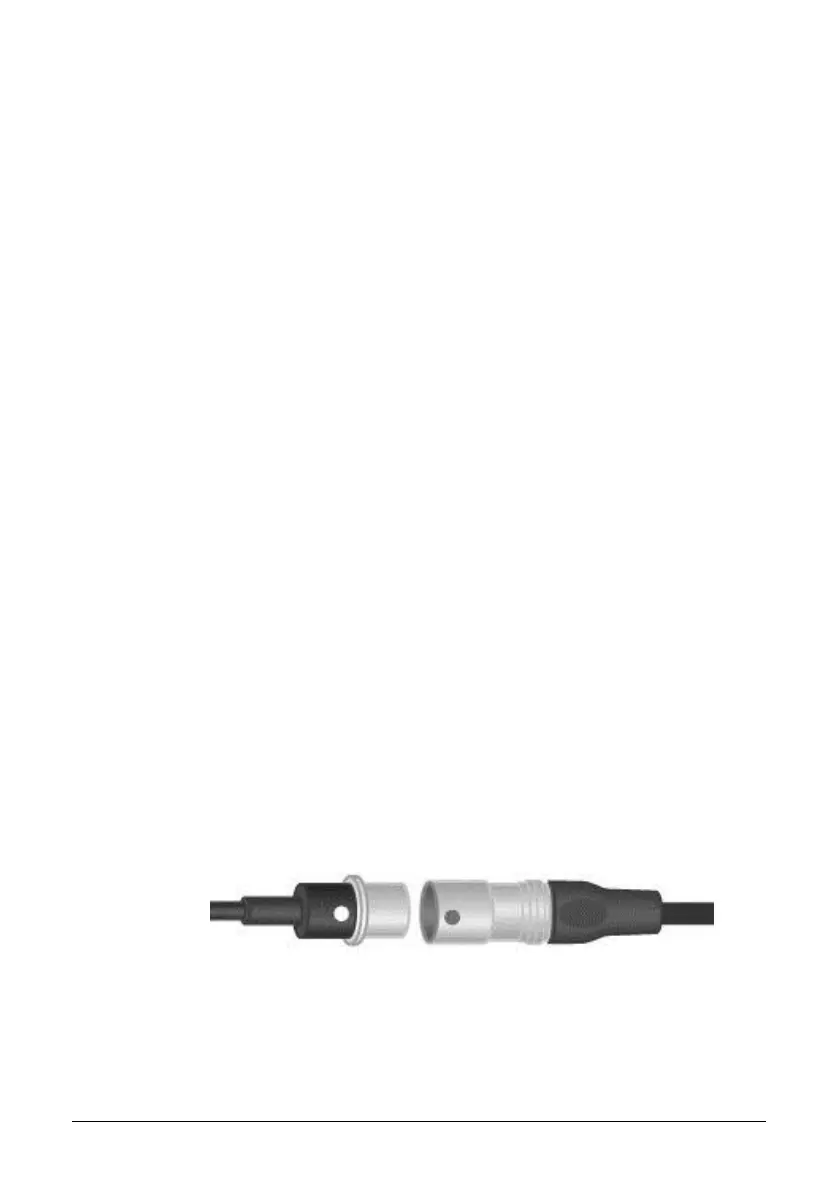
In order to connect the remOVE DC Cutter with the DC cord, align the two
markings (red and white dot) on both devices in such a way that the white dot
on the plug of the remOVE DC Cutter and the red dot on the plug of the DC
cord are opposite to each other, see figure below.
Figure 6: left: remOVE DC Cutter; right: DC cord
5. Activate the remOVE DC Impulse by pressing the ON/OFF switch. The
ON/OFF switch lights up to indicate that the device is activated.


 To Next Page