2
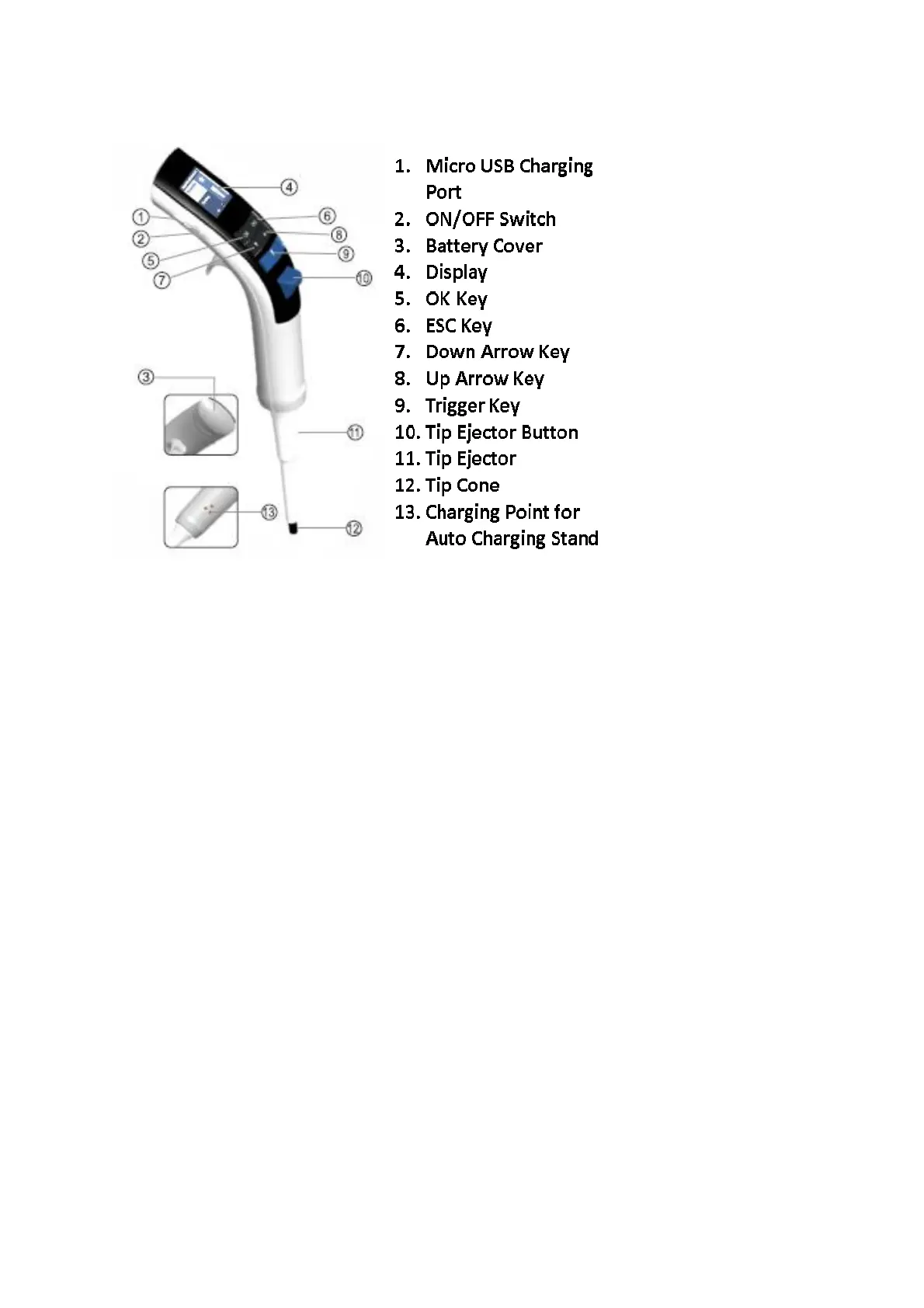
5. Overview
6. Modes
There are various pipetting modes available on the main menu. These modes are designed to
meet various popular pipetting requirements, allowing you to complete your pipetting tasks
more quickly and accurately, with minimal set-up required, saving you time.
Special Note:
Press the “OK” button to select an option.
Press the “ESC” button to go back.
6.1 Favorites
Steps:
1. Select Favorites from the main menu.
2. Select Prog1/Prog2/Prog3 from the Favorites menu.
3. Select the pipetting mode you wish to use.
4. Select the volume you want to pipette using the Up/Down arrow keys.
5. Select the Aspiration Speed using the Up/Down arrow keys.
6. Select the Dispensing Speed using the Up/Down arrow keys.
7. Select one of the 3 options below:
a) Save & Run
This will save the program, and it will be ready to use
immediately.
b) Save & Exit
This will save the program, and will then exit from the menu.
c) Do Not Save
No program will be saved. You can also use the ESC key to exit and
not save the program.


 To Next Page