©2013 PACE Worldwide, Southern Pines, North Carolina All Rights
Page 18 of 18
10. Set LED Backlite
Press the UP and DOWN to enter increase or decrease LCD contrast. The range of backlite is
1 to 100. Press and release the PROGRAM Key to move to the next step.
11. Exiting the Programming Menu
The LED Display now reads "End". The Set-Up Mode procedure is now complete. Choose one
of the
following steps:
a)
Press and release the UP Key to exit Set-Up Mode and return to normal operation.
b)
Press and release the DOWN Key to return to the start of the Set-Up Mode procedure.
Temperature Adjust Mode
To increase or decrease handpiece temperature, press the UP or DOWN arrow key once. The
display will show the current temperature setting for channel “1”. Press the UP
or
DOWN
arrow keys to increase or decrease handpiece temperature for channel “1”. Or press the
PROGRAM Key to move the next channel. After a period of 10 seconds of inactivity, the display will
return to normal operation.
Setting Channel Offset or resetting THC Cal Indicatior (OS mode 2)
To increase or decrease handpiece temperature offset, press the PROGRAM Key once. The display
will show the current temperature offset setting for channel “1”. Press the UP
or DOWN
arrow
keys to increase or decrease offset temperature for channel “1”. Or press the PROGRAM Key to
move the next channel. After a period of 10 seconds of inactivity, the display will return to normal
operation.
THC Tip Calibration
To enter Calibration mode: Press and hold the PROGRAM Key and the UP keys while
powering on unit. Release keys when “Software Version” appears. Follow the instructional prompts
to review or set each menu option. Follow the procedure below.
Calibration Instructions
The steps for the procedure are:
1.
Turn on the system.
2.
Clear any offset from the system by disconnecting the handpiece from the system. Re- connect the
handpiece and proceed to step 2.
3.
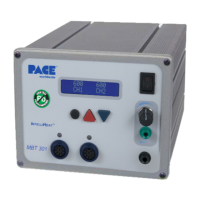
A BLINKING dot will appear in the center of the "C" in channel (“CH”). Set the MBT 301 to 700°F to
(370°C).
4.
Measure the actual temperature of the tip from your temperature verification device.
Note
results.
5.
Turn off the system.
6.
Enter Calibration mode: Press and hold the PROGRAM Key and the UP key while
turning the system on. Release both keys when the display reads version 1.2 or higher.
7.
The display will now read Channel “1” System Cal? Press the UP or DOWN key to enter
the measured temperature from step 4 for channel “1”. For example, your temperature
verification device reads 695 °F. Scroll through until the display reads 695. Press key / NO to
move to the next channel.
8.
Press the PROGRAM Key to save calibration and move to the next channel. Upon exiting,
LED will illuminate green and the display will return to normal operation mode.
9.
See calibration options in the THC Calibration Offset Mode Select section of the manual.


 To Next Page