EasyManua.ls Logo

Pace MSP 995 - INSTALLATION AND COMPATIBILITY; Connecting the Dish Actuator; Connecting the Polariser; SCART Connection to Pace Receiver

Default Icon
14 pages
Print Icon
To Next Page IconTo Next Page
To Previous Page IconTo Previous Page
Loading...
INSTALLATION
CAUTION:
Incorrect
installation
could
damage
the
actuator.
Connecting
the
Actuator
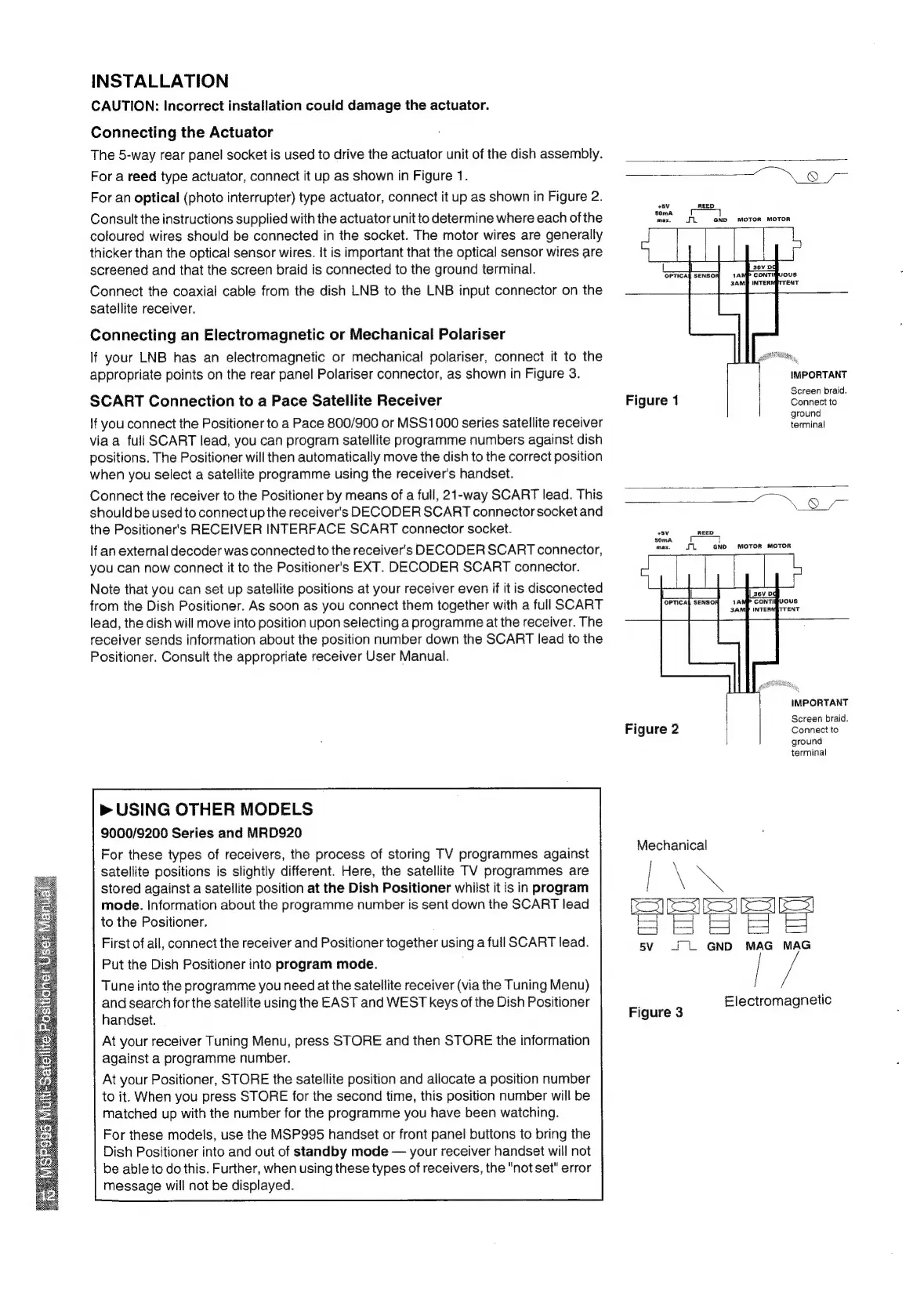
The
5-way
rear
panel
socket
is
used
to
drive
the
actuator
unit
of
the
dish
assembly.
For
a
reed
type
actuator,
connect
it
up
as
shown
in
Figure
1.
For
an
optical
(photo
interrupter)
type
actuator,
connect
it
up
as
shown
in
Figure
2.
Consult
the
instructions
supplied
with
the
actuator
unit
to
determine
where
each
of
the
coloured
wires
should
be
connected
in
the
socket.
The
motor
wires
are
generally
thicker
than
the
optical
sensor
wires.
It
is
important
that
the
optical
sensor
wires
are
screened
and
that
the
screen
braid
is
connected
to
the
ground
terminal.
Connect
the
coaxial
cable
from
the
dish
LNB
to
the
LNB
input
connector
on
the
satellite
receiver.
Connecting
an
Electromagnetic
or
Mechanical
Polariser
If
your
LNB
has
an
electromagnetic
or
mechanical
polariser,
connect
it
to
the
appropriate
points
on
the
rear
panel
Polariser
connector,
as
shown
in
Figure
3.
SCART
Connection
to
a
Pace
Satellite
Receiver
If
you connect
the
Positioner
to
a
Pace
800/900
or
MSS1000
series
satellite
receiver
viaa
full
SCART
lead,
you
can
program
satellite
programme
numbers
against
dish
positions.
The
Positioner
will
then
automatically
move
the
dish
to
the
correct
position
when
you
select
a
satellite
programme
using
the
receiver's
handset.
Connect
the
receiver
to
the
Positioner
by
means
of
a
full,
21-way
SCART
lead.
This
shouldbe
used
to
connect
up
the
receiver's
DECODER
SCART
connector
socket
and
the
Positioner's
RECEIVER
INTERFACE
SCART
connector
socket.
If
an
external
decoder
was
connected
to
the
receiver's
DECODER
SCART
connector,
you
can
now
connect
it
to
the
Positioner's
EXT.
DECODER
SCART
connector.
Note
that
you
can
set
up
satellite
positions
at
your
receiver
even
if
it
is
disconected
from
the
Dish
Positioner.
As
soon
as
you
connect
them
together
with
a
full
SCART
lead,
the
dish
will
move
into
position
upon
selecting
a
programme
at
the
receiver.
The
receiver
sends
information
about
the
position
number
down
the
SCART
lead
to
the
Positioner.
Consult
the
appropriate
receiver
User
Manual.
>
USING
OTHER
MODELS
9000/9200
Series
and
MRD920
For
these
types
of
receivers,
the
process
of
storing
TV
programmes
against
satellite
positions
is
slightly
different.
Here,
the
satellite
TV
programmes
are
stored
against
a
satellite
position
at
the
Dish
Positioner
whilst
it
is
in
program
mode.
information
about
the
programme
number
is
sent
down
the
SCART
lead
to
the
Positioner.
First
of
all,
connect
the
receiver
and
Positioner
together
using
a
full
SCART
lead.
Put
the
Dish
Positioner
into
program
mode.
Tune
into
the
programme
you
need
at
the
satellite
receiver
(via
the
Tuning
Menu)
and
search
for
the
satellite
using
the
EAST
and
WEST
keys
of
the
Dish
Positioner
handset.
At
your
receiver
Tuning
Menu,
press
STORE
and
then
STORE
the
information
against
a
programme
number.
At
your
Positioner,
STORE
the
satellite
position
and
allocate
a
position
number
to
it.
When
you
press
STORE
for
the
second
time,
this
position
number
will
be
matched
up
with
the
number
for
the
programme
you
have
been
watching.
For
these
models,
use
the
MSP995
handset
or
front
panel
buttons
to
bring
the
Dish
Positioner
into
and
out
of
standby
mode
—
your
receiver
handset
will
not
be
able
to
do
this.
Further,
when
using
these
types
of
receivers,
the
"not
set"
error
message
will
not
be
displayed.
8
+5V
REED
50mA
max.
Ji:
GND
MOTOR
MOTOR
==)
IMPORTANT
.
Screen
braid.
Figure
1
Connect
to
ground
terminal
8
/—
Sv
REED
+
50mA
max,
me
GND
MOTOR
MOTOR
=
asv
pg
OPTICA
A P
CONTIGUOUS
INTER!
IMPORTANT
Screen
braid.
Connect
to
ground
terminal
Figure
2
Mechanical
no
3232p
S
_~
L
GND
MAG
MAG
q
Electromagnetic
Figure
3