EasyManua.ls Logo

Pace MSP 995 - OPERATIONAL MODES AND HANDSET; Operational Modes Explained; Handset Overview

Default Icon
14 pages
Print Icon
To Next Page IconTo Next Page
To Previous Page IconTo Previous Page
Loading...
>
OPERATIONAL
MODES
The
MSP995
Dish
Positioner
has
three
main
operational
modes:
normal,
program
and
set
limits.
There
is
a
front
panel
LED
for
each
mode
which
illuminates
when
the
Positioner
is
in
the
corresponding
mode.
The
Positioner
goes
into
normal
mode
when
it
comes
out
of
standby.
In
normal
mode
you
move
the
dish
by
keying
in
a
position
number
which
is
then
displayed
on
the
front
panel.
The
position
number
will
be
one
that
you
have
previously
programmed
into
the
Positioner.
While
you
are
in
normal
mode,
if
you
press
the
EAST
or
WEST
key
on
the
handset
momentarily,
the
Positioner
will
go
into
program
mode
but
the
dish
will
not
move.
If
you
hold
down
the
EAST
or
WEST
key
whilst
in
normal
mode
the
MSP995
will
enter
program
mode
and
the
dish
will
move
in
the
selected
direction.
The
position
is
indicated
by
a
3-digit
setting.
The
three
digits
indicate
the
distance
moved
from
the
Eastern-most
limit
of
the
dish's
panning
range.
In
program
mode
you
can
program
this
actual
position
of
the
dish
against
a
position
number
of
your
choice.
You
can
also
set
up
and
store
polarisation
information
for
that
position
whilst
in
program
mode.
In
practice
you
may
need
to
limit
the
panning
movement
of
the
dish
by
setting
East
and
Westlimits.
This
will,
for
example,
prevent
the
dish
moving
into
fixed
objects
or
areas
where
its
reception
is
affected
in
some
way.
You
set
these
limits
in
the
set
limits
mode.
>
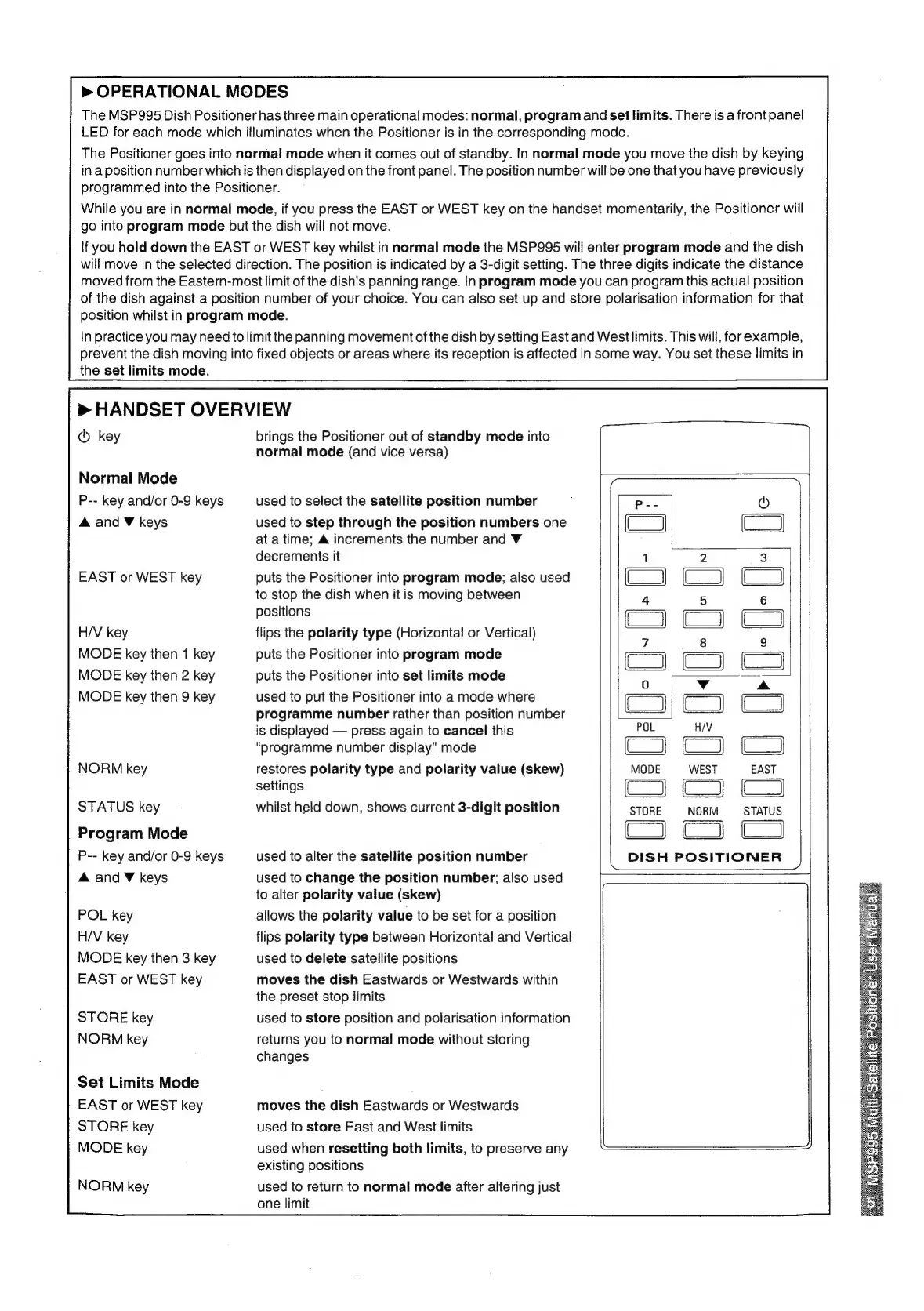
HANDSET
OVERVIEW
®
key
Normal
Mode
P--
key
and/or
0-9
keys
A
and
W
keys
EAST
or
WEST
key
H/V
key
MODE
key
then
1
key
MODE
key
then
2 key
MODE
key
then
9
key
NORM
key
STATUS
key
Program
Mode
P--
key
and/or
0-9
keys
A
and
¥
keys
POL
key
H/V
key
MODE
key
then
3
key
EAST
or
WEST
key
STORE
key
NORM
key
Set
Limits
Mode
EAST
or
WEST
key
STORE
key
MODE
key
NORM
key
brings
the
Positioner
out
of
standby
mode
into
normal
mode
(and
vice
versa)
used
to
select
the
satellite
position
number
used
to
step
through
the
position
numbers
one
at
a
time;
&
increments
the
number
and
V
decrements
it
puts
the
Positioner
into
program
mode;
also
used
to
stop
the
dish
when
it
is
moving
between
positions
flips
the
polarity
type
(Horizontal
or
Vertical)
puts
the
Positioner
into
program
mode
puts
the
Positioner
into
set
limits
mode
used
to
put
the
Positioner
into
a
mode
where
programme
number
rather
than
position
number
is
displayed
press
again
to
cancel
this
“programme
number
display"
mode
restores
polarity
type
and
polarity
value
(skew)
settings
whilst
held
down,
shows
current
3-digit
position
used
to
alter
the
satellite
position
number
used
to
change
the
position
number;
also
used
to
alter
polarity
value
(skew)
allows
the
polarity
value
to
be
set
for
a
position
flips
polarity
type
between
Horizontal
and
Vertical
used
to
delete
satellite
positions
moves
the
dish
Eastwards
or
Westwards
within
the
preset
stop
limits
used
to
store
position
and
polarisation
information
returns
you
to
normal
mode
without
storing
changes
moves
the
dish
Eastwards
or
Westwards
used
to
store
East
and
West
limits
used
when
resetting
both
limits,
to
preserve
any
existing
positions
used
to
return
to
normal
mode
after
altering
just
one
limit
DISH
POSITIONER
7