EasyManua.ls Logo

Pace MSP 995 - PROGRAMMING SATELLITE POSITIONS; Setting Up Position Numbers

Default Icon
14 pages
Print Icon
To Next Page IconTo Next Page
To Previous Page IconTo Previous Page
Loading...
SATELLITE
POSITIONS
The
MSP995
Dish
Positioner
allows
you
to
assign
a
satellite
position
number
for
each
satellite
you
want
to
pick
up.
Then,
upon
entering
this
position
number,
the
dish
will
be
moved
to
the
preset
position.
Using
the
MSP995
in
conjunction
with
a
Pace
800/900
or
MSS1000
series
Satellite
Receiver
provides
you
with
extra
functionality.
You
can
then
operate
the
system
from
your
satellite
receiver
handset.
The
satellite
dish
will
move
into
the
correct
position
when
you
select
a
TV
programme
on
your
receiver.
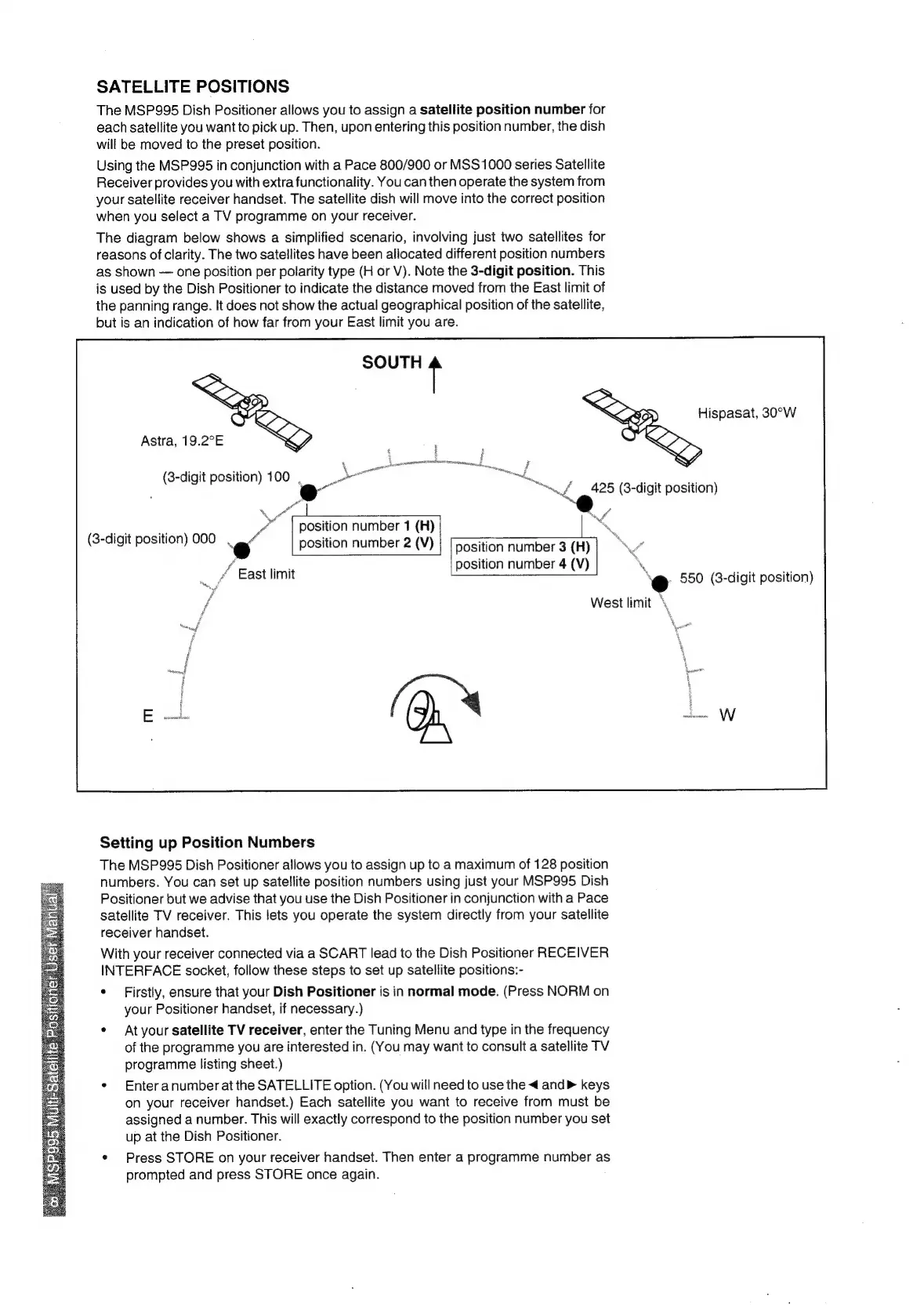
The
diagram
below
shows
a
simplified
scenario,
involving
just
two
satellites
for
reasons
of
clarity.
The
two
satellites
have
been
allocated
different
position
numbers
as
shown
one
position
per
polarity
type
(H
or
V).
Note
the
3-digit
position.
This
is
used
by
the
Dish
Positioner
to
indicate
the
distance
moved
from
the
East
limit
of
the
panning
range.
It
does
not
show
the
actual
geographical
position
of
the
satellite,
but
is
an
indication
of
how
far
from
your
East
limit
you
are.
SOUTH
¢
Hispasat,
30°W
Astra,
19.2°E
(3-digit
position)
100
.
a
position
number
1
(H)
et
ye
é
(3-digit
position)
000
ff
\.
‘e
550
(3-digit
position)
West
limit
\,
6
position
number
2
(V)
|
[position
number
3
Hy
NV
position
number
4
(V)
f
East
limit
Spor”
Setting
up
Position
Numbers
The
MSP995
Dish
Positioner
allows
you
to
assign
up
to
a
maximum
of
128
position
numbers.
You
can
set
up
satellite
position
numbers
using
just
your
MSP995
Dish
Positioner
but
we
advise
that
you
use
the
Dish
Positioner
in
conjunction
with
a
Pace
satellite
TV
receiver.
This
lets
you
operate
the
system
directly
from
your
satellite
receiver
handset.
With
your
receiver
connected
via
a
SCART
lead
to
the
Dish
Positioner
RECEIVER
INTERFACE
socket,
follow
these
steps
to
set
up
satellite
positions:-
*
Firstly,
ensure
that
your
Dish
Positioner
is
in
normal
mode.
(Press
NORM
on
your
Positioner
handset,
if
necessary.)
*
Atyour
satellite
TV
receiver,
enter
the
Tuning
Menu
and
type
in
the
frequency
of
the
programme
you
are
interested
in.
(You
may
want
to
consult
a
satellite
TV
programme
listing
sheet.)
¢
Enteranumber
atthe
SATELLITE
option.
(You
will
need
to
use
the
<
and
keys
on
your
receiver
handset.)
Each
satellite
you
want
to
receive
from
must
be
assigned
a
number.
This
will
exactly
correspond
to
the
position
number
you
set
up
at
the
Dish
Positioner.
¢
Press
STORE
on
your
receiver
handset.
Then
enter
a
programme
number
as
prompted
and
press
STORE
once
again.