EasyManua.ls Logo

Pace MSP 995 - SETTING DISH MOVEMENT LIMITS; Adjusting East and West Limits; Handling Out-of-Limit Positions

Default Icon
14 pages
Print Icon
To Next Page IconTo Next Page
To Previous Page IconTo Previous Page
Loading...
OPERATION
This
section
includes
information
on
how
to
set
up
and
operate
your
Pace
MSP995
Dish
Positioner.
You
might
like
to
use
it
as
a
guide
to
getting
your
unit
"up
and
running".
More
detailed
information
on
the
MSP995's
features
can
be
found
elsewhere
in
this
manual.
Typically,
you
should
follow
these
steps:-
1)
Set
Limits:
Establish
actual
physical
limits
for
the
movement
of
your
satellite
dish.
2)
Set
Up
Positions:
Programme
in
the
positions
of
any
satellites
you
are
interested
in.
This
can
be
done
at
the
Dish
Positioner
or
in
conjunction
with
a
Pace
800/900
or
MSS1000
series
satellite
TV
receiver
(or
similar
model).
3)
Normal
Mode
Operation:
Your
MSP995
should
then
be
ready
for
use
and
can
be
operated
automatically
using
your
satellite
TV
receiver
handset.
SETTING
THE
LIMITS
Introduction
Following
installation
of
your
MSP995
Dish
Positioner,
your
first
task
should
be
to
limit
the
panning
movement
of
the
satellite
dish
antenna.
This
is
needed
to
prevent
the
dish
from
moving
into
physical
obstructions
or
into
areas
where
its
reception
is
affected
by
objects
such
as
overhanging
tree
branches
or
adjacent
buildings.
You
do
this
by
setting
up
an
East
limit
and
a
West
limit
for
the
Dish
Positioner
unit.
Using
your
handset,
follow
the
procedure
outlined
below:-
*
Dish
panning
limits
are
established
by
using
the
set
limits
mode
of
your
Dish
Positioner.
Press
MODE
then
2
on
your
handset.
The
LIMIT
LED
will
illuminate
and
the
Positioner
front
panel
will
show
a
3-digit
value
(such
as
024),
indicating
the
current
position
of
the
dish.
¢
Toset
up
an
East
limit,
press
and
hold
down
the
EAST
key
on
your
handset.
The
satellite
dish
should
move
as
you
do
this
and
the
front
panel
display
will
count
down.
Take
your
finger
off
the
key
to
stop
the
dish
from
moving.
NOTE:
If
the
dish
moves
in
the
opposite
direction
to
that
expected
when
you
press
the
WEST
or
EAST
key,
then
the
actuator
unit
motor
wires
should
be
reversed.
¢
Move
the
dish
Eastwards
until
it
has
reached
the
position
you
want
to
set
as
the
East
limit.
(You
are
advised
to
visually
check
the
dish
as
you
do
this,
to
pinpoint
any
possible
physical
obstructions.)
*
Press
STORE.
The
display
will
read
"L1
set",
indicating
that
Limit
1
has
been
established.
The
3-digit
figure
"000"
will
be
shown.
This
corresponds
to
the
Eastern
limit
of
the
dish
panning
range.
¢«
You
can
now
set
up
the
West
limit.
Using
the
WEST
handset
key,
move
your
satellite
dish
to
the
opposite
extreme
of
the
panning
range
you
require.
Press
STORE.
The
display
should
indicate
that
Limit
2
has
been
set
("L2
set"),
and
will
show
a
corresponding
3-digit
position
for
this
West
limit.
Having
established
your
East
and
West
limits,
you
are
now
ready
to
store
the
positions
of
any
satellites
which
fall
within
these
dish
panning
limits.
See
the
next
section,
Satellite
Positions,
for
details
of
how
to
do
this.
asso
a
|
Pos.
No.
11
sf
425
@
Pos.
No.
10
Pos.
No.
53
<<
500
000
_
m
;
Pos.
No.
75
/
East
limit
f
West
limit
\
@&
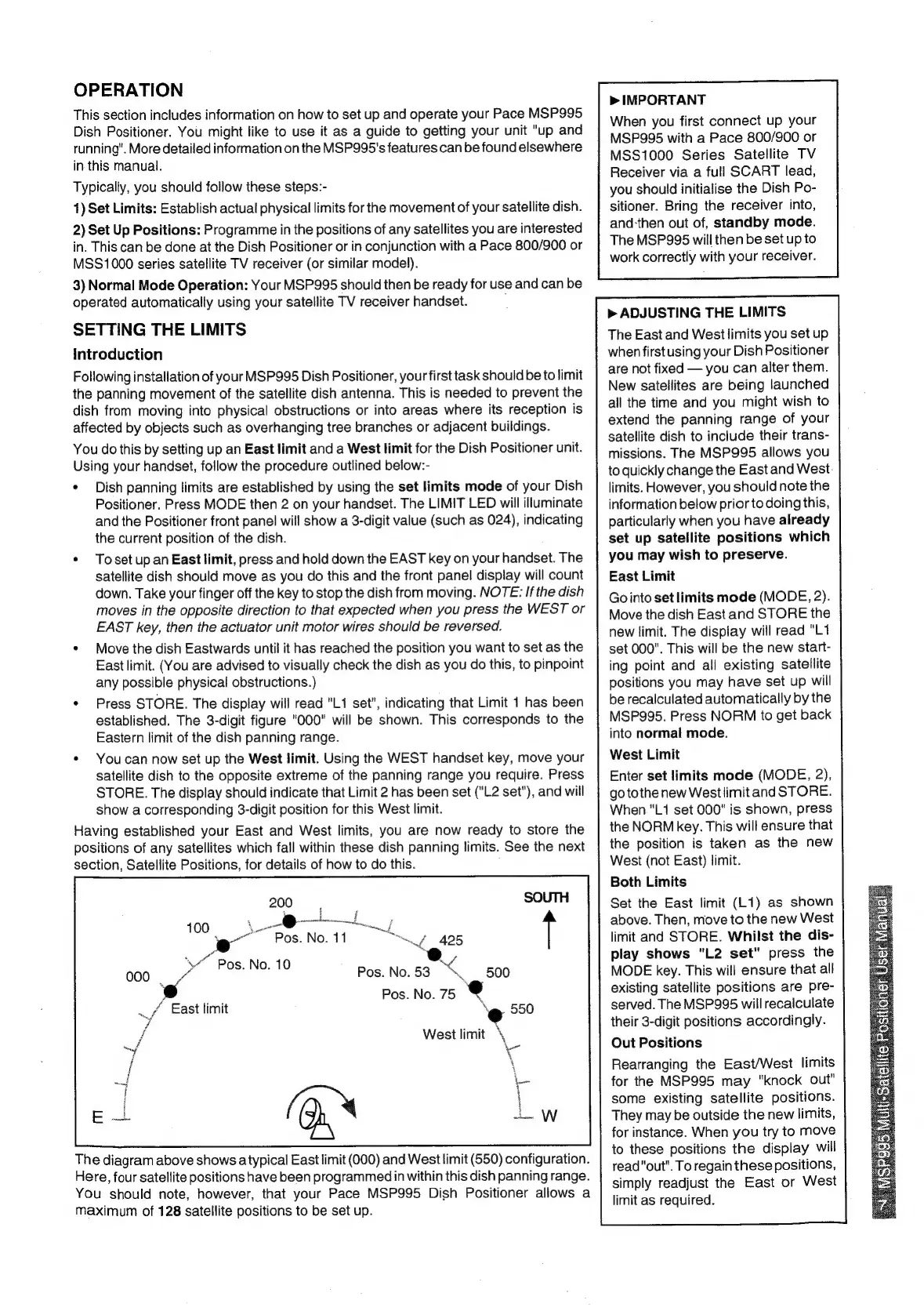
The
diagram
above
shows
a
typical
East
limit
(000)
and
West
limit
(650)
configuration.
Here,
four
satellite
positions
have
been
programmedin
within
this
dish
panning
range.
You
should
note,
however,
that
your
Pace
MSP995
Dish
Positioner
allows
a
maximum
of
128
satellite
positions
to
be
set
up.
i
wed
H
|
a
E
>
IMPORTANT
When
you
first
connect
up
your
MSP995
with
a
Pace
800/900
or
MSS1000
Series
Satellite
TV
Receiver
via
a
full
SCART
lead,
you
should
initialise
the
Dish
Po-
sitioner.
Bring
the
receiver
into,
and-then
out
of,
standby
mode.
The
MSP995
will
then
be
set
up
to
work
correctly
with
your
receiver.
>
ADJUSTING
THE
LIMITS
The
East
and
West
limits
you
set
up
when
first
using
your
Dish
Positioner
are
not
fixed
you
can
alter
them.
New
satellites
are
being
launched
all
the
time
and
you
might
wish
to
extend
the
panning
range
of
your
satellite
dish
to
include
their
trans-
missions.
The
MSP995
allows
you
to
quickly
change
the
East
and
West.
limits.
However,
you
should
note
the
information
below
prior
to
doing
this,
particularly
when
you
have
already
set
up
satellite
positions
which
you
may
wish
to
preserve.
East
Limit
Gointo
set
limits
mode
(MODE,
2).
Move
the
dish
East
and
STORE
the
new
limit.
The
display
will
read
"L1
set
000".
This
will
be
the
new
start-
ing
point
and
all
existing
satellite
positions
you
may
have
set
up
will
be
recalculated
automatically
by
the
MSP995.
Press
NORM
to
get
back
into
normal
mode.
West
Limit
Enter
set
limits
mode
(MODE,
2),
go
tothe
new
Westlimit
and
STORE.
When."L1
set
000"
is
shown,
press
the
NORM
key.
This
will
ensure
that
the
position
is
taken
as
the
new
West
(not
East)
limit.
Both
Limits
Set
the
East
limit
(L1)
as
shown
above.
Then,
move
to
the
new
West
limit
and
STORE.
Whilst
the
dis-
play
shows
"L2
set"
press
the
MODE
key.
This
will
ensure
that
all
existing
satellite
positions
are
pre-
served.
The
MSP995
will
recalculate
their
3-digit
positions
accordingly.
Out
Positions
Rearranging
the
East/West
limits
for
the
MSP995
may
"knock
out"
some
existing
satellite
positions.
They
may
be
outside
the
new
limits,
for
instance.
When
you
try
to
move
to
these
positions
the
display
will
read
"out".
To
regain
these
positions,
simply
readjust
the
East
or
West
limit
as
required.